








Selecting the right enterprise resource planning (ERP) system is one of the most important decisions a business can make. It’s the backbone of your operations, letting you manage projects, finances, and client relationships in one place.
Choose the right one, and you’ll boost productivity while saving time and money. Choose wrong, and you’re looking at costly implementation and retraining… again.
Here’s our carefully-researched list to help consulting firms, marketing agencies, creative studios, and IT service providers find the best ERP for professional services:
| Tool | Best for | G2 Rating | Starting price |
|---|---|---|---|
| Scoro | Agencies, consultancies, and other professional services firms that need to manage projects and resources with deeper financial insight | 4.5/5 (400+ reviews) | $17 per user/month |
| Projectworks | Professional services firms focused on time tracking and financial management | 4.5/5 (80+ reviews) | $37 per user/month |
| Deltek Vantagepoint | Architecture, engineering, consulting, and professional firms needing an ERP solution | 4.1/5 (400+ reviews) | Custom pricing |
| Productive | Professional services teams looking to manage projects, resources, and finances in a single platform | G2: 4.6 (62 reviews) | $11 per user/month |
| Kantata | Agencies that need quick resource management and financial insights | 4.2/5 (1,450+ reviews) | Custom pricing |
| Flowlu | Agencies and consulting firms seeking to manage clients, projects, and finances | 4.7/5 (199 reviews) | $9 per user/month |
| Teamwork | Client-focused businesses that manage creative projects and need to improve collaboration | 4.4/5 (1,150+ reviews) | Free |
| ConnectWise PSA | Managed services provider businesses looking to streamline their operations and service desk management | 3.9/5 (489 reviews) | Custom pricing |
| Accelo | Professional services teams wanting prospect-to-payment automation | 4.4/5 (516 reviews) | Custom pricing |
1. Scoro
Founded in: 2013
Average customer ratings: G2: 4.5 (402 reviews); Capterra: 4.6 (238 reviews)
Best for: Agencies, consultancies, and other professional services firms that need to manage projects and resources with deeper financial insight
Overview
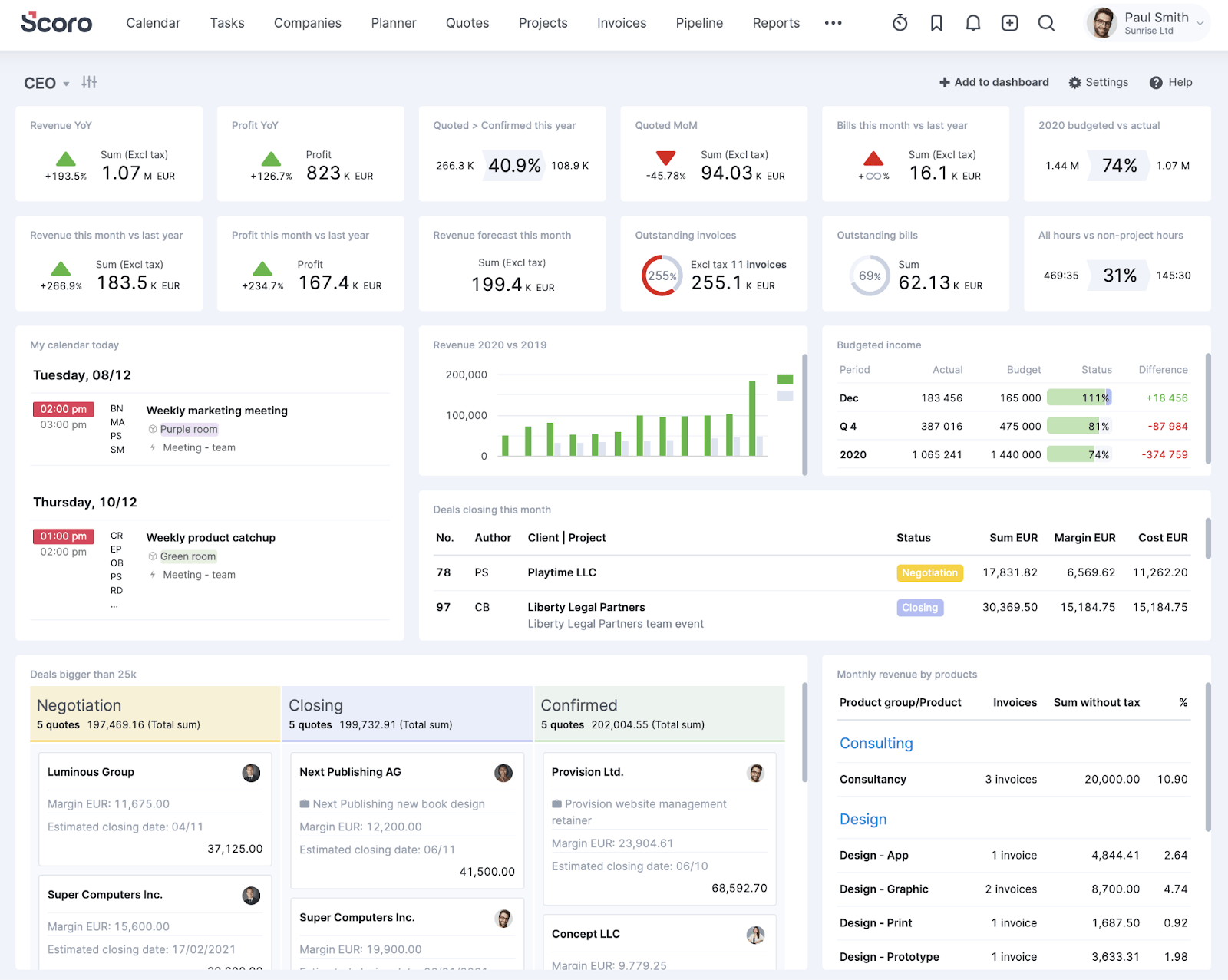
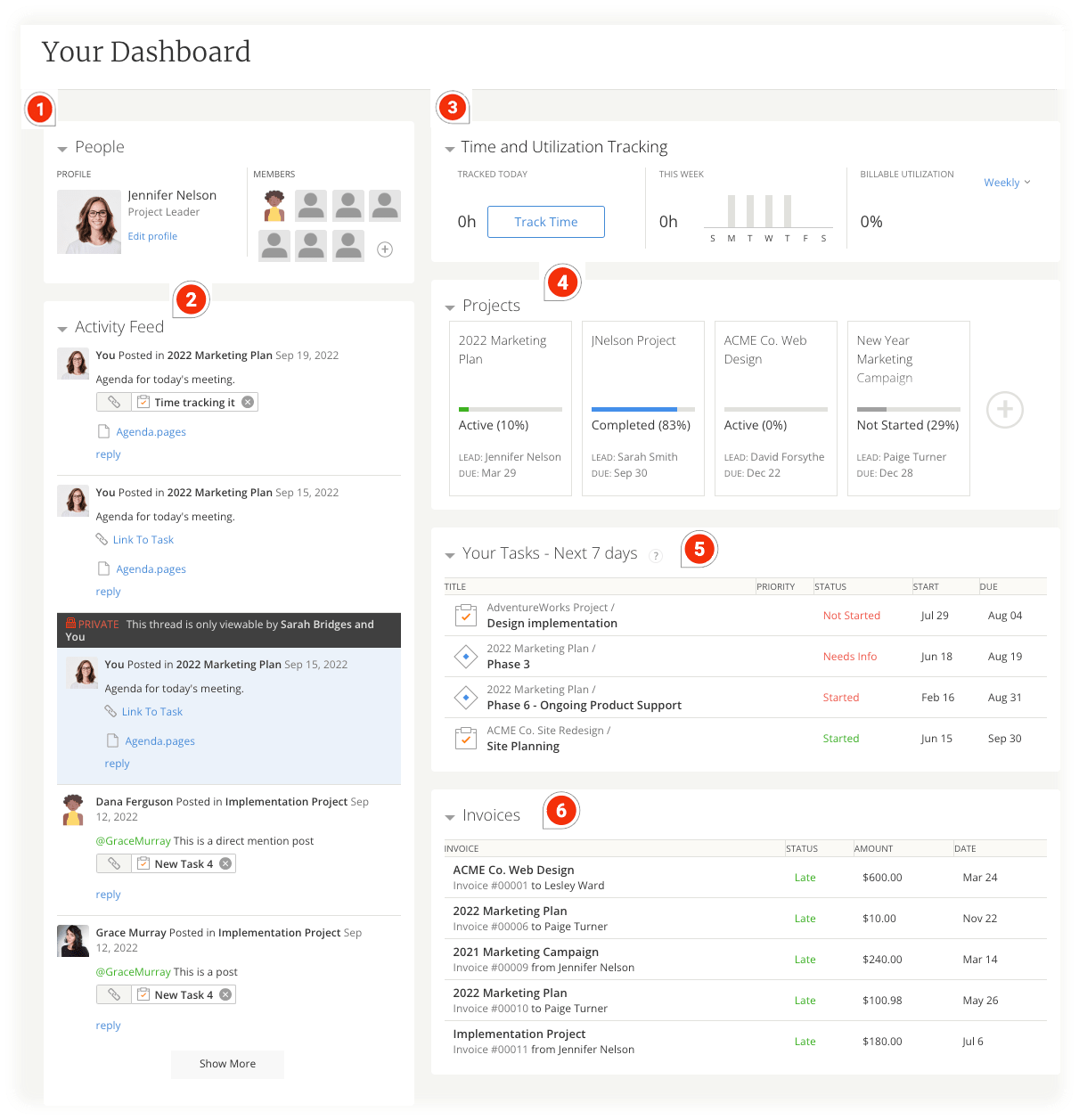
Scoro is an ERP system for scaling agencies and consultancies that need a tool that combines project management, resource planning, accounting, and financial reporting in a single platform. So you can manage your entire business, from quote to cash.
Scoro’s features help businesses run more profitably. For example, three time-tracking options ensure no billable hours get wasted.
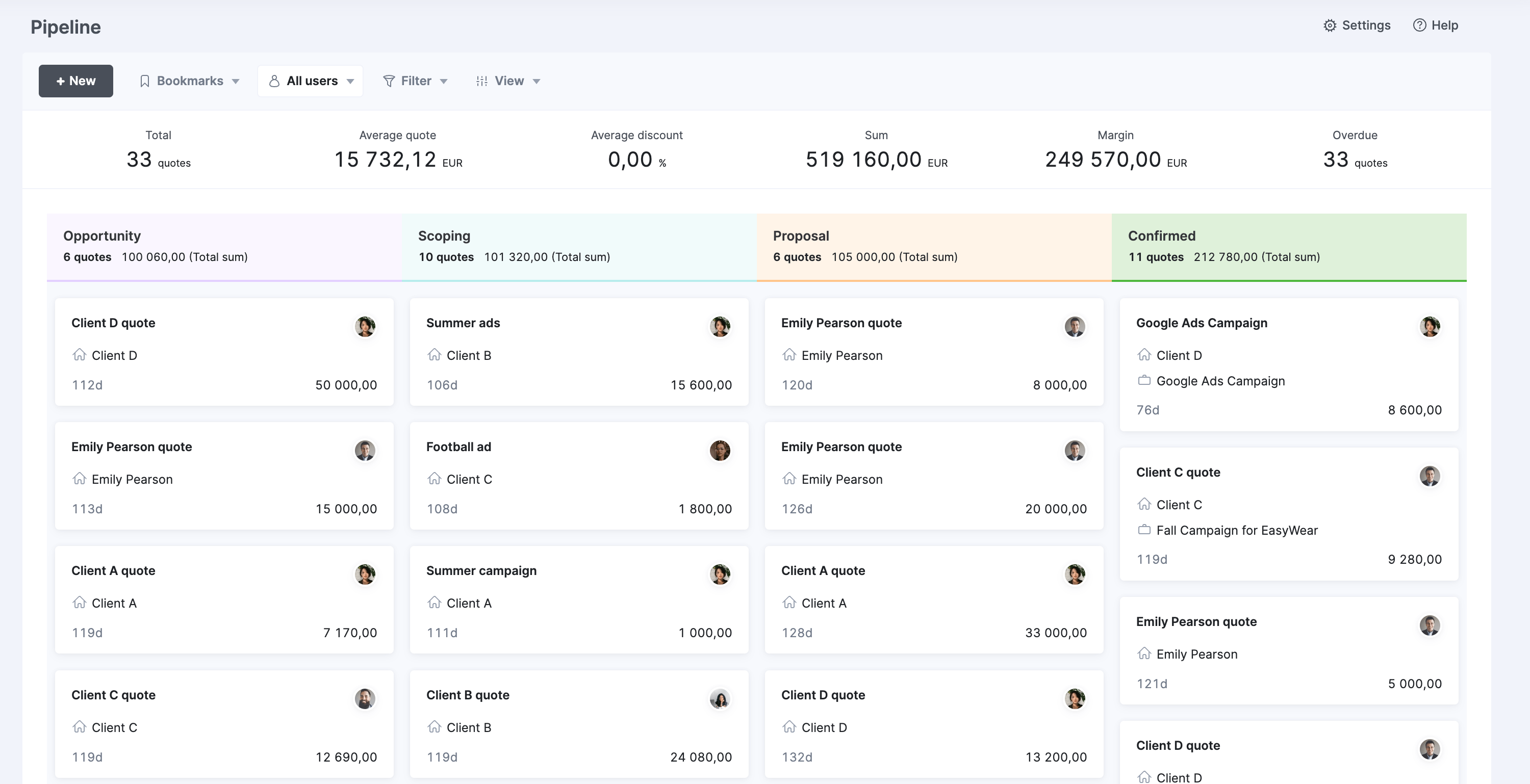
And the built-in sales pipeline and CRM helps you stay on top of client interactions and contracts to win new business:
Key features you’ll love
- 50+ reports covering actual and forecasted revenue, project profitability, team productivity, utilization, and more
- Real-time financial tracking with automatic profit calculations and margin analysis
- An end-to-end invoicing system with templates for quotes, proposals, and recurring bills
- Gantt charts that show task dependencies and project milestones
- Resource scheduling tools to visualize team capacity and workloads
- A client portal to share project progress, invoices, quotes, and more
- Custom project and executive dashboards for different roles (like CEO, CFO, COO, and project manager)
Integrations
Scoro integrates with over 45 business tools, including:
- Slack
- QuickBooks
- Xero
- Sage Intacct
- Expensify
- Stripe
- HubSpot
- Salesforce
- Dropbox
- Google Docs, Calendar & Email
More integrations are also available through Zapier and SyncHub, letting you set up custom workflows between Scoro and other tools like Tableau and Power BI.
And, if needed, you can design your own integrations using Scoro’s API.
Onboarding and support
Small teams can implement Scoro for free using self-onboarding resources, including hundreds of articles and videos in the Help Center.
For teams with more than 10 people, Scoro’s experts assist with set-up and implementing tailored workflows to get the most business value from the platform.
Need more help? Contact support through the request form or request a callback on +44 20 8152 9070 (in the United Kingdom) or +1 332-282-5288 (in the United States).
Customer reviews
Here’s what real-life customers say about Scoro:
| Pros | Cons |
|---|---|
| Pros | Cons |
| Comprehensive project management features | Initial set-up has a learning curve |
| User-friendly and efficient for time tracking | Some integrations (e.g., Outlook, Xero) could be smoother |
| All-in-one solution for project management and financial operations | |
| “Helpful” and “prompt” customer support (according to G2 reviews) |
“The ability to customize and automate processes, coupled with powerful real-time tracking and reporting capabilities, enhances efficiency and supports informed decision-making.”
—Sander, Capterra
“We’ve been using Scoro for over a year now, and it’s had a significant impact on our operations. It’s helped us streamline our processes, stay organized, and make data-driven decisions. Integrating Scoro into our existing systems was straightforward and has boosted our productivity.”
—Cheryl, G2
Further reading: Scoro Customer Success Stories

Pricing
Scoro lets you combine the plan you need based on your core workflows. Combinations start from $17/user/month. We also offer a free 14-day trial and make it easy to book a demo.

2. Projectworks
Founded in: 2015
Average customer ratings: G2: 4.5 (81 reviews); Capterra: 4.7 (92 reviews)
Best for: Teams seeking an easy-to-use platform for project time tracking, resource planning, and financial management.
Overview
Projectworks is a professional services platform designed to optimize project delivery and improve margins. Originally developed as in-house time tracking software, it has grown into a powerful platform used by customers in 53 countries.
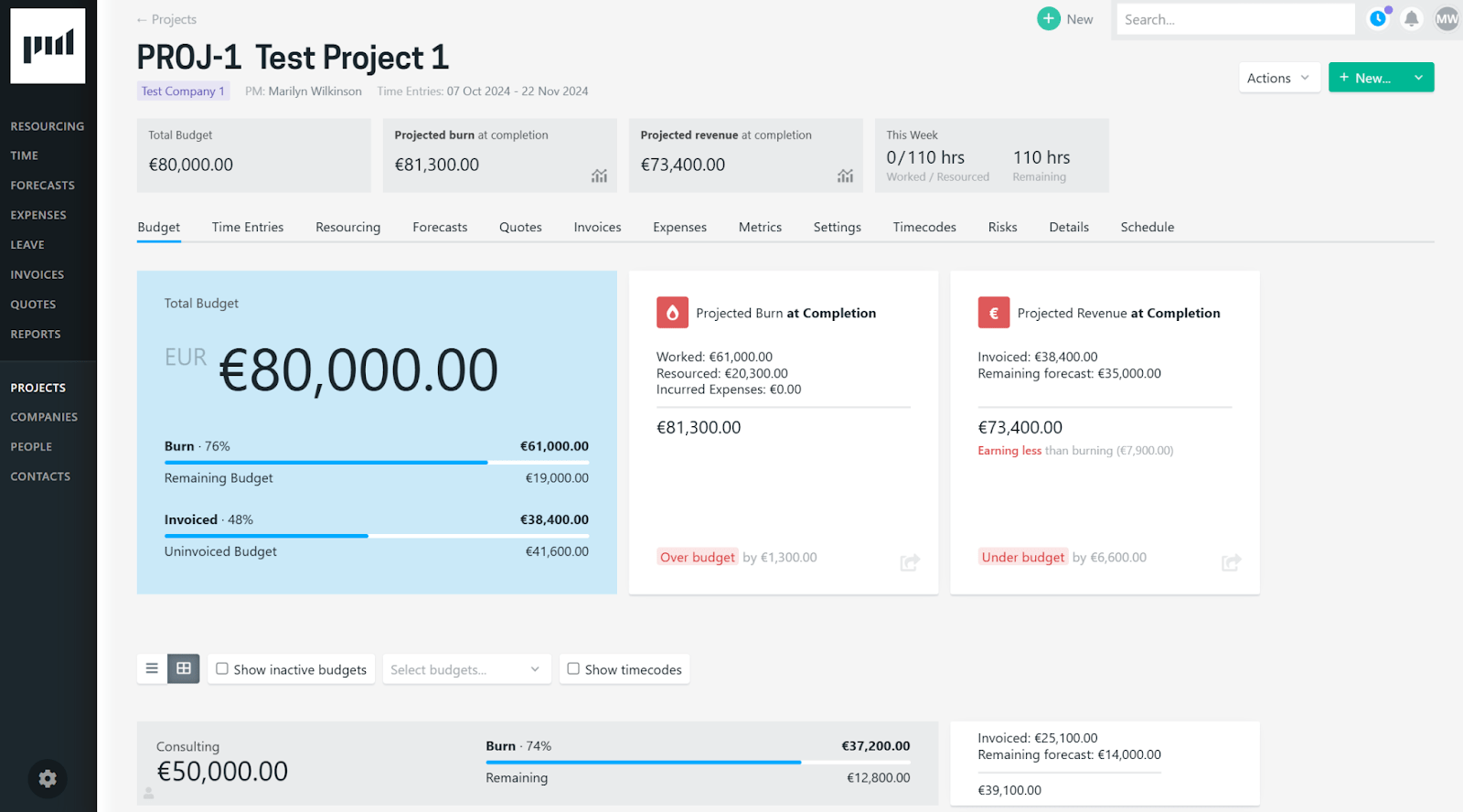
It brings time tracking, resource planning, and financial management features in a single platform, offering better visibility and control over your project portfolio.
For example:
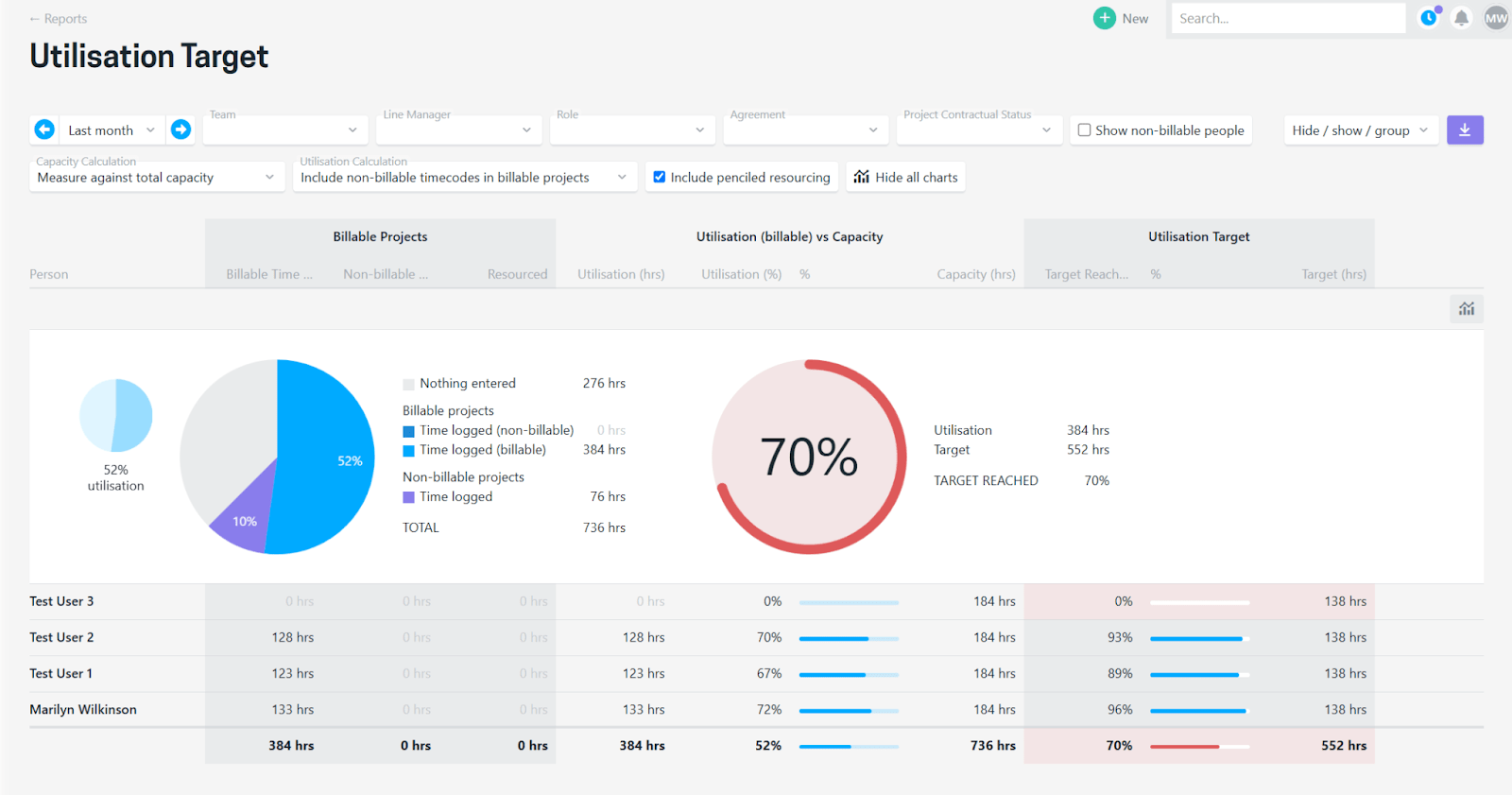
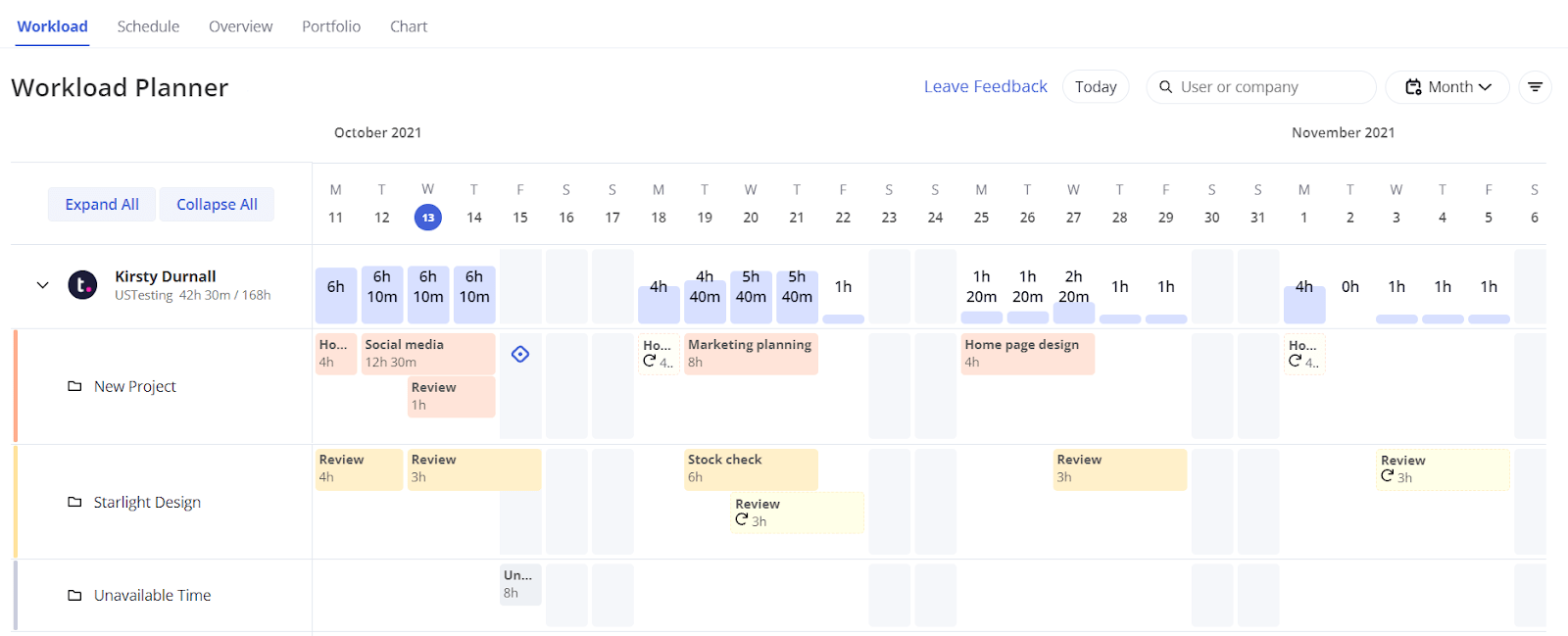
You can easily see your team’s workload and compare their performance against your utilization target:
Key features you’ll love
- Time tracking to log billable and non-billable hours
- Digitized expense management to easily track project costs
- Resource planning and capacity management tools
- Revenue forecasting tools
- An invoicing system that streamlines billing and payment processes
- 17 reports that provide a clear view of business performance
- A leave management tool to quickly factor in time off when project planning
Integrations
Projectworks has 12 integrations with key business tools, including:
- Xero
- QuickBooks
- MYOB
- HubSpot
- Salesforce
- 12d Synergy
- Jira
- Azure DevOps
More integrations are available through Zapier. And Projectworks’ Direct Data Connection lets you create reports in Microsoft Excel and Power BI.
You can also build your own integrations using its API Connection.
Onboarding and support
Projectworks offers a structured onboarding process with guided demos, data migration, and team training sessions.
There is a one-time onboarding fee which starts at $1,000 and varies based on requirements.
You can also leverage email and video support, the Help Center, Projectworks Academy, and their partner network.
Customer reviews
Here’s what real-life customers say about Projectworks:
| Pros | Cons |
|---|---|
| Easy to use with comprehensive resource planning | Limited custom reporting options |
| Strong financial tracking for project profitability | Occasional challenges with bulk data imports |
| Excellent customer support | No mobile app |
| Seamless implementation process | Calendar integration options could be improved |
| Helps improve resource utilization | Only 12 integrations |
“We switched to Projectworks because it had all the basic functions (timesheeting, invoicing) plus a bunch that we had been doing in spreadsheets (forward resourcing, cashflow forecasting).”
—Luke, G2
“Finally, a tool that makes resourcing and forecasting easier and more transparent.”
—Emma, G2
Pricing
Projectworks offers a three-week free trial and user-based pricing tiers:
- Base price: $3,996/year for up to 10 users ($33/user/month)
- From there, you’ll pay for users depending on where your org falls in their tiered structure (e.g., 11-15 users, 16-20 users, etc.)
3. Productive
Average customer ratings: G2: 4.6 (62 reviews); Capterra: 4.6 (103 reviews)
Best for: Agencies, consultancies, and professional services teams looking to manage projects, resources, and finances in a single platform
Overview
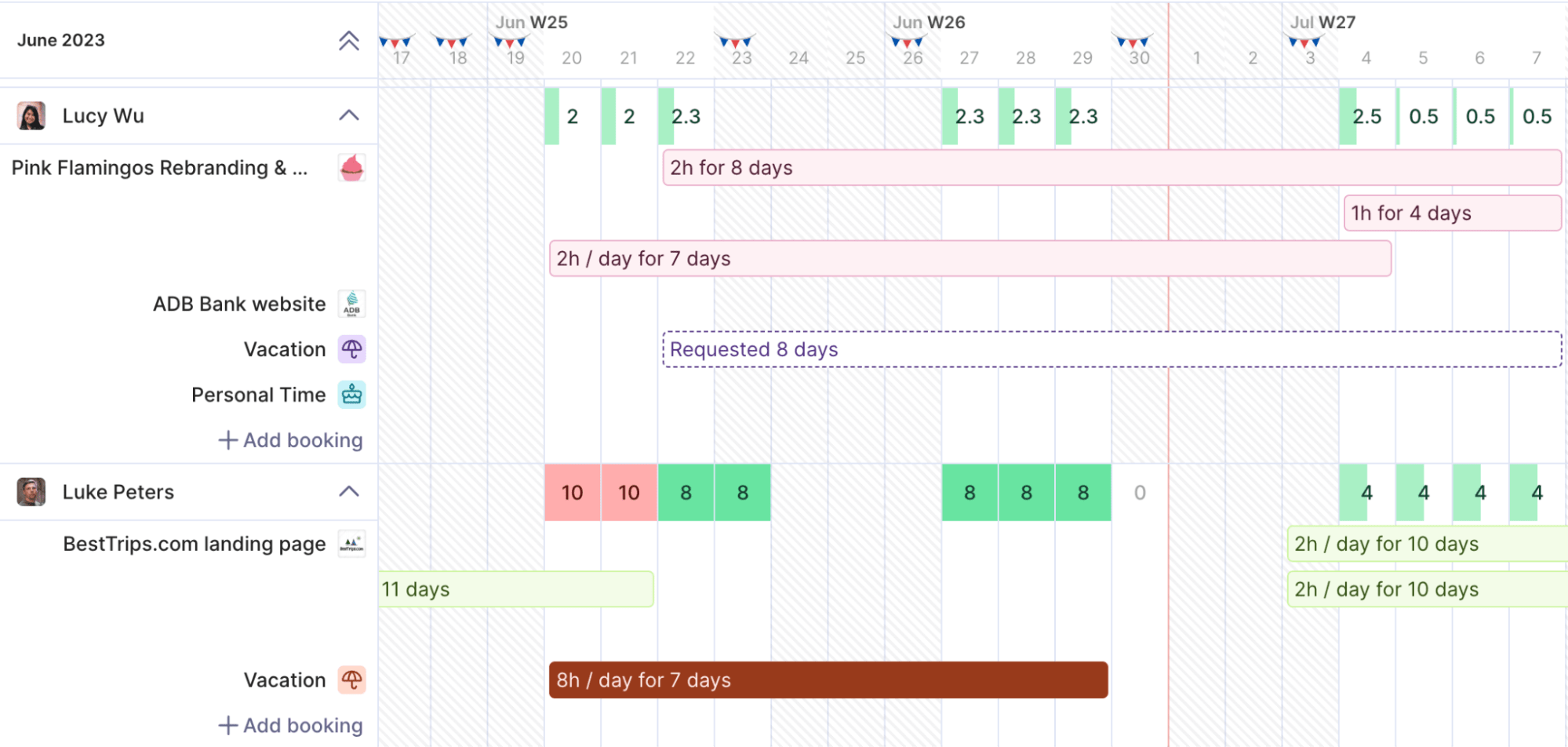
Productive.io is a work management platform for agencies and professional services teams. It combines project management, resource planning, time tracking, and financial operations in one system, helping teams streamline workflows from proposal to payment.
Key features you’ll love
- Project management tools, including task boards, timelines, and milestones
- Time tracking with options for both billable and non-billable hours
- Resource planning to optimize team capacity and utilization
- Financial management with invoicing, expense tracking, and budget monitoring
- Custom dashboards for different roles to monitor performance
- Reporting on project profitability, resource utilization, and financial health
Integrations
Productive.io integrates with a range of popular tools, including:
- Slack
- QuickBooks
- Xero
- Jira
- Zapier (for custom workflows)
Onboarding and support
Productive.io offers self-service onboarding with documentation and tutorials for small teams. For larger teams, experts assist with setup, workflow configuration, and best practices to ensure maximum value from the platform. Support is available via email and chat.
Customer reviews
Here’s what real-life customers say about Productive.io
| Pros | Cons |
|---|---|
| Ease of use | Task management can be limited for complex workflows |
| Team collaboration | Organization difficulties in larger projects |
| Customizability | Some missing features for specialized needs |
| Project tracking | Learning curve for new users |
| Project management | Lack of integrations with certain tools |
‘’The most helpful thing for us as an agency is the visibility we have over everything that is going on in the business. From an initial quote/budget, through the life of a project and into invoicing, the tight integration of relevant data makes errors far less likely. Being able to see all of our resourcing and utilisation (did I mention you can pull a report for just about anything?) all in one dashboard is really useful.’’
—Marc, G2
“Productive is a tool that brings together an efficient task management system, resource allocation, time tracking, leave request management, budgeting, and CRM under one roof.“
—Cinzia V, Capterra
Pricing
Productive.io offers a 14-day free trial. Paid plans start at $11 per user/month or 9 per user/annually.
4. Deltek Vantagepoint
Founded in: 1983
Average customer ratings: G2: 4.1 (436 reviews); Capterra: 3.8 (12 reviews)
Best for: Architecture, engineering, consulting, and professional firms looking for a powerful ERP solution powered by AI
Overview
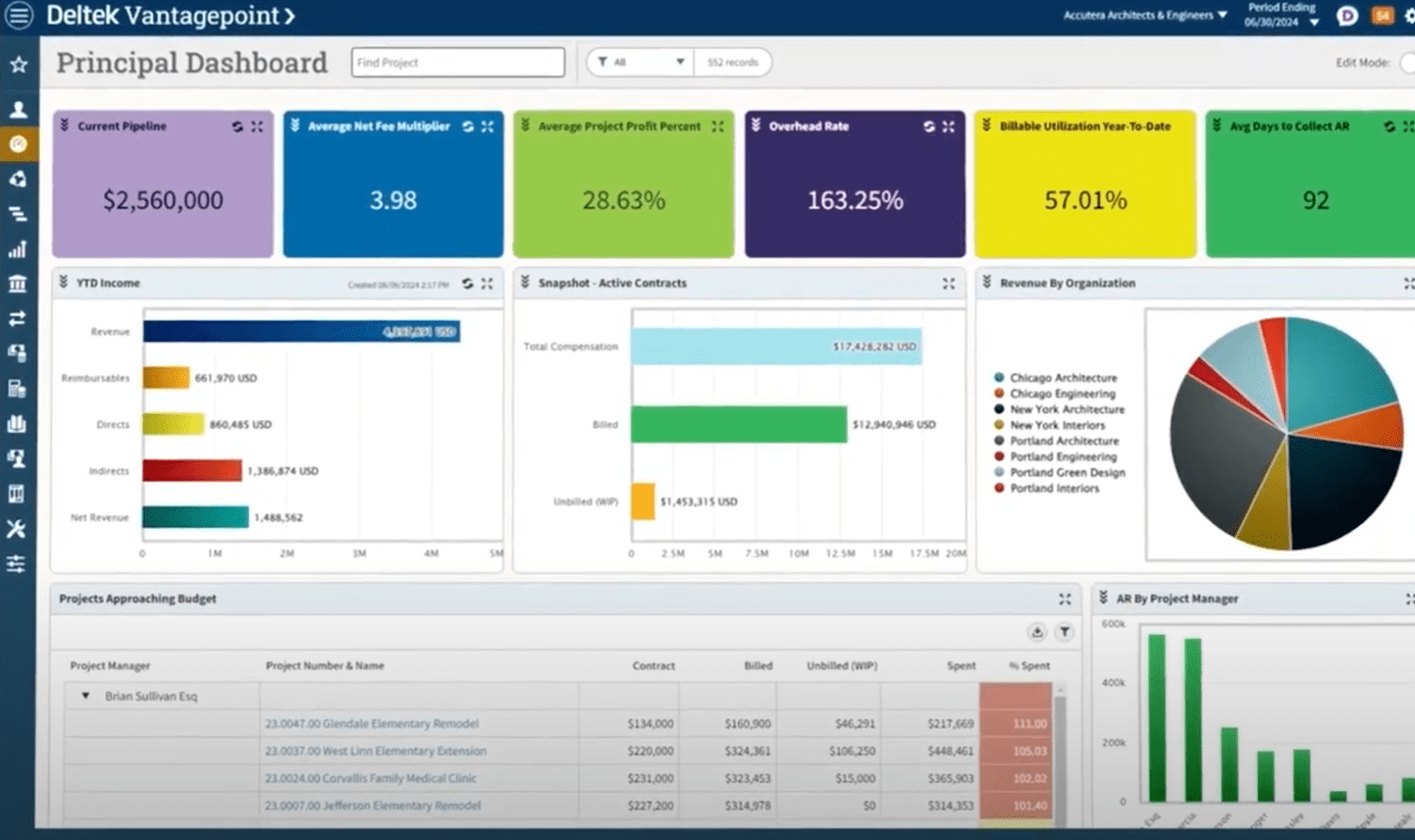
Deltek Vantagepoint is a great ERP solution for architecture, engineering, and consulting businesses. It brings everything you need to manage projects, people, and finances into one place, giving you a clear view across the org. So, you can make more effective decisions based on what’s working (and what isn’t).
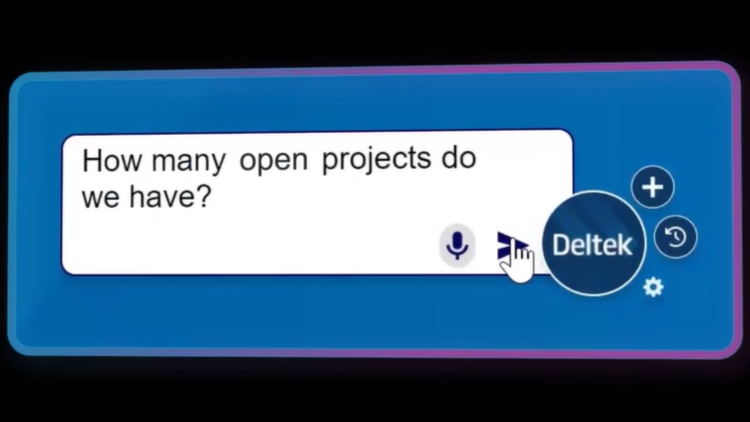
A stand-out feature is Dela, the AI-powered bot that can generate summaries of project documents, predict project outcomes, find requested info, and more:
Key features you’ll love
- Centralized project and financial management tools to streamline operations and improve cash flow
- CRM and pipeline management charts
- Resource planning options to balance workloads and boost team utilization
- Accounting and financial management features to simplify billing and reporting
- AI-powered insights with Deltek Dela
- Customizable reporting dashboards
- Secure, cloud-based storage that grows with your business
Integrations
Deltek Vantagepoint offers three integrations:
- Salesforce
- Xero
- Outlook
You can build custom integrations with Deltek Unionpoint.
Onboarding and support
Deltek Vantagepoint Help offers onboarding support, and their team helps you get set up.
For ongoing assistance, Deltek offers three support plans to fit different business needs:
- Standard Plan: Web, chat, and email support with a three-hour response time for critical issues
- Premium Plan: 24×5 emergency support and two-hour response time
- Select Plan: 24×7 emergency coverage, one-hour response time, and a dedicated senior service manager
Deltek also provides a Learning Hub and ”Getting Started” guidance so you can troubleshoot and learn at your own pace.
Customer reviews
Here’s what real-life customers say about Deltek:
| Pros | Cons |
|---|---|
| User-friendly dashboards that are easy to analyze | Limited flexibility in custom reporting |
| Strong project management tools that provide detailed financial insights | Implementation can be time-consuming and challenging for some users |
| Comprehensive ERP system that consolidates multiple tools into one platform | Employee expense handling can be tricky |
| AI boosts productivity and automates tasks | Calendar and integration features could be improved |
| Effective for managing project lifecycles | Sometimes difficult to find answers in the Help Center (according to one user) |
| Reliable for global project accounting and multi-country billing |
“Vantagepoint meets a lot of our business needs. Vantagepoint has a lot of power to keep track of clients, projects, vendors, etc. I am always discovering new features that I didn’t know were part of it.”
—Brandon, G2
“I love the dashboards. I enjoy how cleanly they display the data that is important to me.”
—Andrew, G2
Pricing
Deltek’s pricing isn’t public. To get custom pricing, request a demo.
5. Kantata
Founded in: 2010
Average customer ratings: G2: 4.2 (1458 reviews); Capterra: 4.2 (618 reviews)
Best for: Agencies that need a tool to manage projects, resources, and finances with quantitative and qualitative data
Overview
Kantata is a professional services ERP software that helps agencies with resource management, financial tracking, and project delivery.
With a 499% ROI (according to a Forrester study), Kantata helps firms forecast project profitability, manage key resources, and confidently adapt to changing priorities.
They say their “breadth of capabilities, flexibility and choice” sets them apart. The platform’s flexibility shows in how different agencies use it, from closing more projects on time to accelerating financial processes like month-end closing.
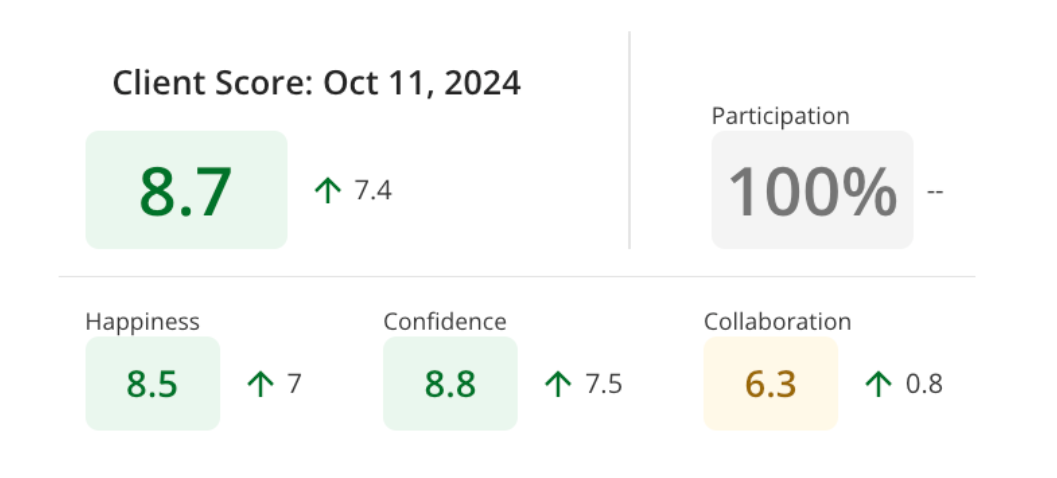
Another cool feature is Kantata Pulse, which uses polls to track client and employee satisfaction during projects:
Key features you’ll love
- Dashboards to provide actionable insights into project health and performance
- Forecasting tools to predict costs, staffing needs, and timelines
- Financial tracking features to monitor budgets, margins, and project profitability
- Project collaboration tools that keep teams and clients connected in one platform
- Real-time sentiment tracking to monitor client and employee feedback
- Resource management tools to make the most of your team’s availability without burning them out
Integrations
Kantata offers over 1,200 integrations, including:
- Salesforce
- Slack
- QuickBooks
- Xero
- Jira
- HubSpot
- SAP
- Xero
- Sage
- Expensify
You can also build custom integrations using scalable APIs. Or connect additional tools through platforms like MuleSoft and Workato.
Onboarding and support
Kantata provides onboarding services to help configure the platform to your business needs, including design, testing, and deployment.
Support includes access to a 24/7 portal with customer success managers and training resources.
Customer reviews
Here’s what real-life customers say about Kantata:
| Pros | Cons |
|---|---|
| Intuitive interface and easy navigation | Steep learning curve for new users |
| Strong project and resource management features | Reporting can be complex, with data load times of up to 30 minutes (according to a G2 user) |
| Real-time budget and KPI tracking | Can’t mark expenses as paid |
| Responsive, helpful customer support | Customization options are limited (according to a G2 user) |
| Regular product updates | High costs for additional modules (according to this review) |
“The best thing about Kantata is that I can see budgets and time entries in real time. I struggled with our old project management software because it didn’t include time tracking. I spent so much time trying to see where we were at on budgets before Kantata. Now, I can know in real time. Kantata finally gave us the ability to add custom task statuses, so that has been a huge help as well.”
—Rachel, G2
“User-friendly interface which is generally pretty straightforward to find what you need.”
—Emma, G2
Pricing
Kantata’s pricing is available on request.
6. Flowlu
Founded in: 2016
Average customer ratings: G2: 4.7 (199 reviews); Capterra: 4.8 (385 reviews)
Best for: Growing agencies and consulting firms seeking a reliable ERP platform to manage clients, projects, tasks, and financial operations.
Overview
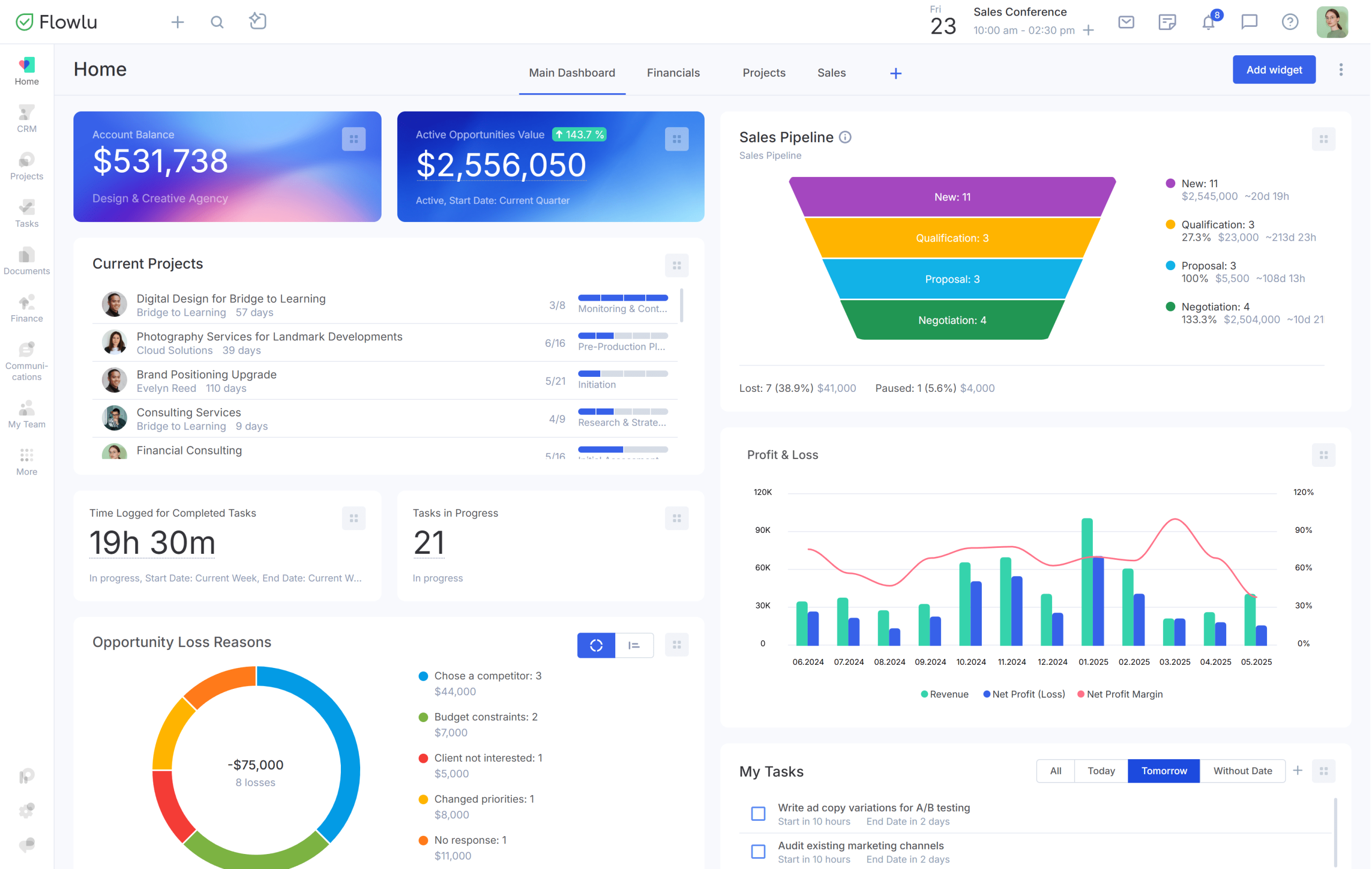
Flowlu is an ERP system for professional services, covering your entire project lifecycle, from lead capture to project execution and final payment. Its modular nature gives businesses flexibility to use only what they need.
The platform is built to be intuitive and give instant visibility into all aspects of your work, be it team productivity or project spending. Customizable dashboards deliver accurate data so you can make better decisions faster.
Integrated business process automation simplifies operations as you can codify your best practices into reusable CRM pipelines and project templates with fully automated task sequences complete with milestones.
Key features you’ll love
- CRM database and sales pipelines to manage leads from capture to close
- Customizable dashboards with real-time insights into project revenue and expenses
- Visual project planning with tasks, milestones, checklist items, and automations
- Automated billing and invoicing from tracked time and estimated expenses
- Dedicated client portals for secure communication, updates, and payments
- Branded knowledge bases to retain team knowledge and share solutions
- Mobile app access to do the work from any location
Integrations
Flowlu offers 48 integrations, including:
- Stripe
- PayPal
- Jira
- Slack
- Google Drive
- Make.com
- Pabbly
- Open API
Onboarding and support
Flowlu streamlines onboarding with an initial setup quiz with industry-relevant sample data and an in-built onboarding checklist for step-by-step learning.
Support includes a free demo, optional paid implementation services, and an up-to-date Help Center.
Online support is available via chat & email.
Customer reviews
Here’s what real-life customers say about Flowlu:
| Pros | Cons |
|---|---|
| Customizable interface and stable performance | UI can feel dated in some modules |
| Automation rules for seamless workflows | Steeper learning curve due to vast features |
| Detailed financial insights for planning, execution, and payments | Integrations with niche accounting software are limited |
| Excellent client, project, and task management | Mobile application lacks certain desktop features |
“After trying different platforms, we can confidently say that Flowlu has become the ideal tool for our company. Its all-in-one approach has allowed us to work more efficiently by centralizing project management, tasks, clients, and finances in a single place.”
—Juan, G2
“Great Value for money. Lots of different well-built out features and functionalities that overlap. Customer support has been great also, we usually get an instant response to any queries and have been able to build our franchise business around the products pretty quickly. Addition of tasks and project features really complete the CRM functionality.”
—Joseph, Capterra
Pricing
Flowlu offers a 7-day free trial and four pricing plans:
- Free: Two users with simple workflows
- Essential: Up to 20 users at $9 per user/month (billed annually)
- Advanced: Maximum of 40 users at $17 per user/month (billed annually)
- Ultimate: Custom pricing
7. Teamwork
Founded in: 2007
Average customer ratings: G2: 4.4 (1150 reviews); Capterra: 4.5 (887 reviews)
Best for: Client-focused businesses that need a platform to manage creative projects, track resources, and collaborate
Overview
Teamwork describes themselves as “one solution for all your client operations challenges.” The platform combines project planning, time tracking, resource management, and collaboration features.
(That said, it’s not perfect. There are valid reasons to consider Teamwork alternatives.)
Teamwork is geared toward creative, collaborative workflows. For example, it offers channels (similar to Slack) where users can discuss specific topics:
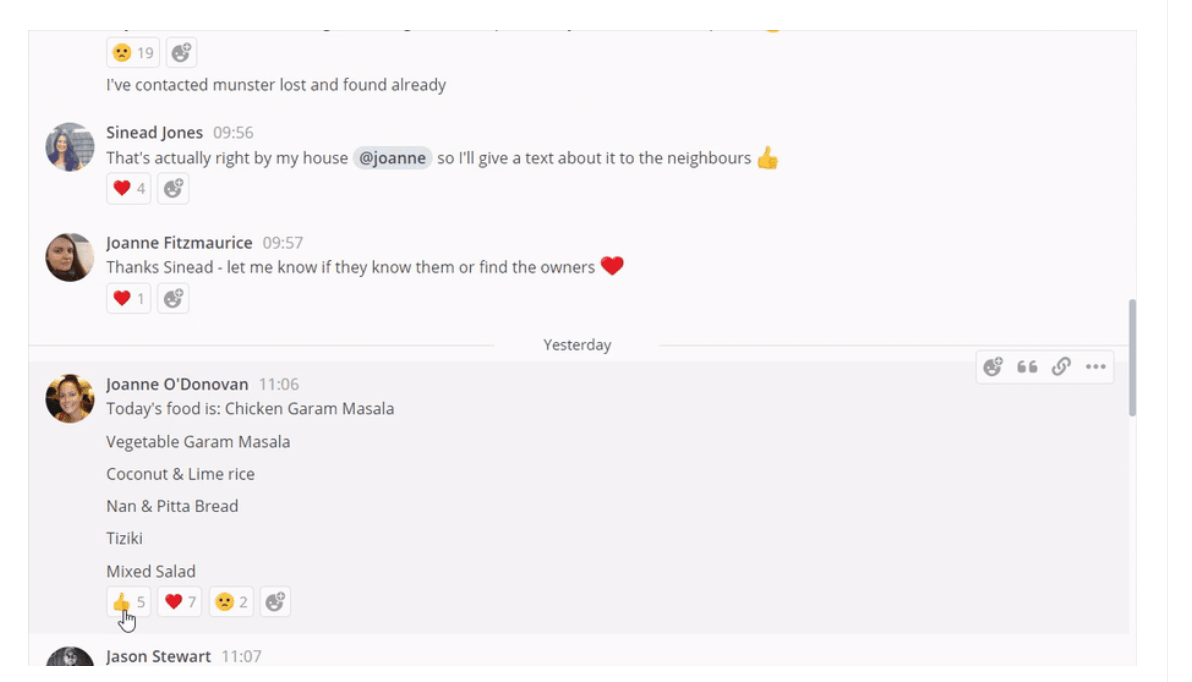
It also has a ChatGPT-powered AI assistant to help you come up with ideas and outlines.
Key features you’ll love
- Flexible project views let you visualize tasks in list, Kanban, table, or Gantt charts
- Resource management tools that help optimize team availability
- A client portal with client request templates and project sharing
- Custom workflows and automations that let teams save time on repetitive tasks
- Built-in proofing and approval tools that streamline feedback cycles
- Customizable client intake forms for smoother onboarding
- Time tracking for accurate progress monitoring and billing
- An invoicing function that simplifies the whole process
Integrations
Teamwork offers over 90 integrations, including:
- Salesforce
- QuickBooks
- Xero
- Slack
- Trello
- Microsoft Teams
- MailChimp
- Dropbox
- Google Workspace
- Microsoft Office
You can also set up custom integrations with the Teamwork API or Zapier.
Onboarding and support
There’s a lot of information available in Teamwork’s knowledge base, which is usually enough for small teams to get up and running on their own.
Only the Enterprise plan includes a dedicated customer success manager, support through email and live chat, and 10 hours of technical services.
Teamwork also has a partner network that can help with implementation and custom development (at an additional cost).
Customer reviews
Here’s what real-life customers say about Teamwork:
| Pros | Cons |
|---|---|
| Free plan available | Limited mobile app functionality compared to desktop |
| Comprehensive features for project management, time tracking, and client collaboration | Slow data load times disrupt real-time reporting |
| Client view enhances communication and transparency | Limited bulk editing options in some views |
| Template library saves time and streamlines project setup | No integration with Microsoft Outlook |
| User-friendly design | Storage restrictions on free or lower-tier plans |
“We use teamwork.com daily, and it has powerful integrations with popular timekeeping and invoicing systems. To implement, takes virtually no time, and support is excellent.”
—Brett, G2
“Best collaboration tool!”
—Lakshmanan, G2
Pricing
Teamwork offers five pricing options, including a free plan and a free trial:
- Free: For teams of up to five users who are just getting started
- Deliver: $9.99 per user per month (billed annually)
- Grow: $19.99 per user per month (billed annually)
- Scale: Custom pricing
- Enterprise: Custom pricing
8. ConnectWise PSA
Founded in: 1982
Average customer ratings: G2: 3.9 (488 reviews); Capterra: 4.1 (250 reviews)
Best for: Managed services provider businesses looking to streamline their operations
Overview
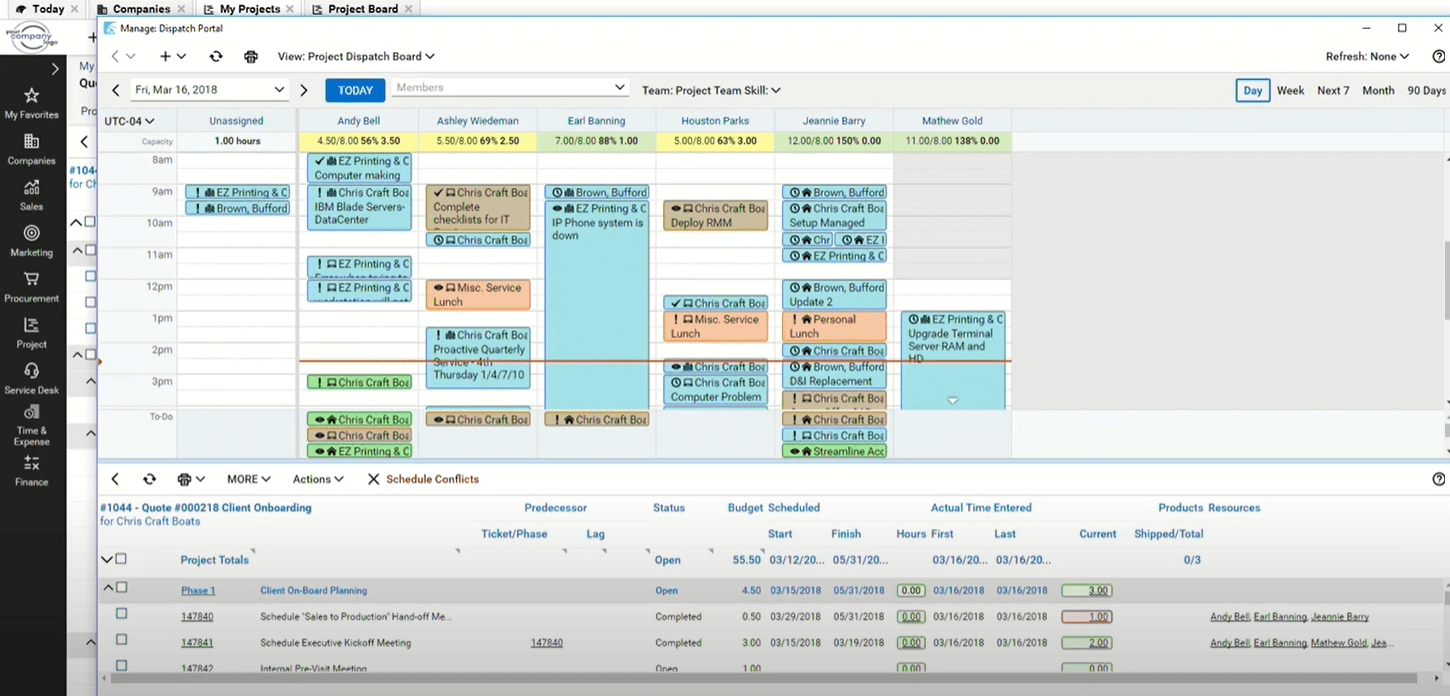
ConnectWise PSA is a platform designed specifically for MSP (managed services provider) businesses, with a core focus on customer service delivery.
At its heart is a sophisticated, AI-powered help desk system designed to let users resolve customer tickets faster. And everything connects to customer support, from the Microsoft Teams bot for quick ticket updates to automated service level agreement (SLA) monitoring.
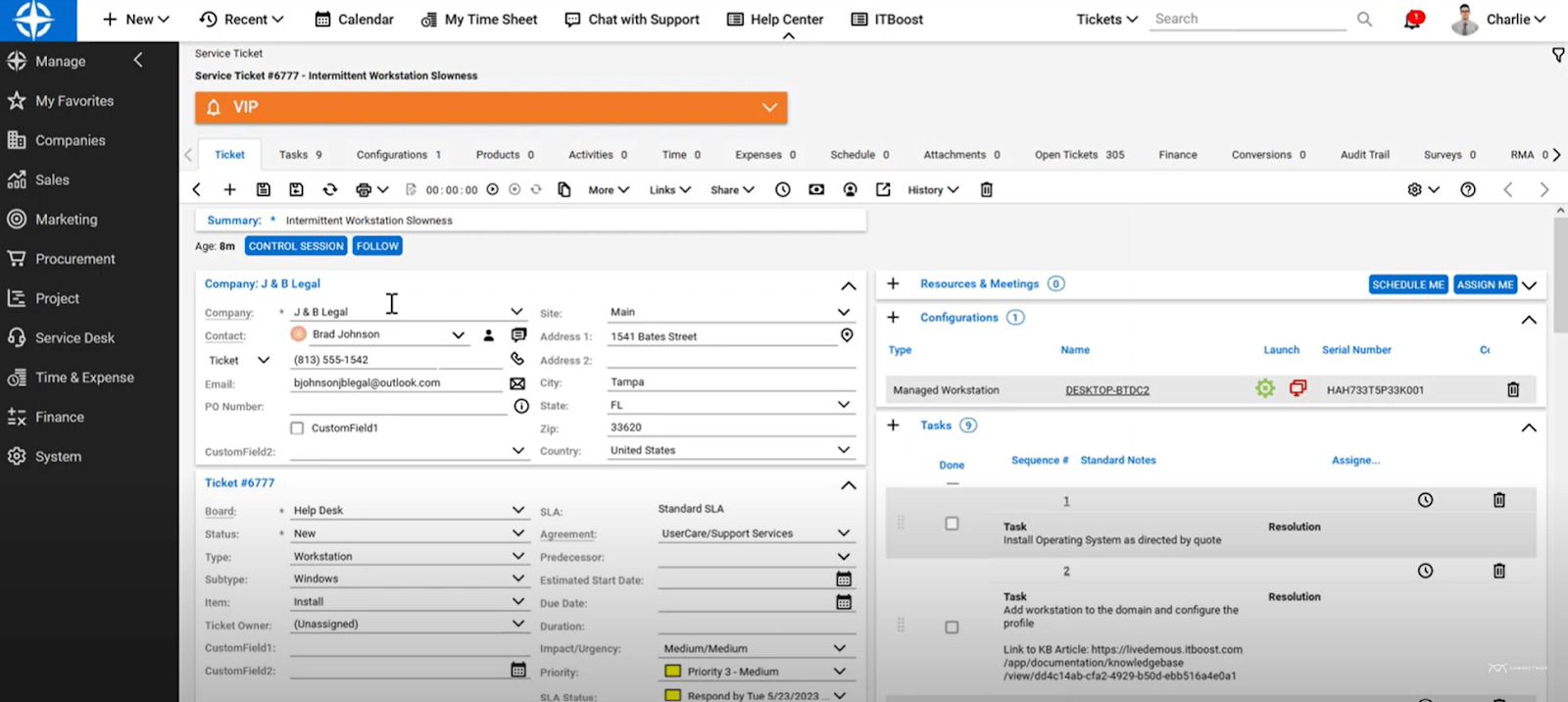
It also has standard business management features like project tracking, where you can monitor key information like budgeted and logged hours, start and end dates, and scopes.
Key features you’ll love
- AI-powered ticket management for improved response times
- Automated billing and recurring invoice processing to speed up payments
- Granular tracking for both billable and non-billable work
- Project tracking with milestone management and budget monitoring
- Pipeline management tools to control the sales process
- Built-in reporting for quick business insights
- The ConnectWise Sidekick bot that streamlines communication in Microsoft Teams
Integrations
The ConnectWise Marketplace offers 106 integrations with IT management tools, including:
- QuickBooks
- Veeam
- IBM MaaS 360
- Google Authenticator
- Microsoft Intune
You can also use Zapier to connect with tools like HubSpot and Jira.
Onboarding and support
ConnectWise offers 24/7 technical support with product specialists, including live chat, phone, and email.
But according to some users, the onboarding process can take longer than anticipated (up to six months or even two years).
Customer reviews
Here’s what real-life customers say about ConnectWise:
| Pros | Cons |
|---|---|
| Strong financial reporting and billing capabilities | Steep learning curve for new users, described as “intimidating at first” |
| Integrates well with other IT management tools | Interface feels outdated and needs a refresh (according to multiple reviews) |
| Automations for ticketing and help desk management | Limited recent feature updates (according to this user) |
“I’ve used ConnectWise PSA for over 10 years. It’s a very versatile and powerful tool when configured correctly. What I like best is how it’s designed for financial reporting.”
—Cassie, G2
“We’ve happily used Connectwise PSA for years. It’s got many great features, we’d be lost without it. There are several features we don’t use, but I imagine they’d be handy for small shops; invoicing, mileage, client signoff sheets, product inventory/management.”
—Starr, G2
Pricing
ConnectWise’s pricing isn’t public. Request a quote for custom pricing.
9. Accelo
Founded in: 2011
Average customer ratings: G2: 4.4 (516 reviews); Capterra: 4.5 (172 reviews)
Best for: Professional services teams looking to unify business processes and track time more effectively
Overview
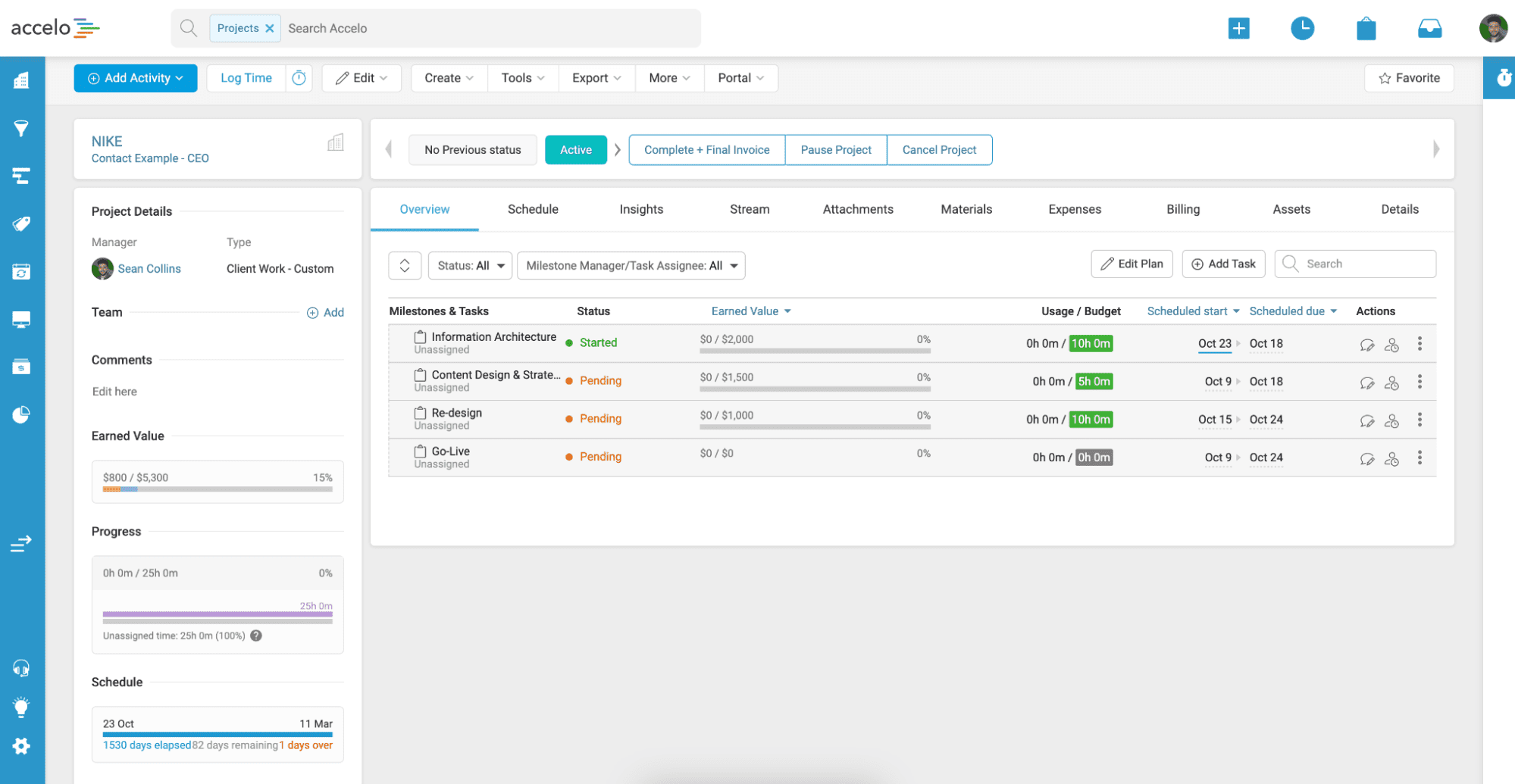
Accelo is an ERP platform that brings together your business management processes, from resource and financial management to CRM.
Automated workflows, comprehensive project overviews, and accurate time tracking help agencies control their projects and profits, which drives 46% higher revenue and 41% more billable time for users.
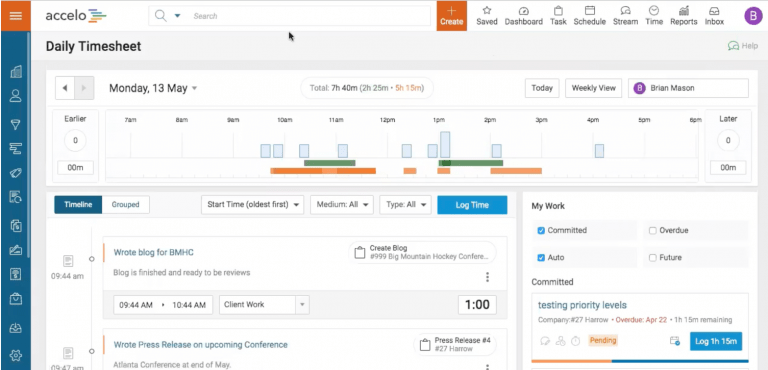
And their resource management feature is great for monitoring your team’s availability and productivity.
Key features you’ll love
- Automated invoice generation from project activities and time entries
- Multiple billing options: time-based, fixed-fee, and milestone billing
- Customizable invoice templates and automatic late payment reminders
- Online payment processing with recurring payment options
- Options to set different rates according to project type, staff role or work timing (like after-hours support)
- Purchase order, expenses, and materials tracking for accurate cost control and financial reporting
- A client portal for easy invoice access and payments
- Real-time profitability dashboards
- Bulk invoicing capabilities
- Budget planning and monitoring tools for tracking spending and maintaining profitability
Integrations
Accelo offers 18 integrations, including:
- Microsoft 365
- Google Workspace
- QuickBooks
- Xero
- Salesforce
- Hubspot
- Mailchimp
- Jira
- Stripe
- PayPal
Onboarding and support
Accelo offers three implementation paths to fit different team needs and capabilities:
- Self-Starter Package with a setup checklist, recorded team training library, and live Q&A support for tech-savvy teams
- Account Setup Package for expert account configuration, data migration, and training resources for teams short on time
- Full Implementation Package which offers complete setup assistance with custom change management plans and live team training
You can also access videos and guides in the Help Center.
Customer reviews
Here’s what real-life customers say about Accelo:
| Pros | Cons |
|---|---|
| Comprehensive client and project management | Steep learning curve (according to some users) |
| Automated workflows and time tracking | Mobile app limitations (according to this user) |
| A built-in email integration for centralizing client communications | May be too complicated, with “multiple ways of doing things that are confusing for teams” (according to this review) |
“Accelo really shines with its project management and CRM integration. It’s awesome having everything I need in one place, and the automation helps me stay on top of tasks without getting overwhelmed.”
—Sufi, G2
“We use Accelo every day for our business, and one of the best things about Accelo is that it can replace a lot of tools and centralize the work and company information in one place, from emails, tickets, projects, invoices, etc.”
—Mitch, G2
Pricing
Accelo’s prices aren’t public, but they offer three pricing tiers:
- Professional
- Business
- Advanced
There’s no free trial available, but you can sign up for a demo.
Choose a professional services ERP with proven ROI
The right ERP system can transform how you manage your business—and how it performs.
Just ask agency Aava & Bang. Design team manager Anna-Kaisa Reed says they went from tracking resources on a white sheet on a wall to having everything “one click away” in Scoro. This visibility made task management more efficient and paved the way for smarter decision-making.
Learn about their experience of using Scoro as an ERP for professional services.
To see the difference for yourself, start with our 14-day free trial.