











Consider this update as a Christmas gift from the Scoro team! 🎁
We saved the best for last: the Scoro MCP server is now fully live and available for everyone, giving your team the tools to supercharge your success in the new year!
Take a look at what’s new in Scoro!
Scoro’s MCP server – now out of beta!
Back in October, we were one of the first in the PSA space to release our very own MCP server to early adopters for beta testing. Now, we are officially making it available for all Scoro sites, with expanded capabilities and added access management.
First, a quick refresh – so what is the Scoro MCP server? The MCP server connects Scoro to AI tools like Claude and ChatGPT, so you can interact with your Scoro data via the AI chat and delegate actions in natural language.
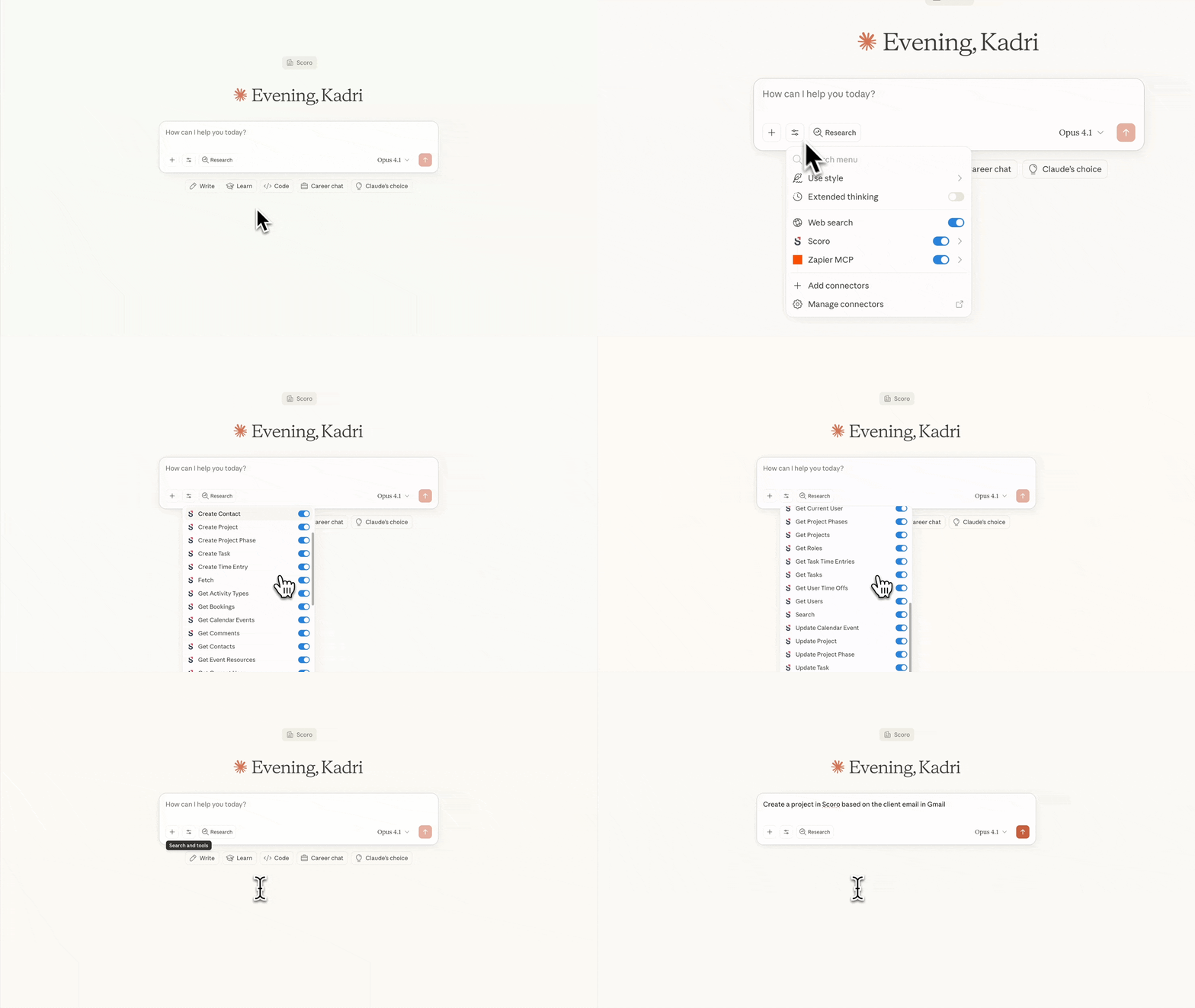
Essentially, by connecting the Scoro MCP server with your site, you open up two powerful new possibilities:
- Work directly from your AI chat: connect Scoro with AI tools like Claude or ChatGPT, and use conversational prompts to pull data from Scoro or create projects, tasks, and comments, all without leaving your AI chat. Works with voice commands, too!
- Orchestrate multi-tool workflows: use Scoro as part of broader, multi-tool workflows. For example, pull data and context from Slack, Gmail, Google Drive, your CRM, and Scoro, then delegate actions across all of those tools with a single prompt.
Example use cases
Here are some example prompts to spark ideas about what becomes possible once you connect the Scoro MCP server with your AI chat.
Delegate things on the go
- Reschedule all my meetings from today to Friday next week as I’m taking a sick day.
- Extend meeting time and schedule a follow-up via voice command.
Automate repetitive tasks & admin work
- Summarize the project progress for Asher & Drum’s website project based on Scoro’s data and draft an email to the client to highlight headwinds and tailwinds.
- Summarize action items from a client call and add them as a comment under the relevant task in Scoro.
Get cross-platform insights
- Get the latest update on the deal from Hubspot and summarize it under the quote in Scoro.
- Pull context from Gmail, Slack, Jira, and Scoro to surface bottlenecks and next steps.
Looking for more inspiration? Explore more use cases in our Help Center.
What’s new since early access?
👉 Centralized access management
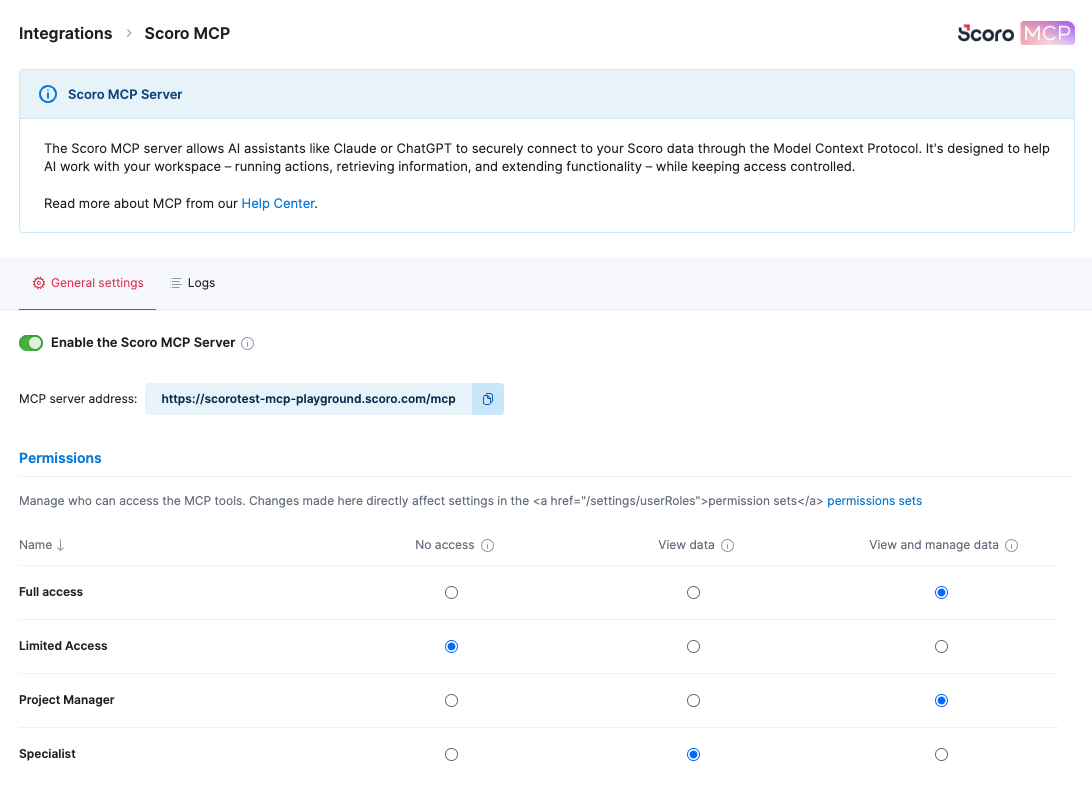
Site admins can now enable or disable MCP at the organization level and control which users can access specific capabilities through permission sets.
👉 Expanded capabilities
In addition to key actions related to tasks, projects, and search available since beta, we’ve added more MCP tools that allow you to work with your financial data:
- Financial visibility – AI can now pull purchase orders, bills, expenses, and invoices to answer questions like ‘Which vendors haven’t been paid yet?’ or ‘Which expenses are not linked to any projects?’.
- Project budget insights – AI can now analyze budget, task completion rates, and resource bookings to flag risks.
- Backtrack as needed – AI can now also delete items created by the MCP server if some action needs to be undone. This gives you more freedom with testing.
How to get started
To enable this for your team, navigate to Settings > Site settings > Integrations > Scoro MCP to activate the organization-level toggle and configure user permissions. Detailed configuration guides, as well as information on tools and data security, are available in our Help Center.
Psst! Behind the scenes, we are also working on updates in ELI, so very soon (think: in just a month or two) you’ll also be able to discuss insights, plan work, and delegate actions directly in your Scoro interface, just by chatting with ELI. Exciting times ahead!
Custom currency for outsourced costs on a quote
We’ve made it easier to manage costs when outsourcing from vendors that will later bill you in a different currency than your default one!
If your site uses multiple currencies, you can now choose a different currency for the outsourced service or product costs than the one used in the quote. For example, if you’re an event organizer in the UK planning an event in Italy, you can now set the venue rental cost in EUR on a quote issued in GBP.
To do this, simply add your outsourced service or product to your quote and select the necessary currency for the costs from the dropdown field. You’ll also see the currency exchange rate details.
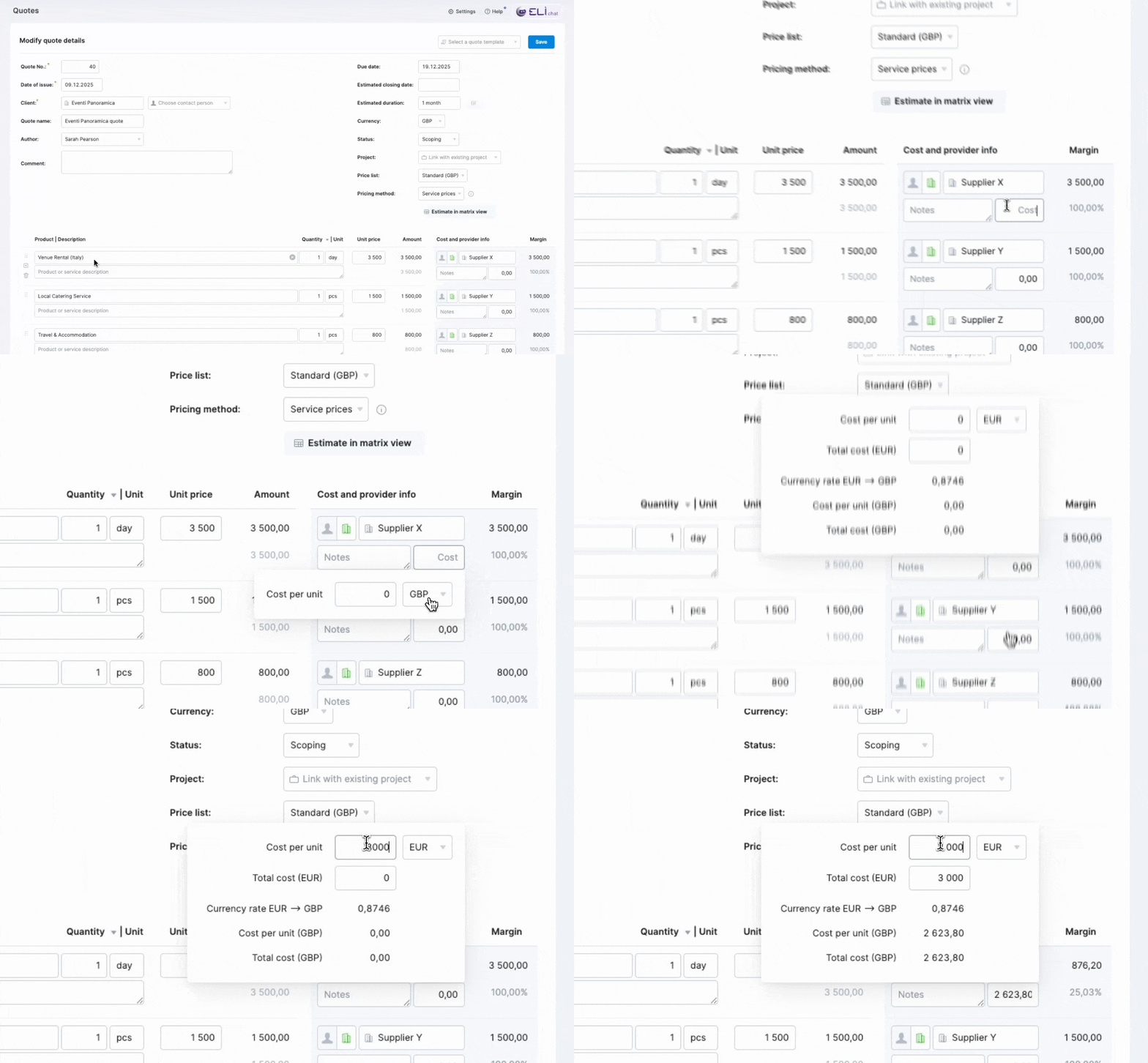
Because the currency conversions happen automatically, you no longer need to do any manual calculations and can easily assess the margins. Purchase orders and bills created directly from your quote will automatically use the currency of the actual cost incurred.
This feature is currently in beta. If you’d like to get early access, drop us an email at [email protected].
Time and cost allocation improvements
Last month, we introduced time and external cost allocation to existing invoices to help you track the time entries and costs already covered by each invoice.
Now, you can also unlink the allocated items from the invoice detailed view to correct an accidental allocation or reallocate them to a different invoice, ensuring your financial records are always accurate. Simply select the necessary items in the section listing the allocated time entries, bills, or expenses, and click the Unlink from invoice button.
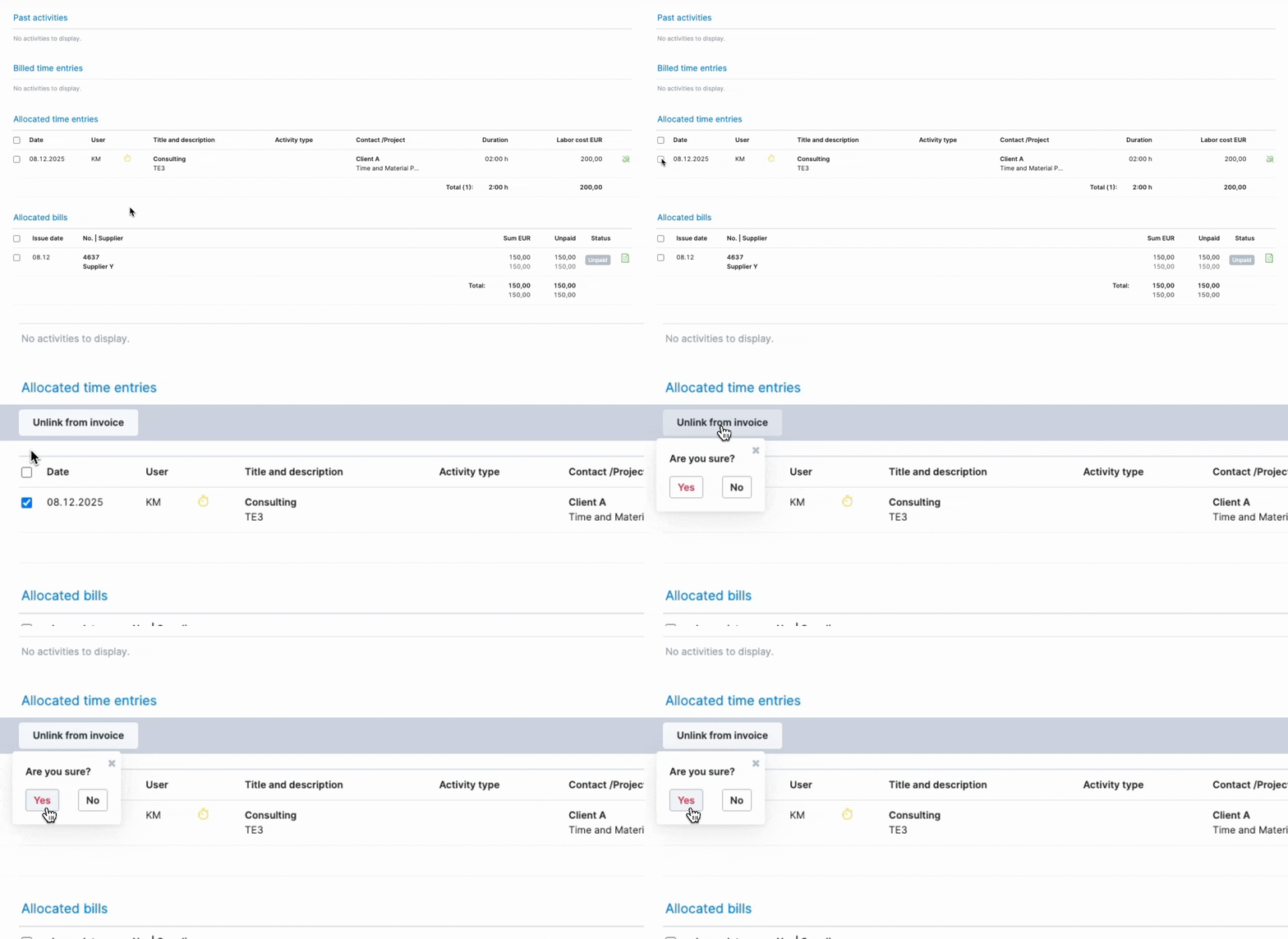
Once unlinked, the time entries are marked as ‘Unbilled’, and bills and expenses revert to their previous status, and you can allocate them to another invoice if needed.
Learn more about time and external cost allocation to existing invoices.
Detailed work report improvements
Previously, the detailed work report (DWR) pulled the billing status from the task the invoice was linked to. This required manually linking the invoice to the relevant task. Additionally, the report could only pull one invoice status per task, making the billing information inaccurate when the work logged on a task was billed through multiple invoices.
To ensure that every billing transaction is reflected accurately, the detailed work report now gets invoice data exclusively from time entries, not from the tasks they might be linked to. This provides multiple wins:
- You no longer need to manually link invoices to tasks, as the report takes into account the billed and allocated time.
- The report shows all invoice numbers related to each task.
- The data you export from this report also contains the correct invoice details based on the time entries.
You can still link an invoice to a task to ensure it appears in the task detailed view, but this linking no longer affects the DWR data.
Other…
Hiding projects without bookings in Bookings module
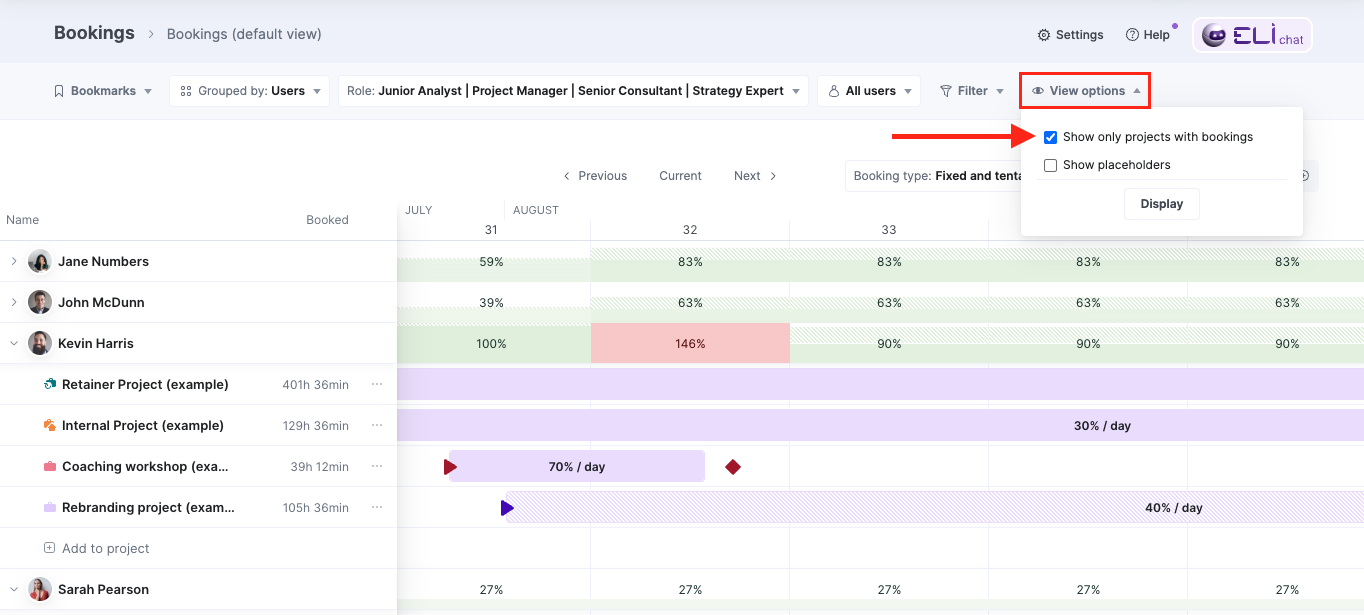
If you’re using the Bookings module for short-term monitoring of your active project portfolio, you can now hide projects without bookings to instantly declutter the view of rows where no team members are booked during the time frame you’re viewing. This makes it significantly easier for specialists and project managers to analyze workloads and check for conflicts.
We’ve also moved the Show placeholders checkbox under View options, so you can customize your Bookings module view as needed.
Setting decimal limits for PDF document values
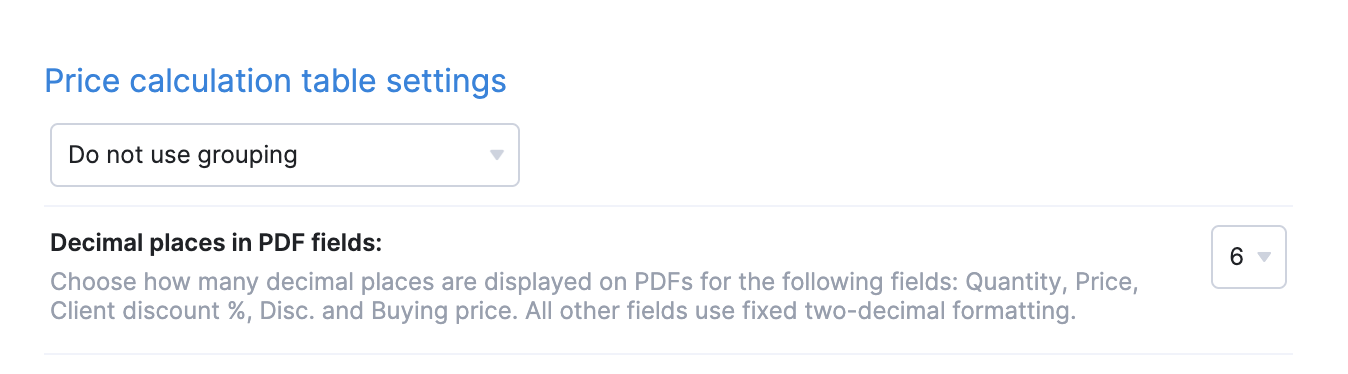
You can now limit how many decimal places are shown for the Quantity, Price, Client discount, Discount, and Buying price values on your PDF documents. Simply modify your template, go to the Price calculation table tab, and choose the number of decimal places to display from the Decimal places in PDF fields dropdown. This ensures the values on your outgoing PDFs have a clean, consistent look.
All other fields on PDF documents retain a fixed two-decimal formatting.
Improved search in the Client field
Previously, you could search for clients by entering custom field values in the Client field within the project modify view. However, you couldn’t do that in other views in Scoro. Now, we’ve expanded this search logic to all financial documents. Whether you are creating a quote, invoice, purchase order, or another financial document, you can simply type a value from a contact-related custom field into the Client field to find the contact you need.
Heads-up: Clearing out old notifications soon!
We wanted to give you a heads-up about a quick cleanup happening in the upcoming January version (26.1) that will make Scoro faster for everyone! 🚀
To significantly boost performance, we will automatically remove all Scoro notifications older than two years from all Scoro sites. This only affects the old notification message itself; the item the notification was about will remain on your site.
As notifications can’t be exported, if there’s anything you want to keep from before December 2023, make sure to copy those details somewhere else before your site gets the 26.1 update in January.
We’re working on…
- Subtasks. Break down more complex project deliverables with multiple contributors into smaller, actionable subtasks to gain complete oversight of your project’s moving parts and monitor the progress with precision.
- Watchdog alerts for retainers. Set up watchdogs for retainer project metrics to get automatic email alerts when key financial or operational thresholds are reached, eliminating the need to monitor these project metrics manually every day.
❗Don’t worry if your Scoro site hasn’t been updated yet – the update is rolling out gradually over the next few weeks.
We do our very best to make Scoro better every day, so we appreciate your feedback! Share your thoughts with us via our contact form.
Wishing for your improvement ideas to come to life on your Scoro site? Send us feedback.
What to do next?
- Join our referral program to invite others to try out Scoro and earn monetary rewards of up to 1800 USD when they become a Scoro customer!
- Visit our Help Center to find in-depth guides about all Scoro features.
- Listen to our podcast The Handbook by Harv Nagra, an Ops Consultant and Ex-Agency Leader, where he dives into engaging conversations with operations experts to discuss and explore the behind-the-scenes and latest trends and innovations in the professional services space.
- Subscribe to The Handbook newsletter to get the latest info on agency challenges and solutions delivered directly to your inbox.