












So, MCP servers. You’ve probably heard about them by now.
Maybe someone mentioned them in a meeting, you read about them on LinkedIn, or one popped up in a product update from one of the tools you use at work.
And maybe you nodded along like you knew what it meant. No judgment. We’ve all done it. (I’ve done it more than I’d like to admit.)
But the problem is, most explanations of MCP servers I’ve read are written by developers, for developers. Lots of “protocol” and “endpoint,” and nothing on what they actually do for you or your team.
So here’s my version, without the developer jargon.
MCP servers, minus the nodding
Picture this…
You’ve finally hired an operations consultant to work out where all your billable hours are going. The one everyone raves about. Sharp, quick, charges like a barrister, worth every penny.
On day one, they sit you down and start asking questions:
“What percentage of last quarter’s hours were billable? Which projects went over their quoted hours, and by how much? And which clients are you doing the most unbilled work for?”
And you answer as best you can. Half from memory, half from a spreadsheet someone exported last month, and the rest from whatever the team said on Friday.
A week later, you get a sharp diagnosis and a clear plan. The trouble is, it’s all built on your best guesses. If your answers were a bit off, so is the diagnosis. And so is the fix.
That’s your AI tool right now. Claude, ChatGPT, whichever one you use. It’s smart, and it asks good questions. But it only knows what you tell it about your business.
An MCP server gives it access. That’s it.
So instead of working from your best guesses, it works from your real data. Then it can find answers (like where your time’s going) and get jobs done for you.
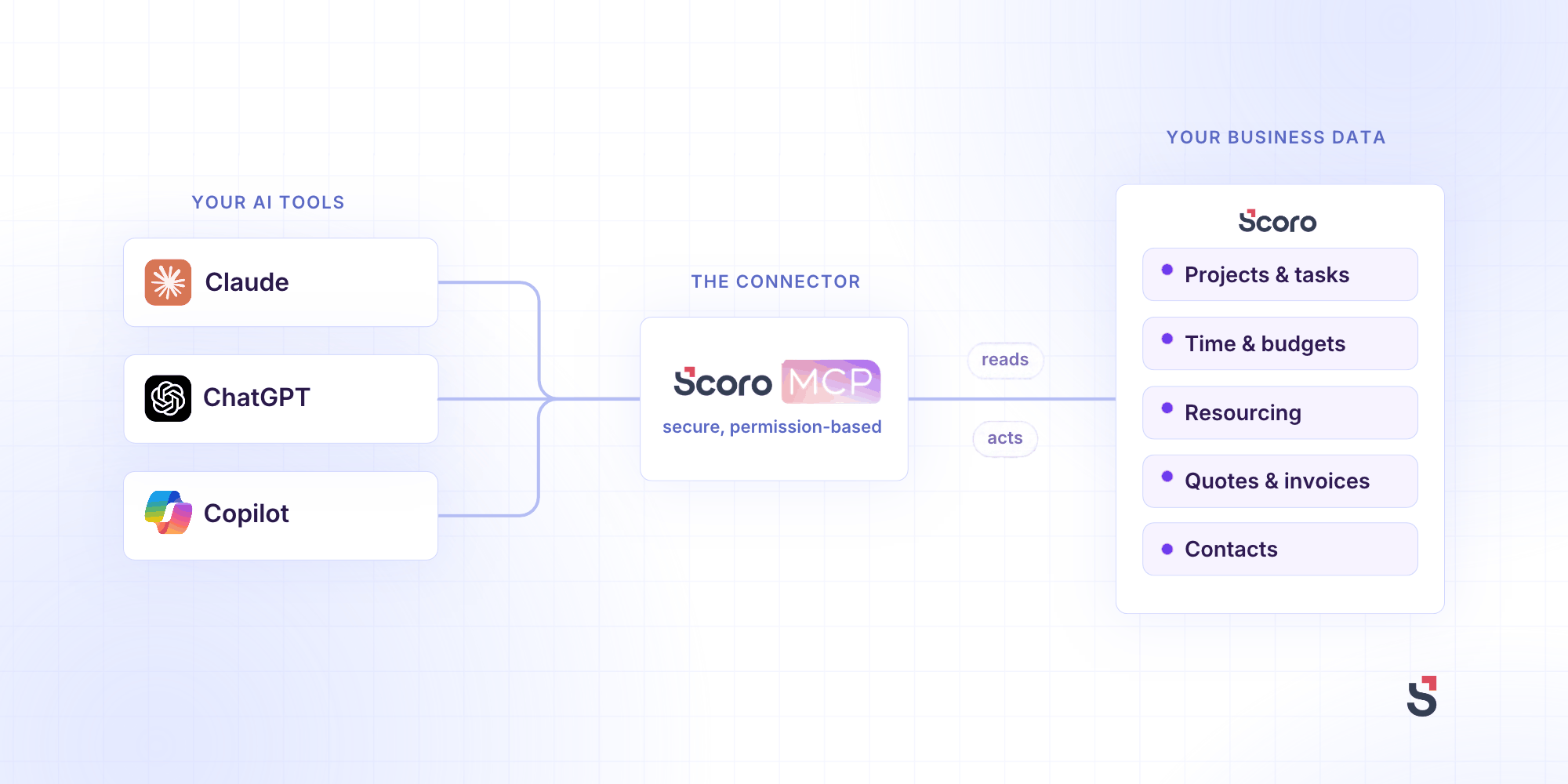
Scoro has an MCP server. In practice, that’s a setting your Scoro admin switches on, and then you connect it to your AI tool. Lots of the other tools you use, like Gmail and Slack, have one too.
Top Tip
MCP stands for Model Context Protocol. It’s a shared standard for how AI tools connect to apps. An MCP server is an app’s own connection point, built to that standard, that safely lets your AI tool in.
So, what can an MCP server actually do?
Take the tool you use to run your business. For a lot of businesses, that’s a professional services automation (PSA) tool like Scoro, where your projects, people, time, and money all live. Connect your AI tool to its MCP server, and you can do two things.
1. Read: get answers from your real data
Some of the actions an MCP server offers just look things up. When you ask a question, your AI tool works out which lookups it needs, runs them in Scoro, and puts the results together into an answer.
So instead of building a report, you just ask: “Which projects are over budget this month?” or “Where have we logged more hours than we quoted?” Because it’s reading Scoro directly, the answer reflects what’s in there right now, not the spreadsheet someone exported last Tuesday.
Here, Claude checks how a client project is going by pulling risks and bottlenecks from Scoro, Gmail, Slack, and Jira, each connected through its own MCP server.
2. Write: get the work done
Other actions make changes, like creating a project, logging time, or booking someone onto a job.
Ask for something like “Set up a project for this brief” or “Book Sam onto Harbor & Pine for 10 hours next week,” and your AI tool picks the right actions and carries them out in Scoro for you. It can only use the actions your admin has switched on, and only within your own permissions.
That second part matters most, because that’s where the time goes. The setting up, the logging, the updating. It’s also where the money slips through: the invoice nobody raised, the hours nobody booked.
Here, a meeting has run over. From a phone, Claude extends it in Scoro by 30 minutes and books a follow-up, so the billable time is captured before anyone’s back at their desk.
How Scoro customers are using it
Demos are one thing. What’s more interesting is what people build once it’s connected to their own business.
Here are five workflows Scoro customers are running right now, all taken from recent conversations with them.
A Monday morning report that writes itself
Before: The general manager of an events agency logged into Scoro every week, set filters, ran a report, and tweaked it until it looked right.
Now: A report lands in his inbox at 9:30 every Monday. It shows each person’s hours from last week, how much was admin, and how much capacity they have left. If something looks off, he forwards it to that person’s manager so the hours get fixed before the week closes.
A day of month-end reporting, done in ten minutes
Before: A partner at a creative agency spent a full day every month pulling numbers out of Scoro and building a PowerPoint for the accountant.
Now: Claude pulls top clients, performance, pipeline, profitability, late payers, and freelance spend into one report in about ten minutes.
The partner who built it doesn’t code. He taught himself by trying things out.
Turning “my website’s broken” into a ready-to-go job
Before: At a full-service agency, every “my website’s broken” email cost a client manager about an hour and a half of back and forth. Usually for a 15-minute fix.
Now: An automation (built in n8n, a workflow tool, using Google’s Gemini) reads the email, works out what’s wrong, and drafts a reply and a developer brief. The client manager checks it and hits send, and Claude sets up the job in Scoro with the right tasks.
It takes one to three clicks, and it runs hundreds of times a month.
Planning a month of work in one go
Before: The operations team at a digital marketing agency spent the end of every month scheduling the next month’s tasks by hand.
Now: They upload the tasks to Scoro and ask Claude to plan them in. A Claude skill, a saved set of instructions Claude follows every time, holds their rules: nothing booked on a Saturday, nobody booked for more than their working day, and quality checks always scheduled the day after the work they’re checking.
That saves them about five days of planning every month.The ops lead who set it up taught herself by experimenting and tweaking as she went.
Keeping client records up to date without the data entry
Before: At a property advisory firm, updating a client record meant working through a long list of custom fields, most of which didn’t apply to the person filling it in. So records went stale.
Now: People ask their AI tool to go through the week’s emails and suggest updates for Scoro, like a new phone number or a quote that needs to be created. A person approves every change, and the firm has switched off deleting altogether.
Records are more complete, and people are more willing to keep them that way. And the team worked it out themselves over a few months, learning as they went.
Things an MCP server is not (despite what LinkedIn says)
There’s a lot of noise around MCP servers, so let’s be clear about what they aren’t:
- It’s not AI running your business. Nobody’s handing the keys to a robot. A person asks for something, and the AI does it within the limits you set. And you can make sure a person approves anything before it happens, like the reply and the job in those examples.
- It’s not a replacement for your business system. Your PSA still holds the projects, the time, the budgets, and the invoices. An MCP server lets AI tools read from it and act on it. It doesn’t replace a good PSA. It makes one dramatically more powerful, because every AI tool is relying on it to be right.
- It won’t stop AI getting things wrong. AI makes mistakes, especially from vague emails like “my website’s broken.” That’s why the approval step matters. And because the AI can delete what it created, its mistakes are easy to undo.
- It’s not magic. If your timesheets are patchy and half your projects were set up on a Friday afternoon, you’ll get patchy answers. Very quickly. AI can’t answer a question your data can’t. An MCP server makes good data more useful. It doesn’t turn bad data into good data. Nothing does.
So think of an MCP server as access. What matters most is what it’s getting access to: clean, up-to-date data in the system that runs your business.
“But is it safe?”
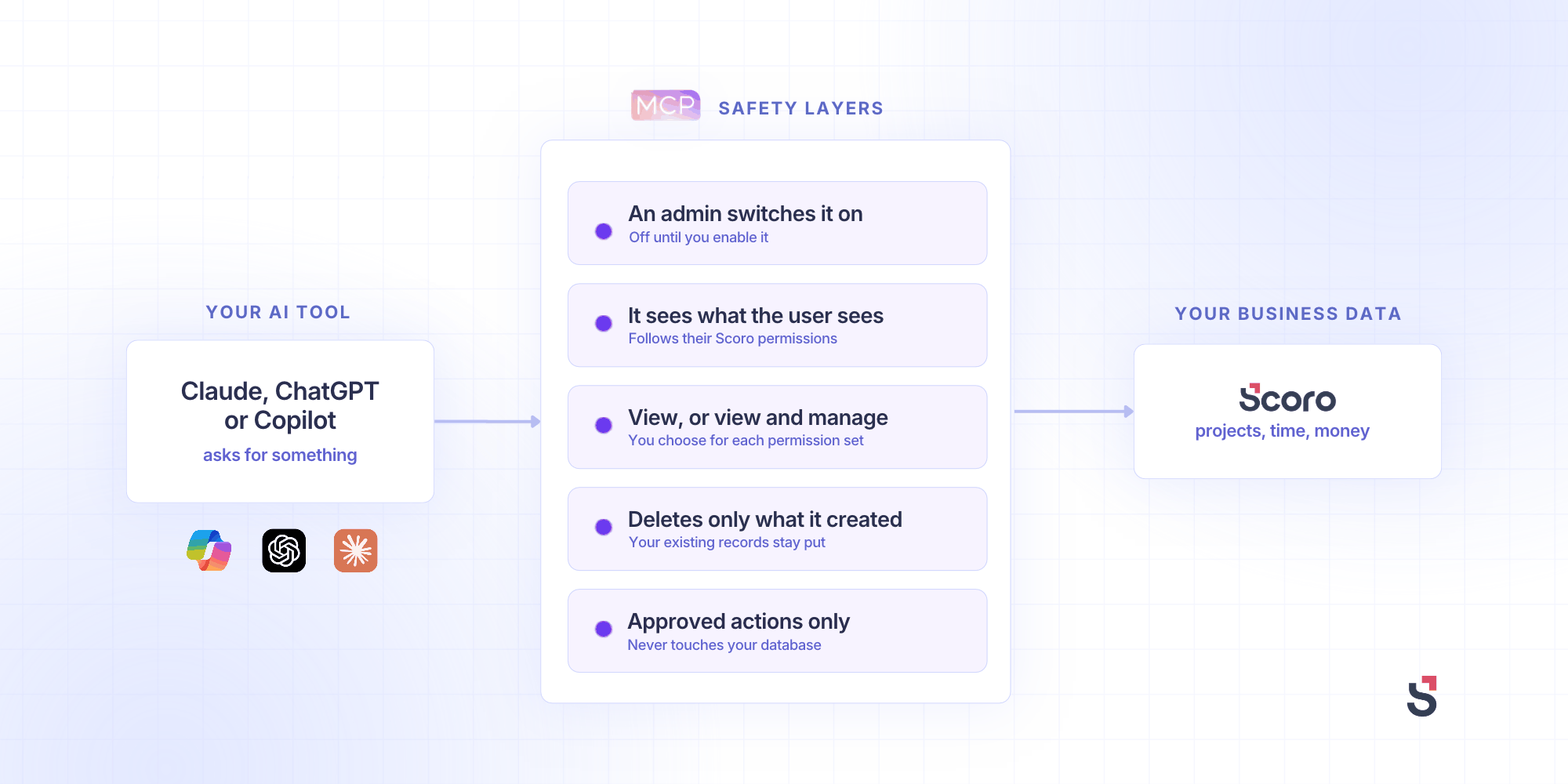
Fair question. It’s usually the first one people ask, and it should be. So here’s how the Scoro MCP server handles it:
- Nothing happens until an admin switches it on. So, no surprise robots.
- The AI sees what the person sees. No more. Access follows each user’s existing Scoro permissions. If you can’t see finance data in Scoro, neither can your AI.
- You decide what the AI can do. Admins set access for each permission set (the roles that already control who sees what in Scoro), either “View data” or “View and manage data.” Your call.
- It can only delete what it created through the MCP server. So it can undo its own mistakes, but your existing projects, quotes, and invoices stay put.
- It never touches your database. That’s where your Scoro data lives. The AI can only use the specific actions Scoro provides, you can switch any of them off, and everything’s encrypted.
How to start without breaking anything
Good news. Giving your consultant access doesn’t take a big rollout or a change management plan.
New to Scoro? Start a free 14-day trial, add a bit of made-up data, and connect your AI tool to test the MCP server.
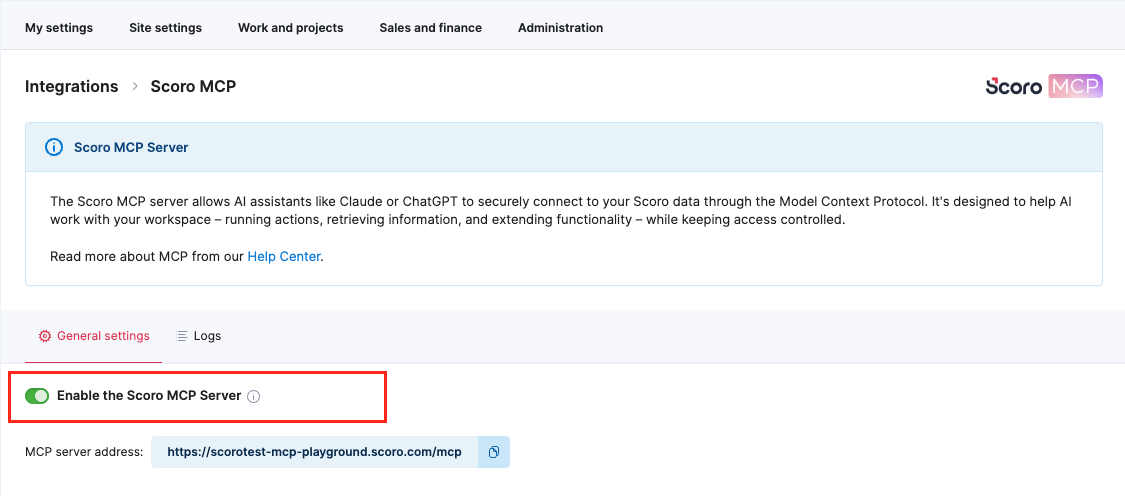
Already a Scoro customer? Ask your Scoro admin to switch on the MCP server. It takes a few seconds:
- Go to Settings > Site settings > Integrations
- Click Scoro MCP
- Switch on the Enable the Scoro MCP Server toggle
The MCP setup guide walks you through connecting Claude or ChatGPT, and the list of supported tools shows everything it can do.
Stuck on any of it? We’ll help you set up sample data and get your AI tool connected. Just ask, or book a demo and we’ll walk you through it.
Questions people ask us (and a few they’re too polite to)
Is MCP just an API with a new name?
Close, but not quite. An API lets software talk to software, usually through code a developer writes. MCP does a similar job, but it’s built for AI tools. So instead of a developer writing code, your AI tool connects to an app’s MCP server and uses it when you ask in plain English. No developer needed.
Which AI tools work with it?
Most AI tools that support MCP. That includes ChatGPT, Claude, and Microsoft Copilot Studio.
What can it access in Scoro?
Most of it. It can read, create, and update projects and budgets, tasks, time entries, calendars, resource bookings, and contacts. It also works with quotes, invoices, bills, expenses, and purchase orders. So it can do more than look. It can draft a quote, set up a project, or book someone onto a job, within the permissions you set. A few things, like users and availability, are read-only.
Do I need a developer to set it up?
Nope. A Scoro admin switches it on in site settings. If your company shares a ChatGPT or Claude account, whoever manages it connects Scoro once. Then each person turns it on in their own AI tool.
Does it cost extra?
Not from Scoro. The MCP server comes with all Scoro packages at no extra cost. Your AI tool provider might charge for its own plans, because of course they do. So your real cost is an AI plan for each person using it, plus a bit of setup time. Start with a small team and you’ll know the number before you scale.