








Resource management is mostly admin. Checking who’s overbooked. Finding cover when someone’s off. Moving every single date when a client slips. Usually at 4:45 on a Friday. AI can now take a lot of that off your plate. Some of it, anyway.
But most of what’s written about AI in resource management is either a vendor promising it’ll run your whole schedule, or a think piece that never gets past “it’s transforming the industry.” Neither helps much when you’ve got 11 people to move before lunch.
So here’s what AI can actually do with your schedule today, what it can’t, and what it needs before you’d trust it anywhere near your people.
What is AI in resource management?
AI in resource management means using AI to plan and adjust who’s working on what. It reads your team’s schedule, answers questions like “who’s free next week?”, and in some tools changes the schedule for you.
In Scoro that’s ELI, Scoro’s built-in AI. Ask it about your schedule, have it make changes, or give it rules to run on its own, all from your live data and within your permissions.
So, what can AI actually do for your schedule?
Four things. It answers questions about your schedule, makes changes when you ask, acts on its own when something happens, and works across your other tools. Of the tools compared below, most do one or two. Let’s go through each.
1. Answer questions about your schedule
This is the easy win. Ask a question, get an answer from your live schedule.
Say an operations manager wants to know where next quarter gets tight. Normally that means opening each project, exporting the schedule, and totaling hours per person. (And then doing it again when someone points out the export was from last week.) Instead they type the question and read the answer.
A project manager comes at it from the other end: has anyone got room to pick up a deliverable that just slipped two weeks?
Either way the answer comes from records your team already keeps. So it reflects where the plan stands this morning, not the version someone exported on Friday.
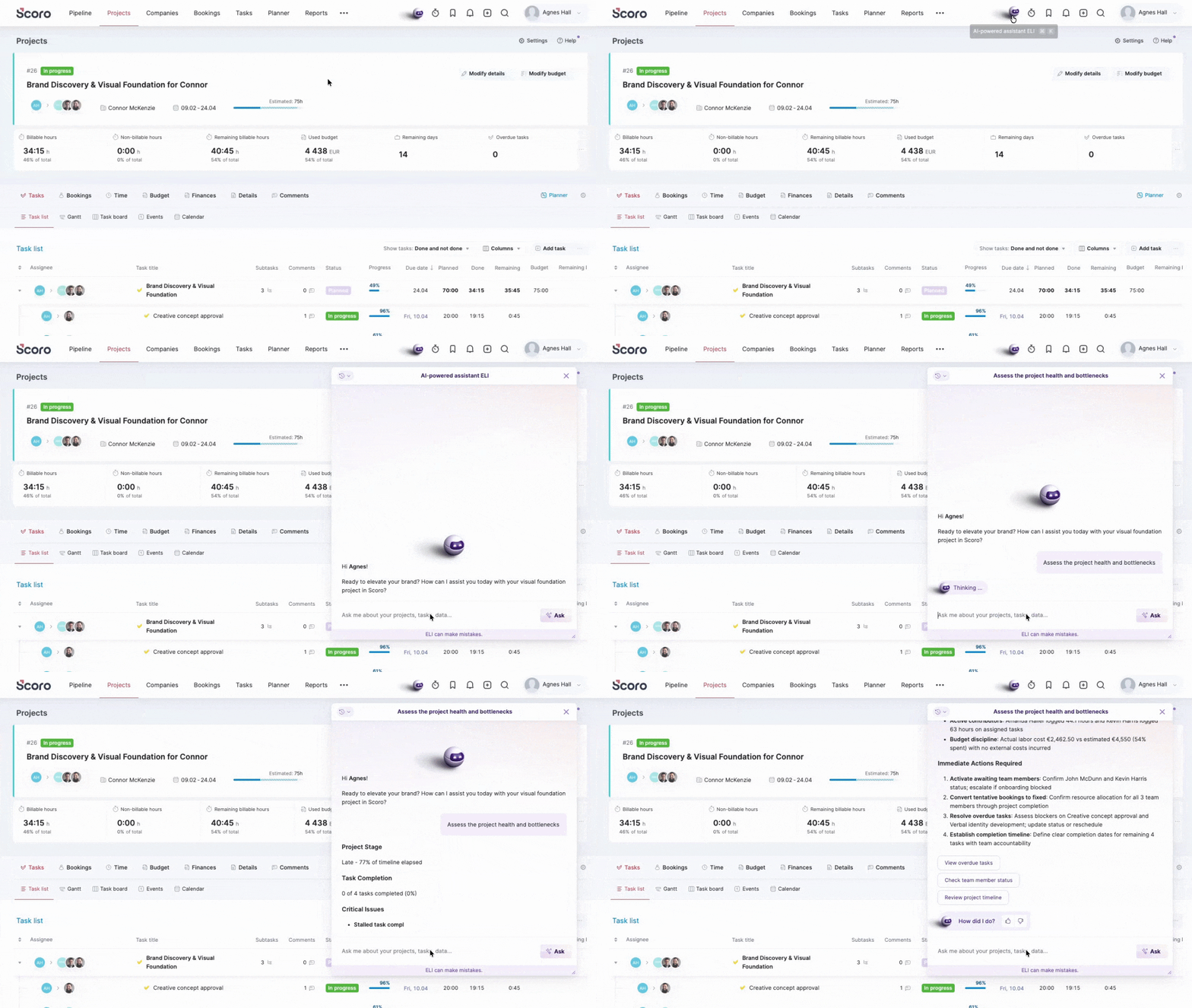
In Scoro just ask ELI. A few questions worth trying:
- Find the pressure points: “Who’s booked over capacity in the next four weeks?”
- Check before you commit: “Have we got the people to start a new project in October?”
- Catch a clash early: “Is anyone booked on work during their leave next month?”
- Read the month properly: “Break billable and non-billable hours down by role for September.”
2. Make changes when you ask
Answers are nice. But knowing three people are over capacity in week 40 doesn’t fix week 40. So ask ELI to fix it. It shows you the change it’s about to make, then makes it for you: creating, moving, or reallocating bookings.
Someone’s off for a fortnight? “Reassign their bookings to whoever’s free” is one request, not 20 minutes of clicking. You stay in charge. It only does what you asked, and it checks with you first.
3. Act on its own when something happens
This is the bit people usually mean when they say “AI agent.” Instead of asking every time, you set a rule once, and AI handles it every time it applies.
Why bother? Because most resourcing admin is small edits that take a minute each and arrive 30 at a time. Someone goes on leave and 11 bookings need new owners. A project slips and the team’s next fortnight has to be redrawn around it. They always land on the day you had something else planned. And the same ones come round again next month.
That repetition is what makes them worth a rule. In Scoro you give ELI a rule: the trigger decides when it runs, and ELI works out how. For example:
- A project goes on hold? ELI puts its open tasks on hold and tells the people working on them.
- A project’s dates change? ELI moves the team’s bookings to match and tells you who now clashes with other work.
- A quote reaches a certain stage? ELI creates the project, adds the team, and pencils in tentative bookings before the deal’s signed.
Setting one up is simple: pick what should start it (say, a project’s dates changing), then describe what ELI should do, in plain English. Not sure how to word it? Ask ELI in the chat, and it’ll help you set the rule up.
Admins can also set rules that run on someone else’s behalf, like whoever triggered the change, so one rule can cover the whole team. Every time it runs, ELI acts with the permissions of whoever it’s acting for and leaves a note in their ELI chat saying what it did. No surprises.
Want to see it in action? Here’s our webinar.
4. Work across your other tools
Here’s the catch with AI built into one tool: it only works inside that tool. And resourcing questions rarely start there.
A client emails asking to move a date. An account manager asks in Slack whether there’s room for more work before the end of the month. So you end up reading the email in one place, checking the schedule in another, and replying from a third.
MCP servers close that gap. Each app has its own MCP server, a connection point that lets AI tools like Claude and ChatGPT safely work with it. (If that’s new to you, I’ve written a plain-English guide to MCP servers.) Scoro’s MCP server connects Scoro to Claude, ChatGPT, and Microsoft Copilot Studio, so the question gets answered where it was asked.
Two examples:
Reshuffle a team after a client moves a date
“Northgate just emailed to push the campaign launch to the 19th. Find who’s booked on that campaign in Scoro over the next fortnight, move their time to match the new dates, and tell me who now clashes with other work.”
You get the reshuffle and the problem list in one go. The bookings move, and anyone who’s now double-booked comes back named. All while you’re still deciding what to tell the client.
Turn a signed scope into provisional bookings
“The signed statement of work (SOW) for the Mercer rebrand is in Google Drive. Pull out the phases and the dates, check in Scoro who’s free across those weeks for the roles it calls for, and book provisional time for whoever has capacity.”
The useful part is the capacity planning before anything gets scheduled. Your AI tool compares the roles and dates in the scope with who’s available in Scoro. If the capacity isn’t there, it flags the gap before you’ve promised the client a start date. If it is, it books provisional time that holds the slot without locking anyone in.
Prefer to stay in Scoro? You can also attach the statement of work straight into your ELI chat and ask it to check who’s free and pencil in the time.
And you stay in control. An admin decides what AI tools can access, and each person’s AI only sees and changes what they could already access in Scoro.
Before you let AI reschedule anyone
AI can only reschedule your people well if it can see the project plan, who’s available, and what the work was sold for. In a lot of firms that’s split across separate tools. So a scheduling agent can move people around without ever seeing what the move does to project margins. Fast, confident, and wrong.
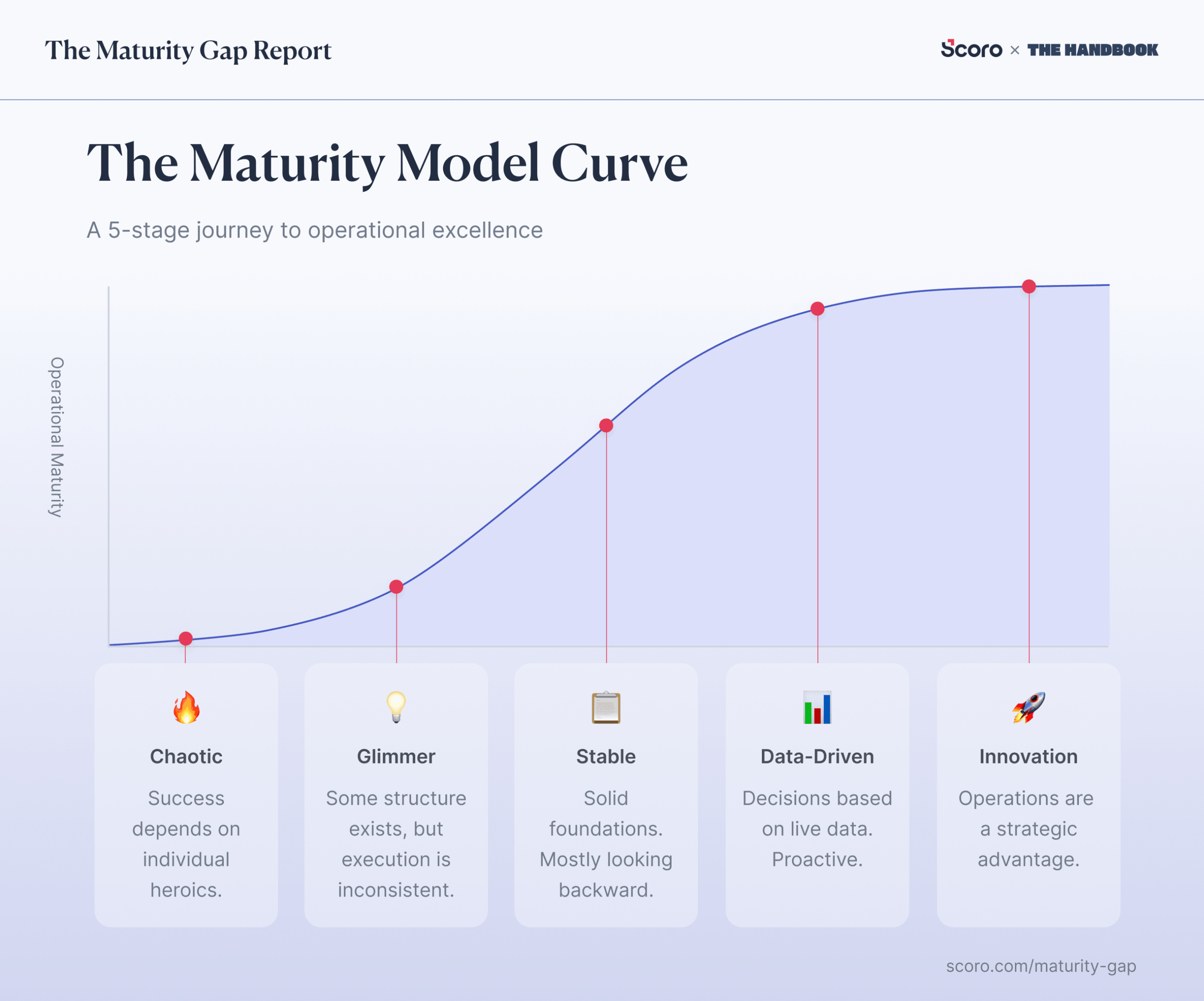
So before shopping for an AI resourcing tool, work out how connected your data already is. Harv Nagra—ex-agency operations leader and host of The Handbook: Agency Ops Podcast—maps this in his business maturity model, five stages from spreadsheets to one connected system:
- Chaotic (Stage 1): the plan is a spreadsheet one person owns, and the current version is in their head.
- Glimmer (Stage 2): a scheduling tool exists, but half the team still books people by messaging each other.
- Stable (Stage 3): resourcing runs in a proper tool, but it doesn’t know what anyone costs, so you find out at month end.
- Data-Driven (Stage 4): availability, the project plan, and rates all read from the same data, so you can see what a reassignment does while you make it.
- Innovation (Stage 5): booking someone updates the forecast, budget, and billing, without anyone re-entering anything.
Asking questions works from Stage 3, once your schedule data is accurate enough to report on. “Who’s free in week 40?” only needs the schedule to be right.
Letting AI reschedule people needs Stage 4. Every move changes next month’s delivery and margin, so AI needs capacity and financial forecasts it can trust. And forecasts are only trustworthy when everyone logs time and plans work the same way, in the same system. Without those, a reassignment is just a quick guess.
Which AI Resource Management tools should you consider?
Nearly every resourcing tool has something AI-shaped in it now. What separates them is whether the AI only answers questions or can change the schedule. And how much of your operation it can see while it does.
| Tool | AI functionality | What it reaches | Consideration |
|---|---|---|---|
| Scoro | ELI works as both assistant and agent: answers from live data, and creates, reallocates and rebalances bookings. MCP server connects Claude, ChatGPT and Copilot. | Pipeline, quotes, project plans, bookings, time, costs and invoices, with two-way sync to Xero, QuickBooks, Sage Intacct and Exact Online. | Scheduling on its own won’t out-feature a dedicated planner. The strength is that a reassignment is visible in the budget and the invoice. |
| Float | AI-assisted best‑fit recommendations, AI‑built Smart Insights experience profiles and a read‑only MCP server. | The schedule, project baselines covering price, budget, roles and timeline, budget burn and margin. | Strong on allocation, and the AI leans towards suggesting the right person rather than rebuilding a broken week. |
| Runn | SmartMatch AI (Beta) to find the best matches for a project with AI recommendations. | The schedule, rate cards, costs, budgets, and revenue and profit predictions. | Built for resource forecasting rather than acting. The AI connection is maintained by a third party rather than by Runn. |
| Resource Guru | An MCP server so ChatGPT or Claude can answer resourcing questions from your schedule. No built-in agent that reschedules. | The schedule, project budgets, billable utilization and profit analytics. | The simplest of the four to run. It will tell you what’s wrong with next week, then leave the fixing to you. |
Connect the data, then let AI reschedule
Everything in this article works because the schedule, the project plan, and the money sit in one system.
AI can reassign someone in seconds. But whether that move costs you margin only gets answered when rates and budgets sit alongside the schedule. Split them across tools and an agent can shuffle your people without ever seeing what the shuffle does to the project.
Andrew McBarnett, Group Financial Director at Lucid Group, puts it well: disconnected or messy data will only “help you reach the wrong conclusion faster.” Lucid spent years building single sources of truth across accounting, project delivery, and expenses before it added AI. Now 44% of its finance work is automated or AI-assisted. Andrew explains how in his episode of The Handbook.
So the order matters. Connect the data first, then bring in the AI.
- Already exploring tools? Book a Scoro demo and we’ll walk you through a reschedule from start to finish, using your own bookings, rates, and budgets.
- Not sure where your firm sits? The Business Maturity Quiz shows you which stage you’re at and what to fix to move up.
FAQs
Can AI replace a resource manager?
No. It takes over the reshuffling. The judgment calls stay with you: who suits a demanding client, who’s ready for stretch work, who’s close to burning out. What changes is how much of the resource manager’s week goes on admin instead of those decisions.
How accurate is AI at resource scheduling?
It’s only as accurate as the data underneath it. If the schedule’s out of date, leave isn’t logged, or tentative work isn’t marked as tentative, AI will confidently plan around a schedule that doesn’t exist. Treat its answers as a fast first draft, and check anything it proposes before it goes live.
What if AI gets a change wrong?
In chat ELI shows you what it’s about to change before it does it, and you can stop it mid-request. When a rule runs on its own, ELI leaves a note in your chat saying exactly what it did, and each rule keeps a log of every run. So you can always see what changed and put it right. Start with small changes until you trust it.
What should I clean up before using AI for resource management?
Start with the records AI will reason from. Make sure every person has a role, leave is logged in the same system as the schedule, tentative and confirmed work are clearly separated, and cost rates are set by role. If those are reliable, AI can answer questions from day one. If they aren’t, fix them first. Every answer and every change it makes will be built on them.
Can I use ChatGPT or Claude for resource management without a resourcing tool?
You can paste in an exported schedule and ask questions about it. But the answers are only as current as the export, and the AI can’t change anything. Connected through an MCP server, the same tools can read your live schedule instead. Some, like Scoro’s MCP server, can also make changes to it.
Is it safe to connect my resourcing data to ChatGPT or Claude?
Fair question. Connections through MCP inherit each person’s existing permissions, so the AI can only see and change what that person could. The data is processed by the AI provider while it works, though. So check their data and retention policies, and use a business account rather than a personal one. Scoro’s AI policy covers how ELI and the MCP server handle your data.
How much does AI resource management cost?
It depends on how the vendor packages it. Some include AI in the base plan, some charge for it as an add-on or by usage credits, and some only offer it through third-party connectors with their own fees.
If you connect a tool like ChatGPT or Claude through MCP, you’ll usually need a paid plan with that AI provider too. In Scoro, ELI and the MCP server are included on every plan, with a monthly allowance of AI credits and the option to buy more. See Scoro pricing for current plans.