








Who did we speak to for this article?
This article draws on people who’ve built their own operations tools and people who help businesses roll out bought ones.
TL;DR: Should you build or buy your operations tools?
For anyone short on time (which is most of the people building these tools), here’s the argument in six points.
If you run an agency or consultancy, you might already be vibe coding your own tools, or thinking about it. A project planner here, a client portal there, maybe even a whole system to run the business on.
And you’re not the only one. I keep hearing about it on our sales and customer calls, usually from senior people who aren’t developers.
And a lot of these tools work, which raises a fair question: “Why would I still pay for software?”
I build some of my own tools at work, so I know how easy that first version feels. The catch is that AI has made building a tool cheap, but nobody else looks after it once it’s built.
When something breaks or an integration changes, someone on your team has to fix it, and usually only the person who built it knows how. And all of that lands on those who can least afford the time, your most senior, most billable people.
I think the core system is the part you should buy, then build your AI tools on top. But I looked at what the people doing the building told us, from prospects on sales calls and our own customers to the technology director of an agency group. Judge what follows on what they told me.
Why one vibe-coded tool turns into five
Take one head of creative our sales team spoke to, at an agency of about 30 people. He built his own resource planner in Claude. It shows who on his team is free, compares estimates against the hours people log, and suggests new ones based on past projects. It’s pretty good.
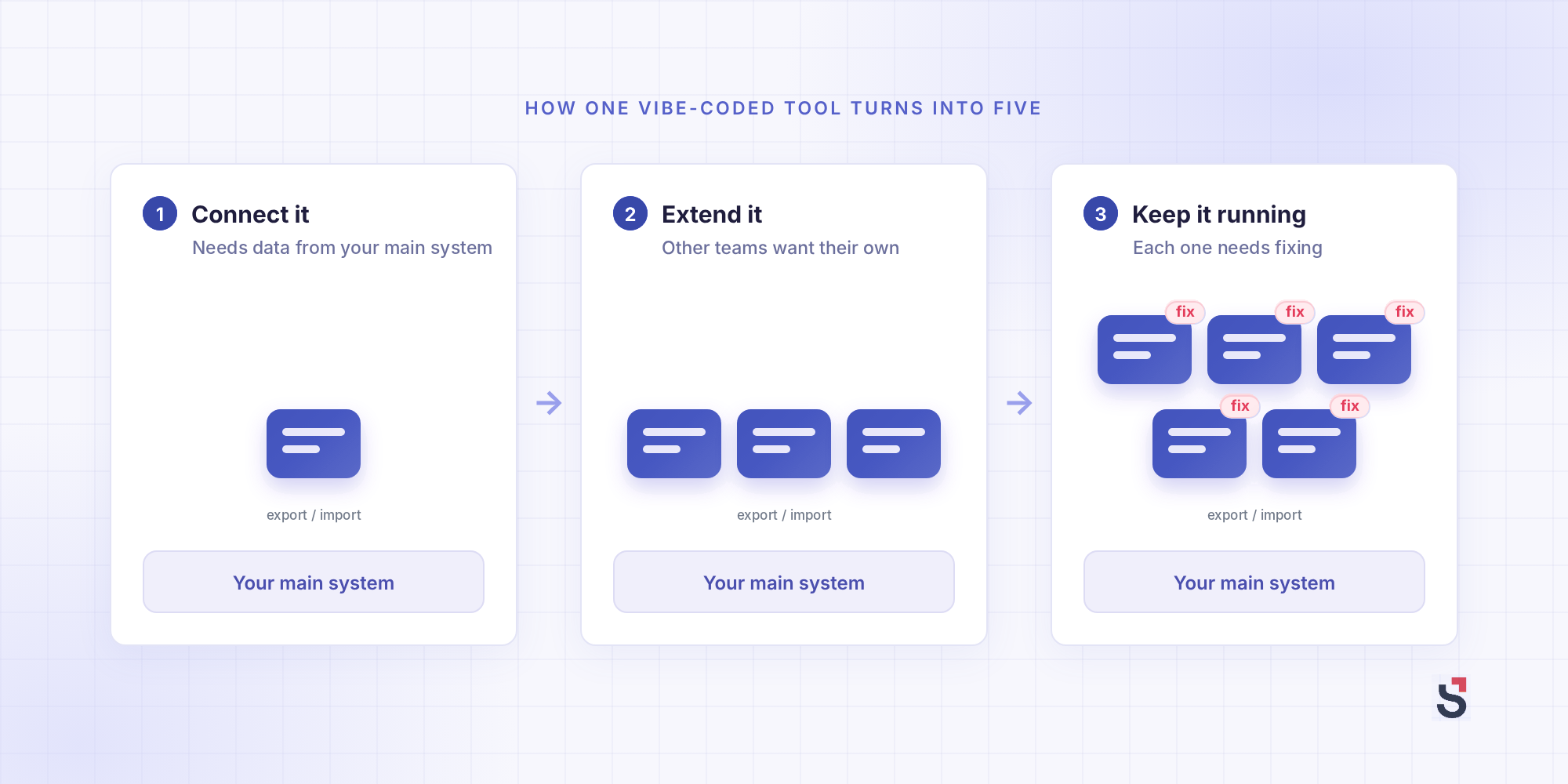
He built it because the system his agency already pays for can’t do that without someone pulling the numbers out by hand. Fair enough. But the hours his team logs still live in that main system, and his tool doesn’t connect to it. So every time he wants fresh numbers, he exports a file from one and imports it into the other.
But it also only covers his department. Production and account management plan their work differently, so either his tool grows to handle all three ways of working, or each team builds its own. Either way, none of it connects to the main system.
When we asked him whether he could build the rest, his answer was “probably.” He also said it would take a lot of time and trial and error, and keep growing into more work. And you’ve probably seen how this ends, with a file called planner-FINAL-v2 on a shared drive somewhere.
You’ll see the same pattern with most vibe-coded tools:
- Connect it: it needs data that lives in your main system
- Extend it: other teams see it and want their own
- Keep it running: something changes, and it needs fixing
Harv Nagra, our Head of Brand Comms, has rolled out professional services automation (PSA) platforms in previous operations roles and covers this in The Missing Finance Course (a free course we run for agencies and consultancies).
“From personal experience, building an in-house platform can be a slippery slope where more time than you ever expected gets sunk into troubleshooting or adding ad hoc new features.”
The usual defense is that a vibe-coded tool fits how you work. And for one team, it does. The head of creative said as much himself. He built a tool for his team, and he doesn’t see it as something the whole company could rely on.
But follow his plan to the end, with one tool per department and none of them connected, and you’re back in the mess you’ve been trying to escape.
Harv sees the same thing with the bought tools many businesses already juggle. “None of those platforms is a bad decision on its own. The problem is they don’t talk to each other.”
That mess is what many of the service-based businesses we speak to about a PSA tool are trying to get away from. A pile of tools that people have to tie together by hand.
Vibe coding speeds this up. Each tool is quick to build, so more of them get built, by more people, each solving one team’s problem.
And connecting the tools to each other is a band-aid, not a fix. “Connectivity isn’t the same as shared data architecture,” Harv says of connecting any set of tools.
Each tool has its own idea of what a project or a cost is. “Stitching them together doesn’t change that, it just masks it.” And when one tool changes, the connections break.
The hidden cost of vibe coding is your most expensive people’s time
A vibe-coded system can feel free, as long as you value your own time at $0. There’s some cash for AI credits and hosting, but the bigger cost is time. In a service-based business, that’s usually your most senior, most expensive people’s time.
Because there’s no bill for that time, it’s easy to leave out of the budget until it’s large. And that cost shows up in two places.
The first is billable hours. The people we hear from who are building these tools are rarely developers.
They’re department heads, senior consultants, and account leads. People who understand the work well enough to know what the tool should do, and whose hours are some of the most expensive the business sells.
“Every hour a developer or a senior person spends building or maintaining a homemade system is an hour that isn’t on a client project,” Harv says.
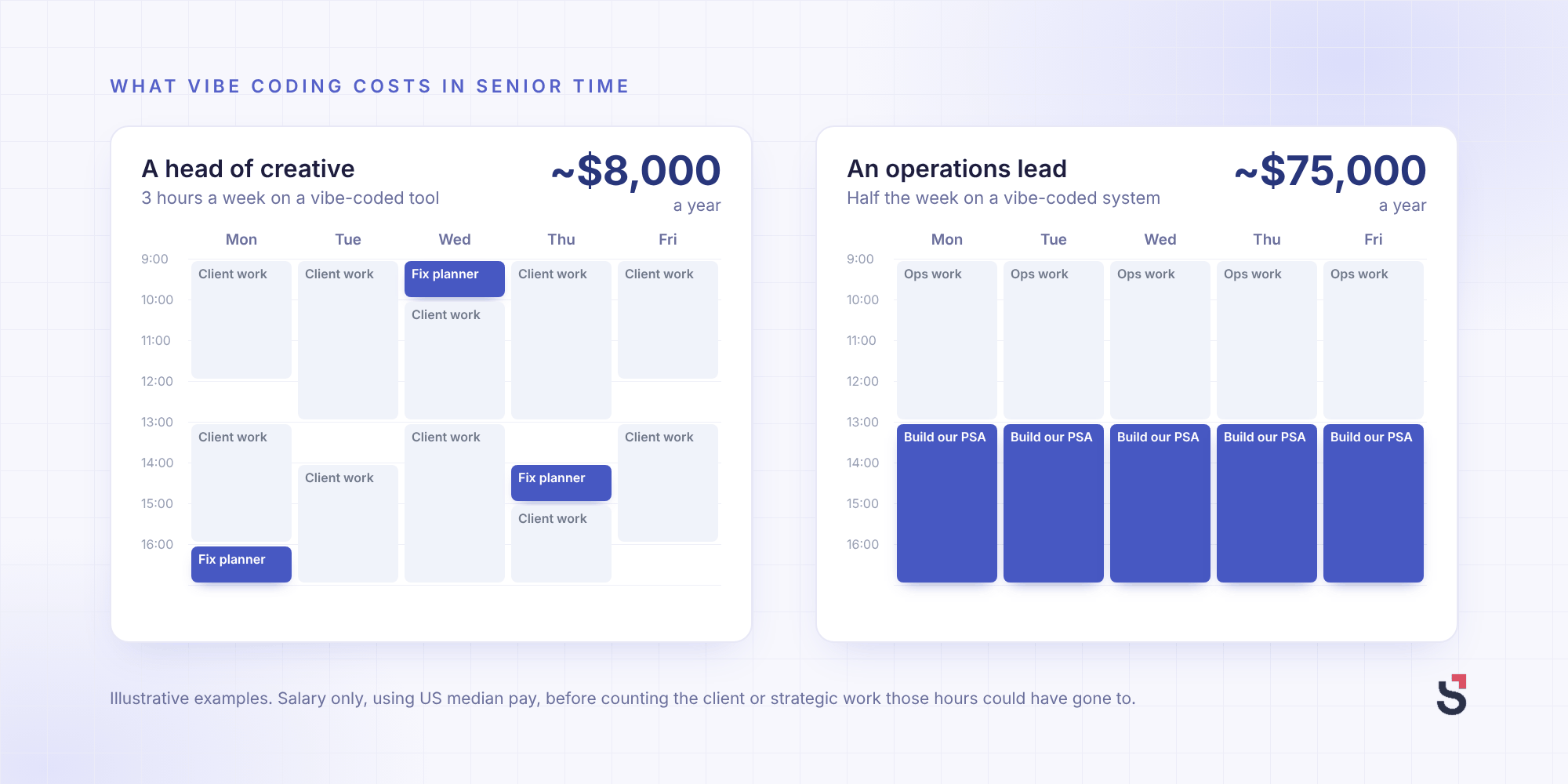
Let’s put a number on it. In the US, art directors at advertising and public relations agencies earn a median of $121,490 a year, or about $58 an hour.
Say a head of creative on that salary spends three hours a week on a vibe-coded tool. Over a working year, that’s about $8,000 of his time, before you count the client work those hours could have billed. And that’s one person on one tool. Now multiply it by every department that wants its own version.
The second cost is harder to spot. Sometimes the person building isn’t a billable expert at all. It’s the operations lead.
That costs more than you’d think, because operations is one of the roles that separates the most mature service-based businesses from the rest. In our Maturity Gap report, which surveyed 303 businesses, 92% of the most mature had someone in leadership responsible for operations strategy, compared with 27% of the least mature.
And maturity pays. The report maps its stages to SPI Research’s benchmarks, which put margins at 36.8% for businesses in the middle and 48.7% one stage up.
One operations lead we spoke to built their own PSA with AI. It works, though bugs are still coming up. For the first two months, it took about half their week, and they’ve spent thousands on AI credits on top.
If that pace kept up for 12 months, at the US median for an operations manager in professional services, $151,040 a year, it would cost the business about $75,000 in salary alone.
But the bigger cost is what that half week would otherwise go on. Reviewing margins, planning capacity, deciding when to hire, and fixing the processes that leak time are the work that moves a business up a stage. For a $10 million business, the Maturity Gap report estimates that one-stage jump at about $270,000 a year in profit.
To be fair, buying isn’t free either. There’s a subscription to pay, and a rollout takes senior time of its own. “Onboarding takes more time and attention than clients often realize,” says Maggie Luce, a Senior Customer Onboarding Expert at Scoro. That time goes on:
- Mapping your processes
- Configuring the system
- Moving your data over
- Getting the team to use it
Harv is blunt that it can go wrong. You can do all that work, and “three months later, half the team has gone back to their spreadsheets.”
That’s a real problem. But it’s a change management and communication problem, and a team that won’t use a bought system won’t use a vibe-coded one either.
The two costs also have different shapes. A rollout is front-loaded. “Spending more time in the system early on can improve momentum long-term,” says Olga Moskatova, a Service Delivery Manager at Scoro. You can also get help from the vendor or a partner, and our team has shared what a good PSA rollout takes.
A vibe-coded system’s hours don’t stop at launch. The fixes keep coming, they keep landing on the same people, and none of them arrives as an invoice. That’s why the upkeep is so easy to miss. The person who built it is now a part-time product engineer, whether they applied for the job or not.
Why AI won’t make maintenance cheap, even as it gets better
You might be thinking that if AI can build a tool in an evening, it can fix one in an evening too. The models get better every few months, so maintenance should get cheaper, and the hours above stop adding up.
Part of that is right. Writing code is now the cheap part. But someone still has to spot what’s broken, decide what “right” looks like, and own the result. And in a business without a development team, that someone isn’t a developer.
Code was never the expensive part of running a system. The expensive part is everything around it:
- Noticing: realizing an invoice total is wrong before the client does
- Deciding: knowing what the correct number should have been, and why
- Testing: checking the fix doesn’t break something else
- Owning: being the person who’s on the hook when it goes wrong
AI can help with all four. It can’t take responsibility for any of them.
Owning includes client data. Your business is responsible for it whether you build or buy, but with a vibe-coded tool, keeping it secure is down to whoever built it. Harv’s question for anyone building their own system: “how confident are you that the platform is secure and not exposing data that you’re responsible for?”
Remember who’s building these tools. Department heads, senior consultants, account leads, and operations leads. They can describe what they want, but many can’t read the code to tell whether it’s right.
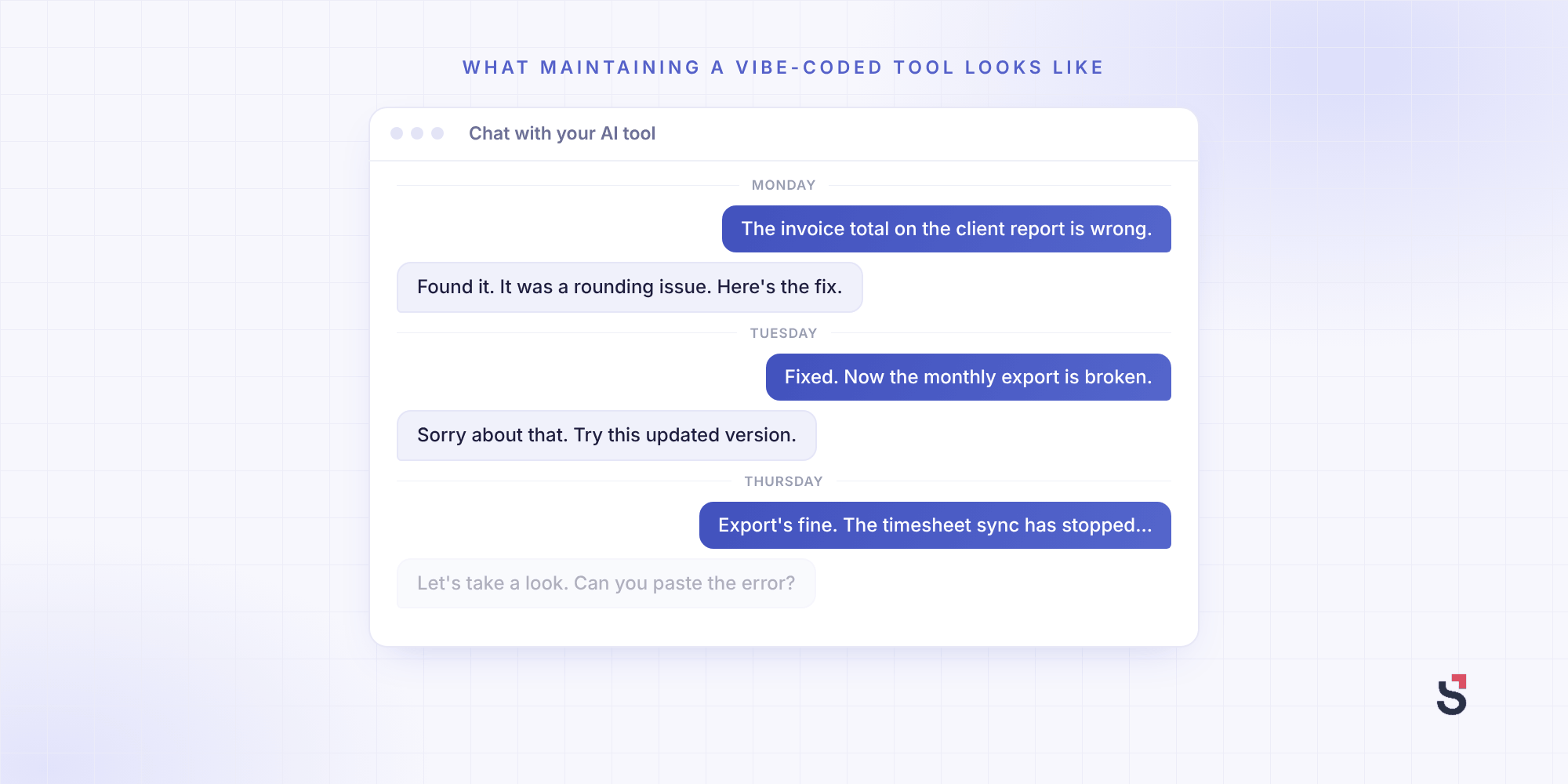
So when something breaks, they go back to the AI, describe the problem, try the fix, and check again. Round and round. That loop is where maintenance time goes.
The leader who built their own PSA has a development background, and says that’s what made it possible. You “have to understand database structure and you have to understand APIs.” Without that, you can’t check what’s in the database or tell the AI where things live.
And all of this usually runs through one person. Asked what would happen if they left, the leader said, “the system works, but they’d need to do something.” The colleague they’re training up “doesn’t have the dev background.” So nobody’s booking a long holiday just yet.
Jonathan Healey, Group Technology Director at IDHL, a UK digital agency group of about 500 people, has been building its operations software for years. So he knows.
He doesn’t think AI changes the maintenance bill: “it takes just as much effort to maintain a vibe coded application as it does a traditional software application. That side of things is not going away,” he said on The Handbook: The Operations Podcast.
Buy the core system, and vibe code the tools on top
Plenty of the businesses we talk to, our own customers included, already split the work in two.
Underneath, they keep one system for quotes, projects, time, resourcing, and invoices. It’s the context layer for their AI tools, the one place they get their data from.
On top, they vibe code small tools. Here are a few from our customer research calls:
- Reporting: a business consultancy builds its monthly board margin deck, about 10 slides, from Scoro data.
- Budget alerts: a communications agency gets a Scoro notification when a project’s budget is being spent too fast.
- Project setup: a creative agency turns a client’s scope of work into a project with tasks, people, budgets, and a timeline in one click.
- Scheduling: a marketing agency has Claude plan a client’s monthly tasks, which its operations manager estimates saves around five days a month.
- Timesheets: at a small law practice, AI turns each client call into a time entry and follow-up tasks, and one click writes them into Scoro.
They connect these tools to Scoro through our Model Context Protocol (MCP) Server, which is included in every plan. If MCP is new to you, we’ve explained what an MCP server is and how our customers use it.
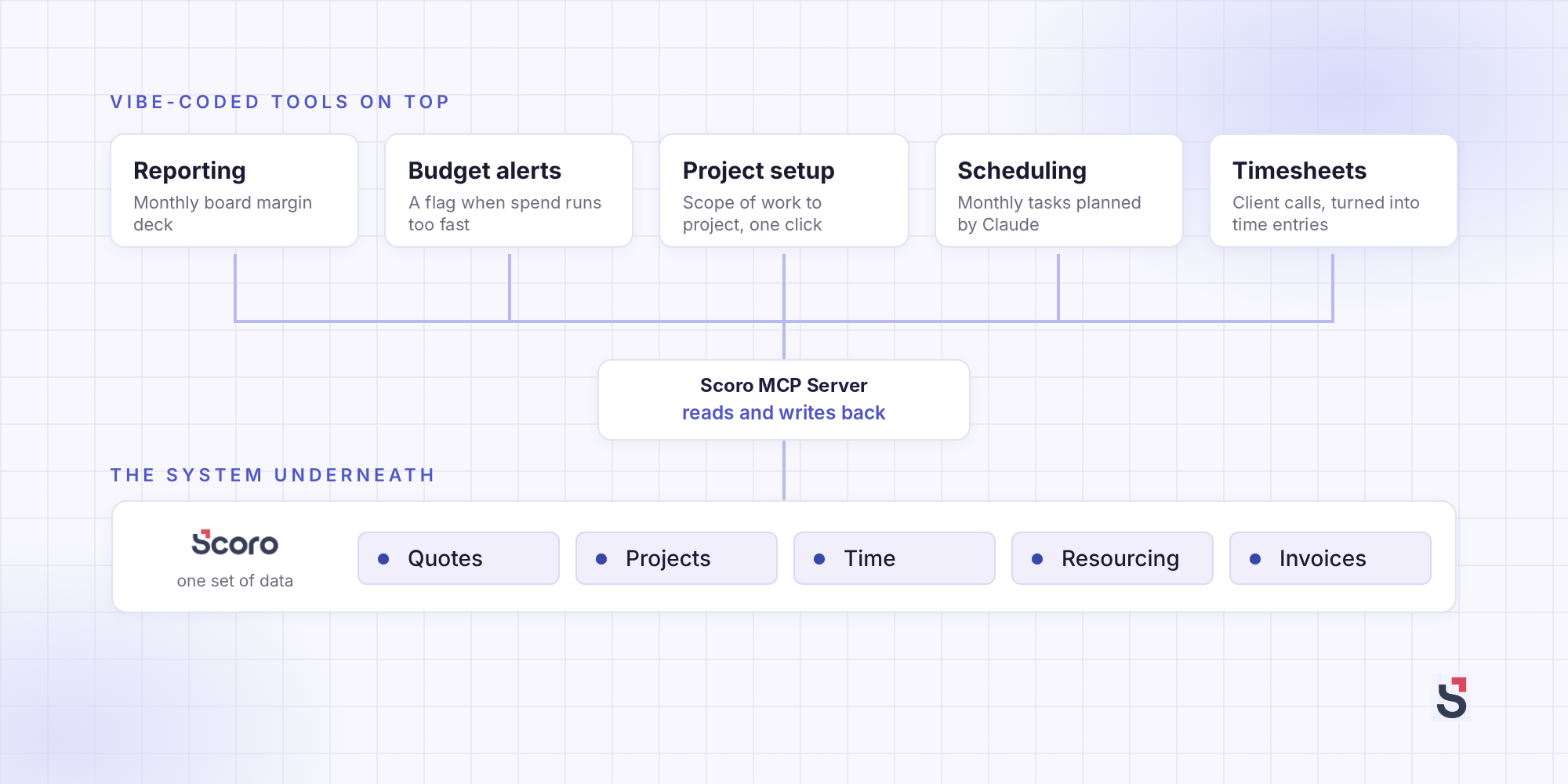
What sets these apart from the head of creative’s planner is where the data lives. His planner keeps its own copy of his team’s hours, so he’s stuck exporting and importing. A tool on top keeps nothing of its own. It reads from the system underneath and writes back to it.
That also limits the damage when something breaks. If a budget alert stops working, someone checks budgets by hand for a week. If the system underneath breaks, invoices go out wrong and hours go missing.
That’s the part worth paying someone else to maintain.
Even IDHL, which built some of its operations systems more than 20 years ago, replaced its in-house customer relationship management (CRM) system with an off-the-shelf one. “If we were starting the business fresh from scratch today, we probably would’ve bought more than we’ve built,” Jonathan said. And IDHL has “an internal development team that is not responsible for any revenue whatsoever.” If you don’t have one, your builders are your billable people.
The leader with the homemade PSA lands in the same place. Even with the skills to build it, they “definitely wouldn’t recommend it” for most businesses.
If you do buy, the risk moves to the vendor. Products stall, and prices rise at renewal. So before you choose one, check:
- How often it ships, and what’s changed in the last year
- Whether your data leaves with you
- Whether your AI tools can read from it and write back to it
Which brings us back to the head of creative. He’s since started looking at off-the-shelf systems again, this time for one that connects to everything else.
Final words
Vibe coding is a good way to build the small tools that make your team faster. The trouble starts when one of those tools becomes something the business runs on, because then someone has to own it.
So before you build, ask whether the tool sits on top or underneath. If it’s on top, build it. If it’s underneath, buy it, and keep your senior people’s hours for client work.
If you’re weighing up what to buy for the layer underneath, I’d start by trying Scoro free for 14 days or booking a demo with one of our experts. Every plan includes our MCP Server, so the tools you build on top can work with it from the start.