











Resource management is mostly admin. Checking who’s overbooked, finding cover when someone’s off, or moving every date when a client slips.
AI can now take on a lot of that work, from answering questions about your schedule to actually making the changes.
This guide covers what AI in resource management usually handles today, and the data it needs before you can trust it to reschedule your people.
What is AI in resource management?
AI in resource management means using AI to plan and adjust who’s working on what. It reads your team’s schedule, answers questions like “who’s free next week?” or “who’s overbooked?”, and in some tools it can even change your team’s schedule for you.
What AI in resource management looks like in practice
AI turns up in resourcing tools in three forms: assistants, agents, and a connection layer called Model Context Protocol (MCP).
AI assistants
An AI assistant does what you ask. Ask it a question and it answers. Ask it to change the schedule and it shows you the change, then makes it.
Say an operations manager wants to know where next quarter gets tight. Instead of opening each project, exporting the bookings and totaling hours per person, they type the question and read the answer.
A project manager comes at it from the other end: has anyone got room to pick up a deliverable that just slipped two weeks?
Everything it tells you comes from records your team is already keeping, so the answer reflects where the plan stands this morning rather than the version someone exported on Friday.
Scoro’s assistant is ELI. Questions worth putting to it:
- Find the pressure points — “Who’s booked over capacity in the next four weeks?”
- Check before you commit — “Have we got the people to start a new project in October?”
- Catch a clash early — “Is anyone booked on work during their leave next month?”
- Read the month properly — “Break billable and non-billable hours down by role for September.”
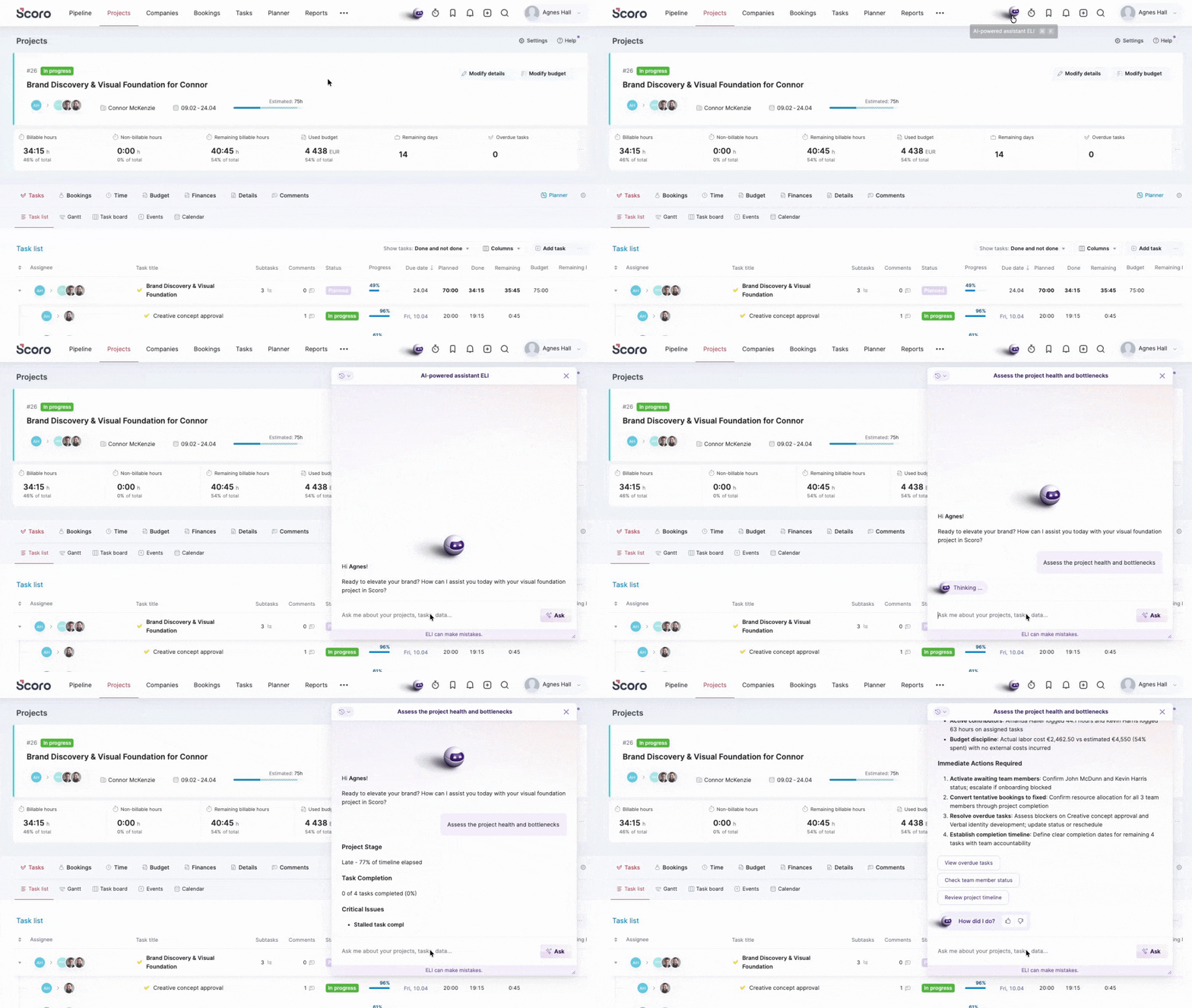
Ask ELI a question and it’ll show you that three people are over capacity in week 40, but it leaves the rebooking to you. Ask it to fix the problem and it works as an agent instead.
AI agents
An AI agent acts when something needs doing, without being asked. In Scoro, you set this up by giving ELI a rule. The trigger decides when ELI runs, and ELI works out how.
Most resourcing admin is small edits that take a minute each and arrive thirty at a time. Someone goes on leave and eleven bookings need new owners. A project slips and the team’s next fortnight has to be redrawn around it.
The edits always land on the day you had something else planned, and the same ones come round again next month. That repetition is what makes them worth a rule.
- A project goes on hold? ELI puts its open tasks on hold and tells the people working on them.
- A project’s dates change? ELI moves the team’s bookings to match and tells you who now clashes with other work.
- A quote reaches a certain stage? ELI creates the project, adds the team and pencils in tentative bookings before the deal’s signed.
You write the rule once, in plain English. Every time it fires, ELI acts with your permissions, leaves a thread in your ELI chat saying what it did, and logs the run against the rule.
Want to learn more about how ELI can work? Check out our webinar below.
MCP
MCP is the piece that lets AI tools outside your resourcing system work with what’s inside it.
An assistant or agent is limited to the product it ships with. Resourcing questions rarely start there. A client emails asking to move a date, or an account manager asks in Slack whether there’s room for more work before the end of the month.
Scoro’s MCP server connects Scoro to Claude, ChatGPT and Copilot, so the question gets answered where it was asked.
Example #1: Reshuffle a team after a client moves a date
Prompt: “Northgate just emailed to push the campaign launch to the 19th. Find who’s booked on that campaign in Scoro over the next fortnight, move their time to match the new dates, and tell me who now clashes with other work.”
You get the reshuffle and the problem list in one pass. The bookings move, and anyone who’s now double booked comes back named, while you’re still in the thread deciding what to tell the client.
Example #2: Turn a signed scope document into provisional bookings
Prompt: “The signed SOW for the Mercer rebrand is in Google Drive. Pull out the phases and the dates, check in Scoro who’s free across those weeks for the roles it calls for, and book provisional time for whoever has capacity.”
The useful part is the capacity planning before scheduling. Claude compares the roles and dates in the scope with Scoro’s live availability, existing workload, and tentative bookings. If the capacity isn’t there, it flags the gap before you’ve promised the client a start date. If it is, it books provisional time that holds the slot without locking anyone in.
What each tool can read and change stays yours to set, per user, from read-only up to making changes.
Let AI handle the scheduling heavy lifting
AI can only reschedule your people effectively if it can see the project plan, who’s available, and what the work was sold for. In most firms, that information lives in different tools, so a scheduling agent might move people around without seeing how those changes affect project margins.
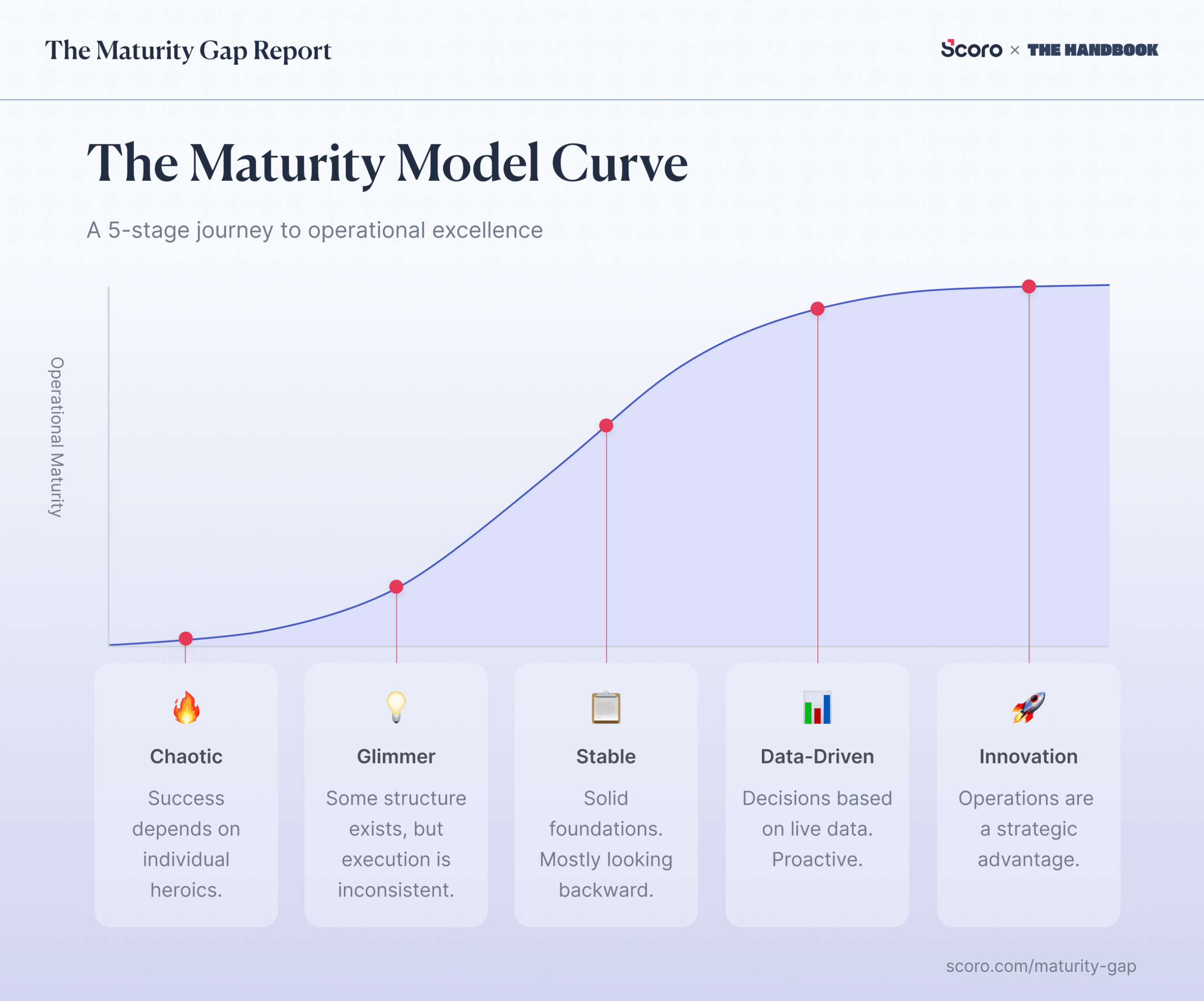
Before shopping for an AI resourcing tool, work out how connected your data already is. Harv Nagra’s (Head of Brand Comms at Scoro) business maturity model maps this in five stages, from spreadsheets to a single connected system:
- Chaotic (Stage 1) — the plan is a spreadsheet one person owns; the current version is in their head.
- Glimmer (Stage 2) — a scheduling tool exists, but half the team still books people by messaging each other.
- Stable (Stage 3) — resourcing runs in a proper tool, but it doesn’t know what anyone costs, so you find that out at month end.
- Data-Driven (Stage 4) — availability, the project plan, and rates read from the same data, so you can see what a reassignment does while you make it.
- Innovation (Stage 5) — booking someone updates the forecast, budget, and billing without re-entry.
The two kinds of AI need different stages. An assistant earns its place from Stage 3, once your scheduling data is accurate enough to report on. Answering “who’s free in week 40” only needs the bookings to be right.
An agent that reschedules people is a Stage 4 capability. Every move it makes changes next month’s delivery and margin, so it needs what Stage 4 adds. Forecasts for capacity and finances, kept current because everyone works the same way. Without those, a reassignment is a guess.
Which AI Resource Management tools should you consider?
Nearly every resourcing tool has something AI-shaped in it now. What separates them is whether the AI only answers questions or can change the schedule, and how much of your operation it can see while doing it.
| Tool | AI functionality | What it reaches | Consideration |
|---|---|---|---|
| Scoro | ELI works as both assistant and agent: answers from live data, and creates, reallocates and rebalances bookings. MCP server connects Claude, ChatGPT and Copilot. | Pipeline, quotes, project plans, bookings, time, costs and invoices, with two-way sync to Xero, QuickBooks, Sage Intacct and Exact Online. | Scheduling on its own won’t out-feature a dedicated planner. The strength is that a reassignment is visible in the budget and the invoice. |
| Float | AI-assisted best‑fit recommendations, AI‑built Smart Insights experience profiles and a read‑only MCP server. | The schedule, project baselines covering price, budget, roles and timeline, budget burn and margin. | Strong on allocation, and the AI leans towards suggesting the right person rather than rebuilding a broken week. |
| Runn | SmartMatch AI (Beta) to find the best matches for a project with AI recommendations. | The schedule, rate cards, costs, budgets, and revenue and profit predictions. | Built for resource forecasting rather than acting. The AI connection is maintained by a third party rather than by Runn. |
| Resource Guru | An MCP server so ChatGPT or Claude can answer resourcing questions from your schedule. No built-in agent that reschedules. | The schedule, project budgets, billable utilization and profit analytics. | The simplest of the four to run. It will tell you what’s wrong with next week, then leave the fixing to you. |
Connect the data, then let AI reschedule
Everything in this article works because the schedule, the project plan and the money sit in one system. An AI can reassign someone in seconds, but whether that move costs you margin only gets answered when rates and budgets sit alongside the bookings. Split them across tools and an agent can shuffle your people without ever seeing what the shuffle does to the project.
Andrew McBarnett, Group Financial Director at Lucid Group, warns that disconnected or messy data will only “help you reach the wrong conclusion faster.” Lucid spent years building single sources of truth across accounting, project delivery and expenses before it added AI. Now 44% of its finance work is automated or AI-assisted. Andrew explains how they got there in his episode of The Handbook.
So the order matters: get the data connected first, then bring in the AI.
- Already exploring tools? Book a Scoro demo and we’ll walk you through a reschedule from start to finish, working from your own bookings, rates and budgets in one place.
- Not sure where your firm sits? The Business Maturity Quiz shows you which stage you’re at and what to fix to move up.
FAQs
Can AI replace a resource manager?
No. It takes over the reshuffling, but not the judgment calls, like who suits a demanding client, who’s ready for stretch work, or who’s close to burning out. What changes is how much of the resource manager’s week goes on admin instead of those decisions.
How accurate is AI at resource scheduling?
It’s only as accurate as the data underneath it. If the schedule is out of date, leave isn’t logged, or tentative work isn’t marked as tentative, the AI will confidently plan around a schedule that doesn’t exist. Treat its answers as a fast first draft and check anything it proposes before it goes live.
What should I clean up before using AI for resource management?
Start with the records the AI will reason from. Make sure every person has a role, leave is logged in the same system as the schedule, tentative and confirmed work are clearly separated, and cost rates are set by role. If those are reliable, an assistant can answer questions from day one. If they aren’t, fix those first, because every answer and every change the AI makes will be built on them.
Can I use ChatGPT or Claude for resource management without a resourcing tool?
You can paste in an exported schedule and ask questions about it, but the answers are only as current as the export, and the AI can’t change anything. Connected through MCP, the same tools can read your live schedule instead. Some, like Scoro’s MCP server, can also make changes to the schedule.
Is it safe to connect my resourcing data to ChatGPT or Claude?
Connections through MCP inherit the user’s existing permissions, so the AI can only see and change what that person could. The data is processed by the AI provider while it works, though, so check their data and retention policies and use a business account rather than a personal one. Scoro’s AI policy covers how ELI and the MCP server handle your data.
How much does AI resource management cost?
It depends on how the vendor packages it. Some include AI in the base plan, some charge for it as an add-on or by usage credits, and some only offer it through third-party connectors that come with their own fees.
If you connect a tool like ChatGPT or Claude through MCP, you’ll usually need a paid plan with that AI provider too. In Scoro, ELI and the MCP server are included on every plan, with a monthly allowance of AI credits and the option to buy more. See Scoro pricing for current plans.