















This August, we are focusing on removing administrative friction from your day-to-day operations and helping your team work more smoothly. We’ve further improved ELI – our AI-powered assistant – and recently held a webinar where we demoed its newest capabilities now available to you. ELI can now turn your client emails and scoping notes into quotes, automatically mapping requirements to your product catalog and pricing rules and setting delivery timelines based on live resource availability.
We’re also preparing for the upcoming transition from monthly version updates to a versionless, continuous release process, which will bring valuable improvements to your site much faster.
See what’s new in Scoro!
ELI improvements
Use ELI for quoting & estimating
ELI, Scoro’s AI-powered assistant, can now draft and configure detailed quotes for you directly from the context you provide! For example, you can copy your prospect’s email or unstructured scoping notes as context and paste them into your prompt. ELI will automatically parse the requirements, align them with your active Scoro product catalog and pricing rules, and map them out as staged quote lines.
If your client’s email doesn’t specify a time budget, ELI will use a 1-hour placeholder for each quote line. You can then ask ELI to distribute a total hour limit or monetary budget across those lines.
Additionally, you can ask ELI to check resource availability for the proposed project timeline. ELI cross-references your draft quote phases against actual team bookings and calendars to forecast an accurate, manageable delivery date.
Want to see this in action? See the video below or watch the full webinar recording!
Psst! Soon, you’ll also be able to upload files directly to ELI instead of copying and pasting text!
Ask ELI to send notifications on your behalf
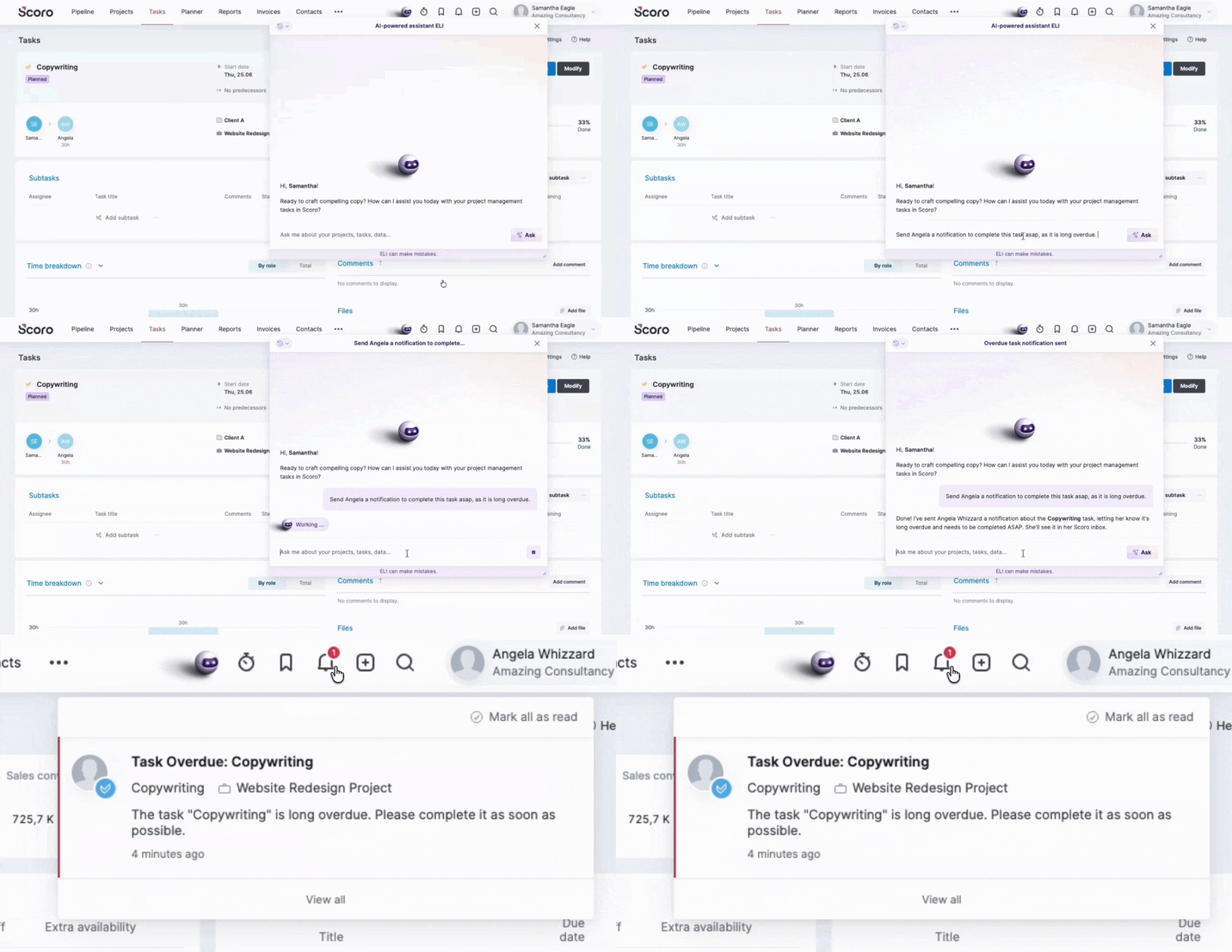
ELI can now send notifications to site users on your behalf, letting you quickly follow up on work and keep projects moving without leaving your conversation with ELI.
For example, if you notice an overdue task on a project, you can ask ELI to notify the task assignee to encourage them to close it as soon as possible.
Stop prompt execution
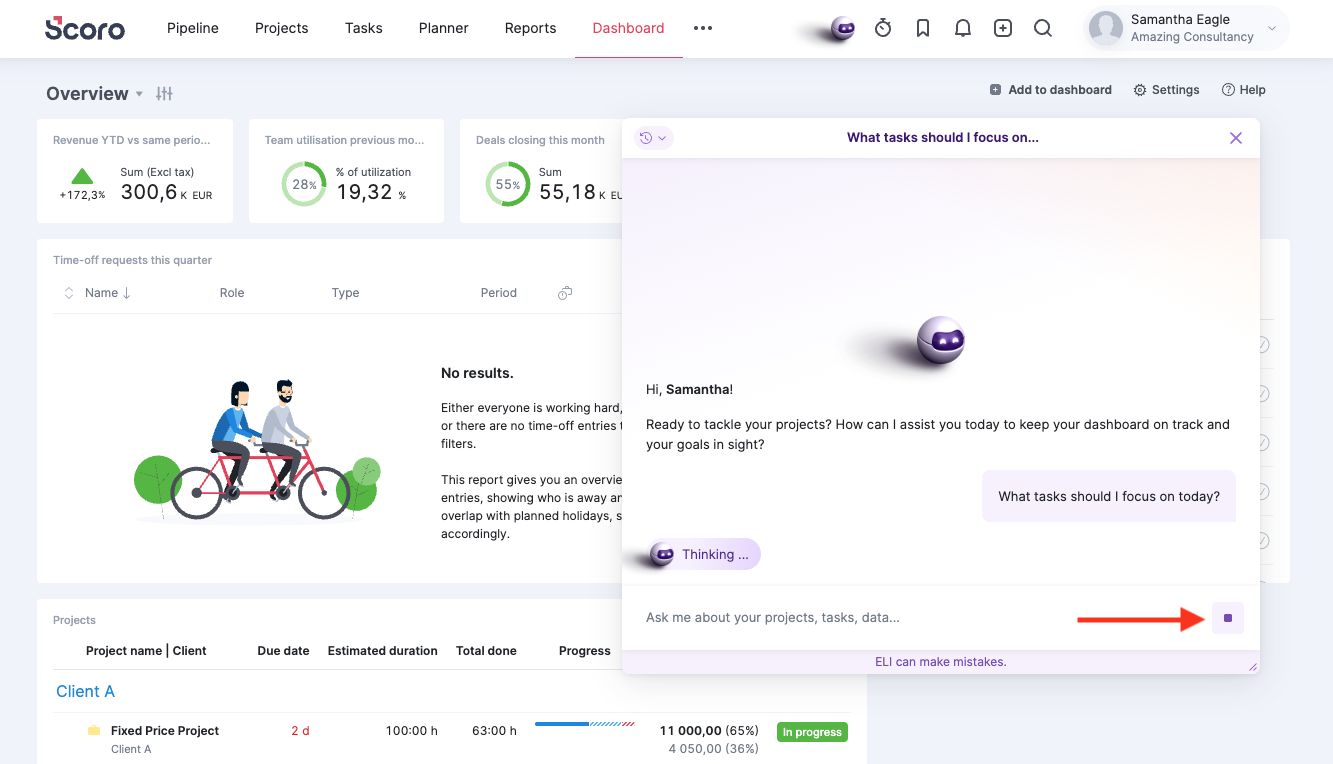
Accidentally hit Enter before finishing your prompt? Don’t worry – you can now click the stop icon next to the prompt field, and ELI will stop working on your request.
Give ELI a try with your free monthly credits!
Haven’t tried out ELI yet? We recommend giving it a go – it’s already highly capable, and we improve its skills every month!
- Free credits included: Every Scoro site comes with a pool of free credits to get started.
- No surprise fees: ELI will notify you as soon as you reach your free limit – there are no automatic charges.
- Affordable additional credits: If you run out and want to keep using ELI, purchasing additional credits as add-ons is quick and super affordable.
💡 Don’t see ELI on your site? ELI is available with free credits across all Scoro plans. Site administrators can turn it on under Settings > Site settings > ELI settings. You can also manage which team members have access to ELI via user permission settings.
Learn more about how ELI works and give these prompt examples a try!
Calendar improvements
We’ve made some usability improvements to make event management easier and the events more visually scannable:
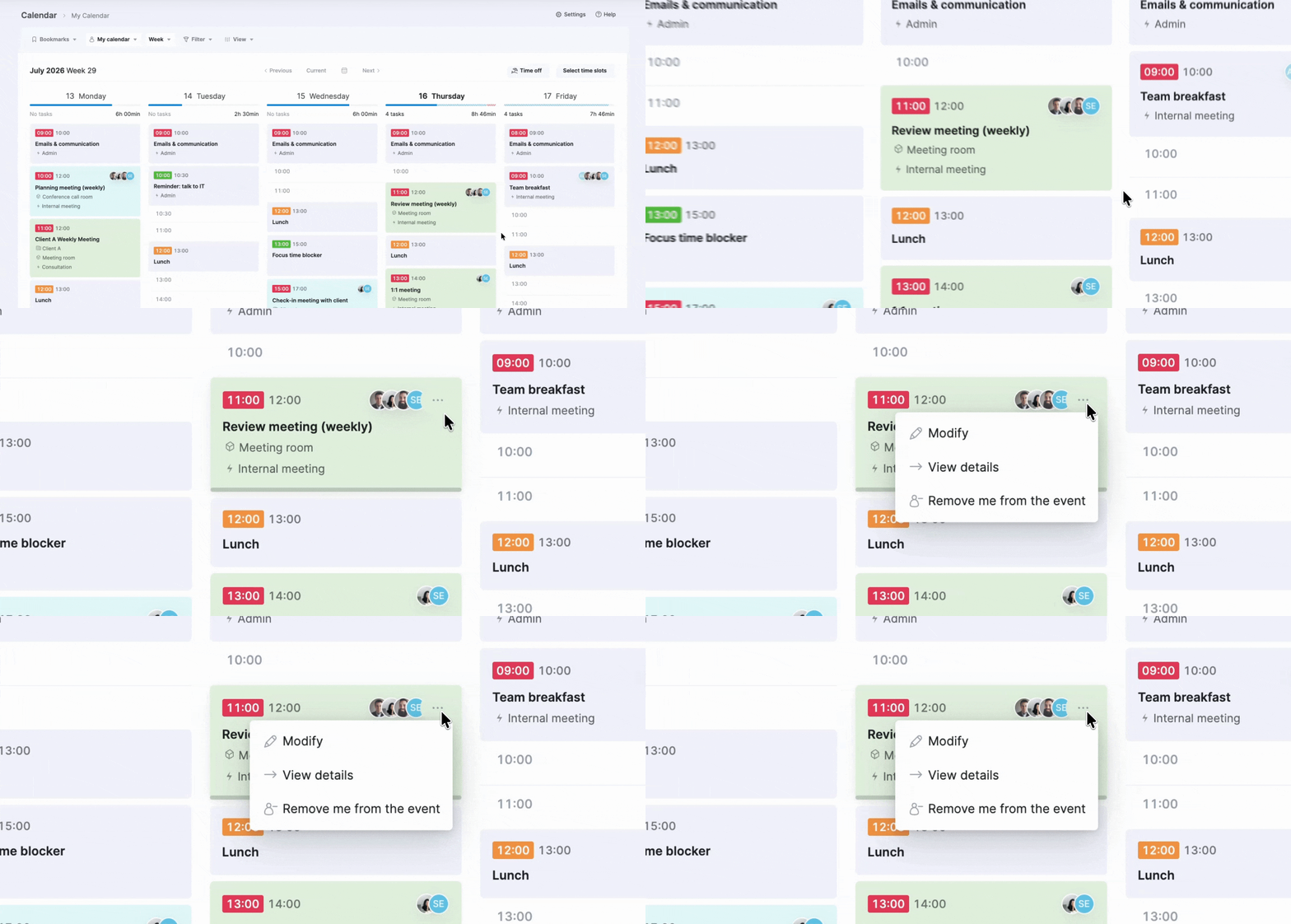
- Access the event view, modify, and delete buttons by hovering over the three-dot icon at the event card’s corner.
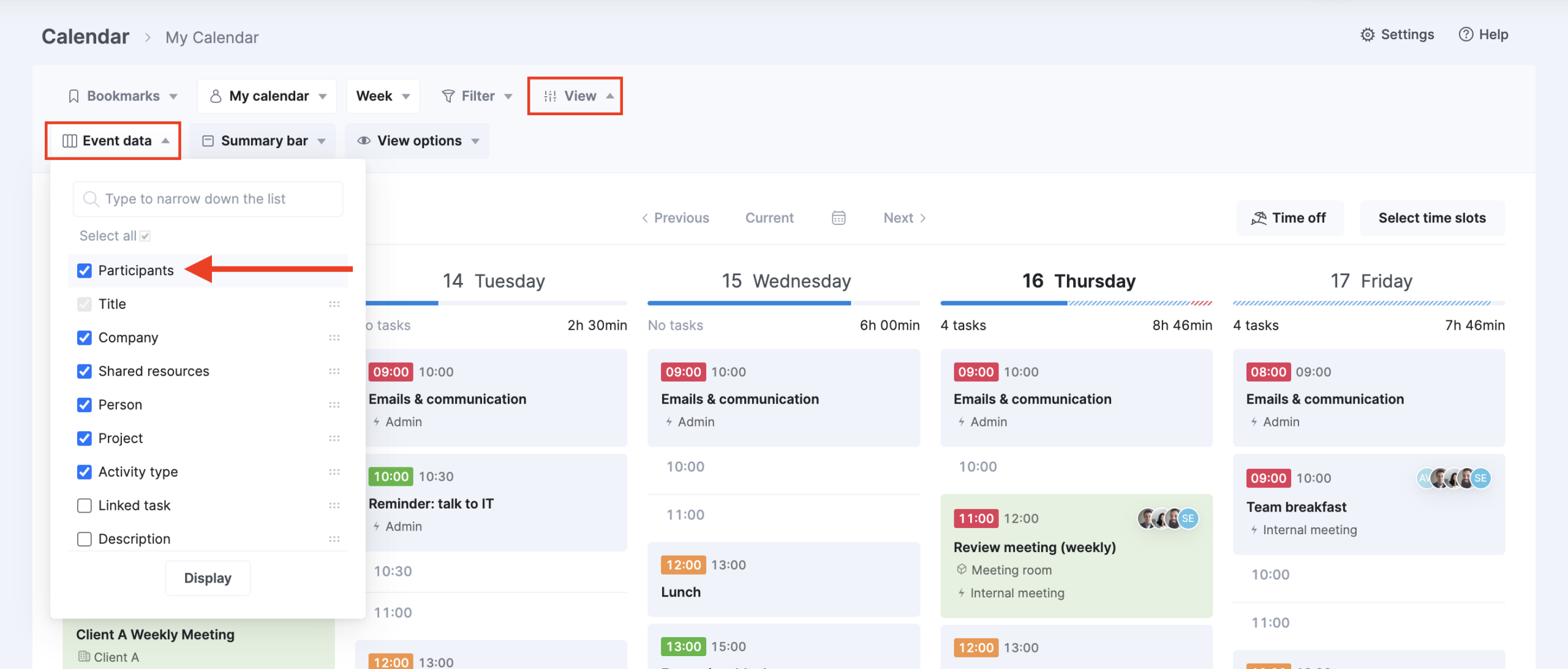
- Display participant avatars on event cards to easily distinguish meetings from your personal time blocks at a quick glance. To do so, click View > Event data and enable the Participants option.
Other…
Grouping several custom modules under a module group
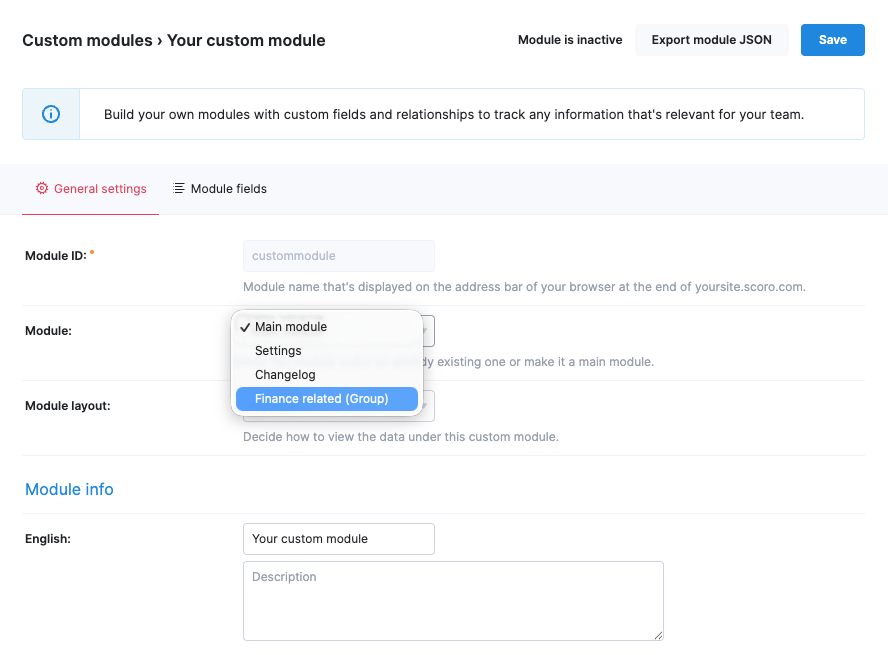
If you manage multiple custom modules on your site, you can now create custom module groups to consolidate similar modules under a single menu selection, decluttering the menu for every site user.
To do this, create the custom module group first – go to Settings > Site settings > Custom modules, then click the Add module group button. For example, if you have multiple finance-related custom modules, you could name the group “Finances”.

Then, move the custom modules to the group – modify the custom module and select the group from the Module dropdown field.
Displaying tags as a data column in the project and contact lists
You can now add the Tags data column to the project and contact list views to see exactly how your records are categorized at a glance, without opening each item.
Heads-up: Transitioning to versionless Scoro updates!
Following this August release, we’ll be gradually transitioning from our traditional monthly Scoro version updates to a versionless release model. Rather than waiting for a single monthly update, your site will receive smaller improvements and new features as soon as they are fully tested and ready, so you can benefit from the improvements much sooner!
This shift changes how updates reach your site and how we communicate them, designed with your convenience in mind:
- Faster updates with zero downtime: Improvements will appear on your site as soon as they are ready, with no planned downtime or interruptions to your work.
- Timely advance notice for impactful changes: While minor updates will be rolled out to your site continuously, any changes that directly impact your existing operational workflows will still be communicated well in advance. We highly recommend that site administrators keep an eye on their inboxes to stay in the loop about upcoming changes!
- No more update scheduling or postponements: Because updates are now rolling out continuously, site administrators will no longer receive planned update window notifications, and the option to postpone updates will be retired.
- Real-time tracking with a public changelog: At the same time, we are building out a public changelog – a real-time feed of product updates and improvements you can access at any time to see exactly what has changed, available from this fall.
- Periodic digests for key features: We will continue to compile system summaries of high-impact updates, tailoring notifications to the features most relevant to your site setup and workflow.
When is this happening? We’re switching over to a fully versionless model gradually:
- In August, we move away from the monthly planned updates.
- Over the next few months, we’ll start rolling out updates more and more frequently.
We’re working on…
- Quote-based pipeline bookings & retainer quotes. Visualize your sales pipeline directly in the Bookings module to see how potential deals and retainers impact your team’s capacity and revenue forecast even before a project is created.
- Scoro Time mobile app. Use the Scoro Time mobile app for iOS or Android to log hours against your daily work tasks to easily hit your utilization goals while working away from your desk.
❗Don’t worry if your Scoro site hasn’t been updated yet – the update is rolling out gradually over the next few weeks.
We do our very best to make Scoro better every day, so we appreciate your feedback! Share your thoughts with us via our contact form.
Wishing for your improvement ideas to come to life on your Scoro site? Send us feedback.
What to do next?
- Join our referral program to invite others to try out Scoro and earn monetary rewards of up to 1800 USD when they become a Scoro customer!
- Visit our Help Center to find in-depth guides about all Scoro features.
- Listen to our podcast The Handbook by Harv Nagra, an Ops Consultant and Ex-Agency Leader, where he dives into engaging conversations with operations experts to discuss and explore the behind-the-scenes and latest trends and innovations in the professional services space.
- Subscribe to The Handbook newsletter to get the latest info on agency challenges and solutions delivered directly to your inbox.