












What if you could wrap up your weekly resource planning much faster and enjoy more of that well-deserved rest in the sunshine this summer? 🏖️ With the updates we’re releasing this July, it’s 100% possible!
Use ELI’s new booking management capabilities to sort out your team’s bookings for this month and next, run instant project health audits with a single click, keep track of active time tracker straight from the project task list, and more.
See what’s new in Scoro!
Work faster with new ELI action buttons and expanded booking capabilities
ELI, Scoro’s AI-powered assistant, is far more than a simple Q&A chatbot – it is an active, context-aware, and highly capable ‘coworker’ built directly into your Scoro workspace. This month, we’ve expanded on ELI’s capabilities to help you spend less time on manual admin and more time focusing on your client work.
Use ELI to manage your resource bookings
ELI’s booking-related skill set has grown significantly! You can now instruct ELI to create, update, confirm, delete, or reallocate bookings. What would typically take a significant portion of your workweek can now be done with ELI in seconds!
Here are a few example prompts to give you an idea of the level of complexity ELI can tackle:
- “Confirm all tentative bookings for the Q3 Marketing Campaign project.”
- “Since John will not be able to work on Project X, move his bookings for that project back to the designer role.”
- “Sarah is on vacation for the next two weeks. Split her bookings at the vacation start date and move those parts to other team members who have available capacity.”
Looking for more prompt inspiration? We’ve also expanded our ELI use case library with more ideas and example prompts, even beyond booking management!
One-click ELI action shortcuts
We’ve added two new ELI action buttons that act as shortcuts to the ELI chat window, triggering specific actions:
- Use the Analyze project health button in the project header to instantly assess your project’s health and get useful suggestions on what to monitor or adjust to ensure your project’s progress stays on track.
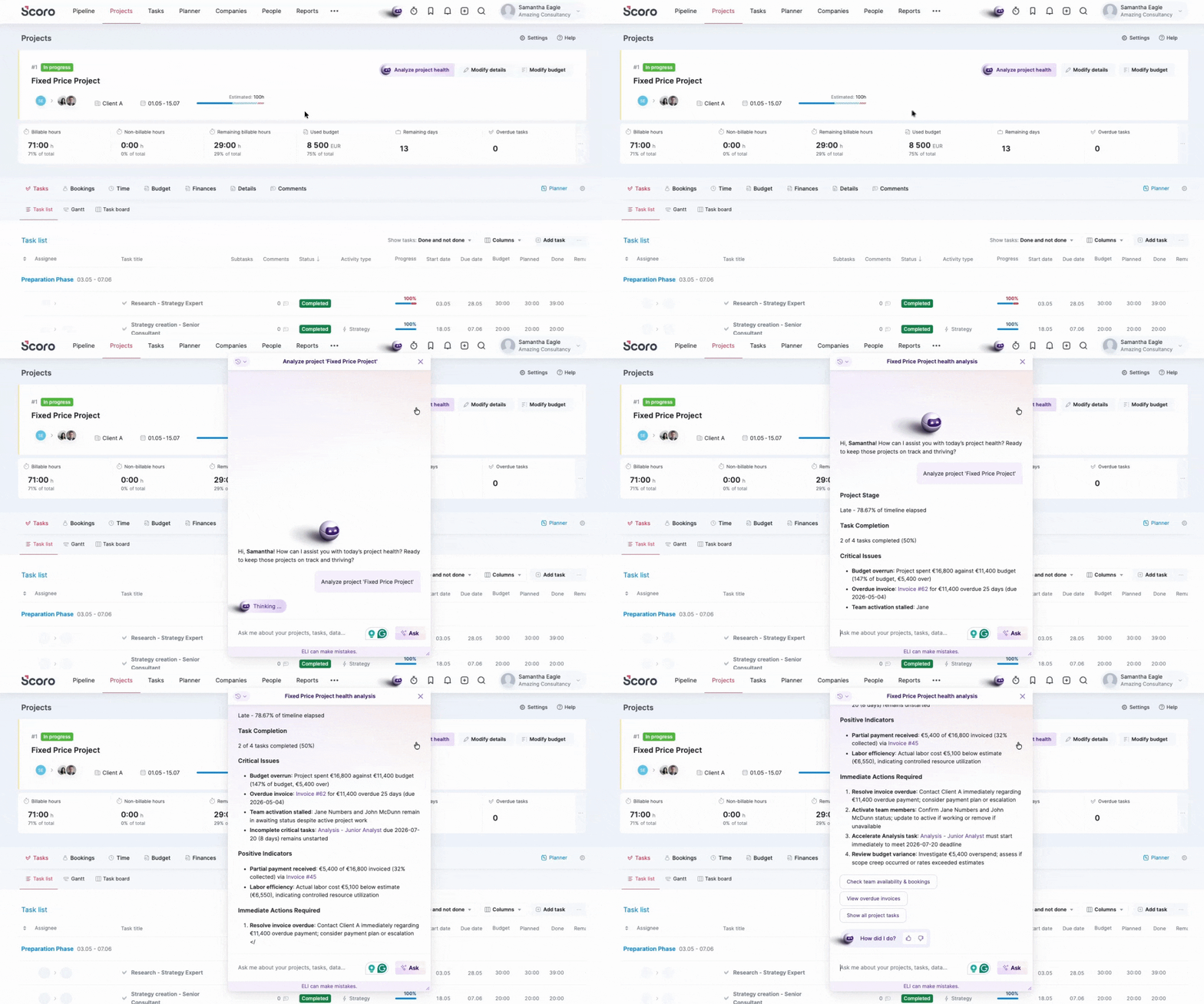
- Use the Balance bookings button in the Bookings module to evaluate and redistribute your team’s workload in the current or upcoming month to ensure no team members sit idle or work unintended overtime.
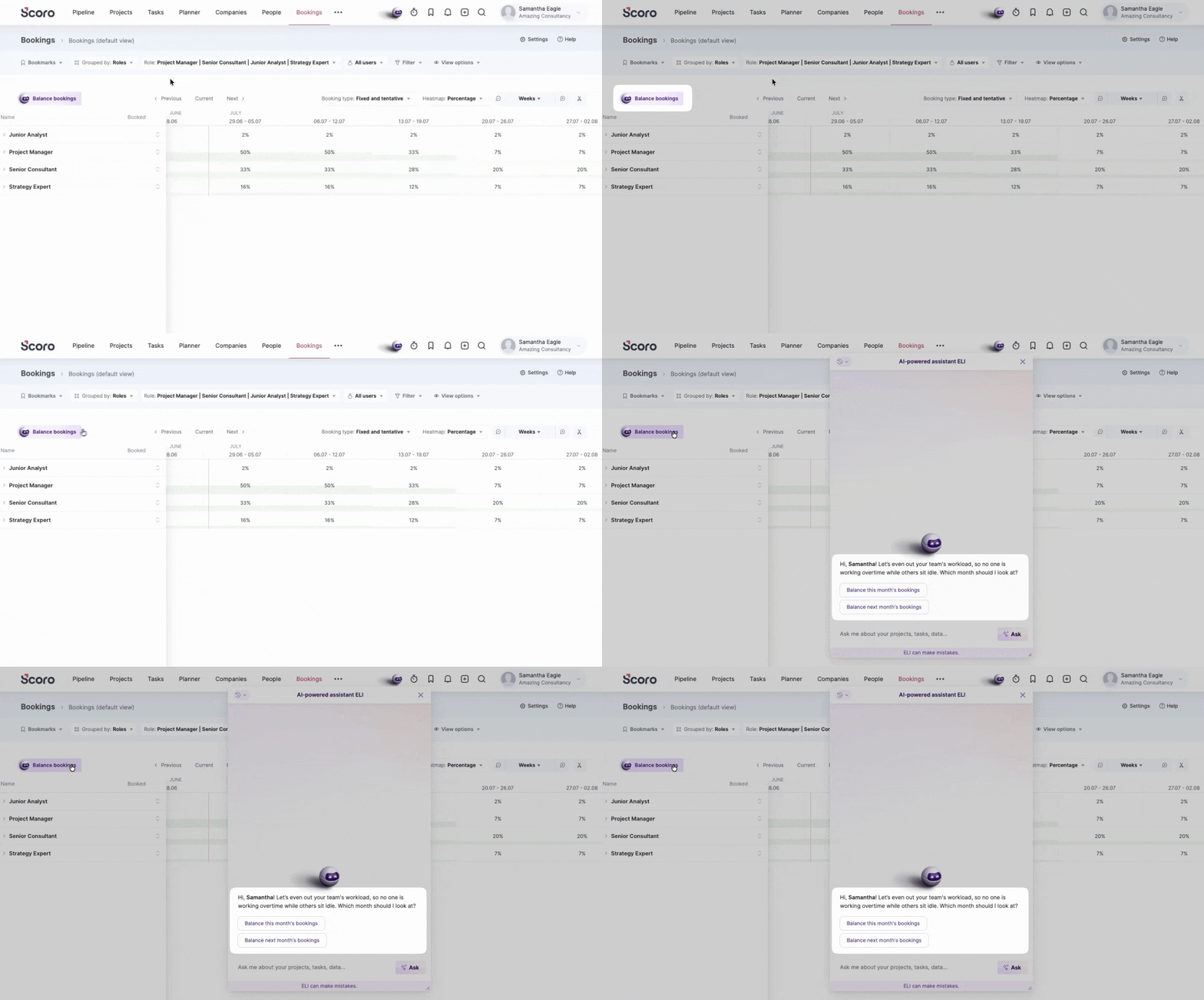
If you haven’t played around with ELI much yet, give these shortcut buttons a try and see how much ELI can do for you and your team already! 🤩
Psst! Want to learn more about Scoro’s long-term vision for AI-powered work and see real-life use cases? Join our live webinar on July 15th and see how ELI can actively help your team! We’ll save some time for a Q&A session as well.
Time tracker improvements
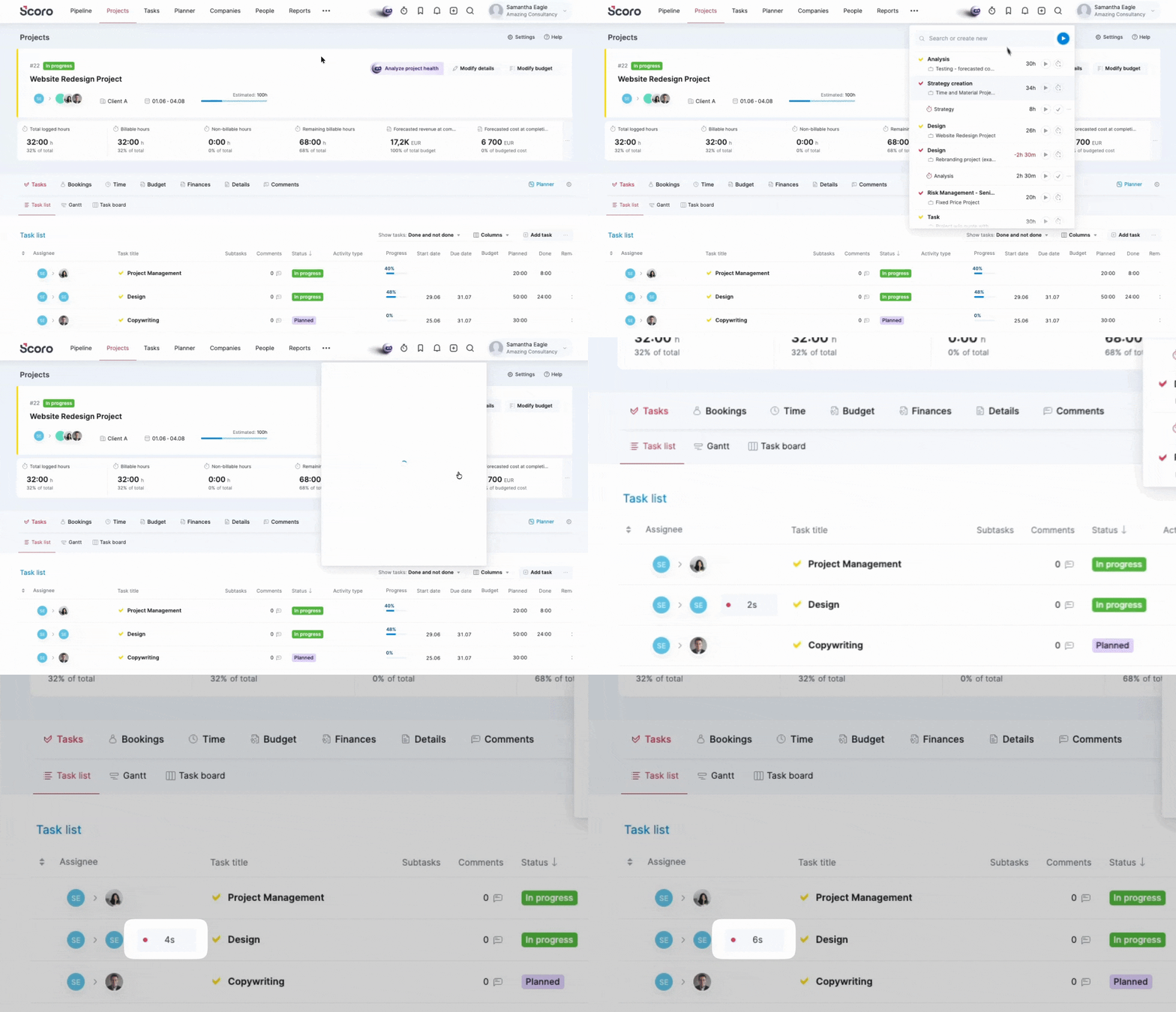
When you start tracking time on a task, the project task list and the subtask list in the parent task view now show a visual timer indicator next to that task. This makes it instantly clear which task is currently active, and you can stop the timer directly from the task list without opening any extra menus.
Multi-select options for drop-down custom fields
You can now set up drop-down custom fields to allow multiple selections. This makes it much easier to tag accounts, projects, or tasks with multiple attributes at once without cluttering your view with extra fields.
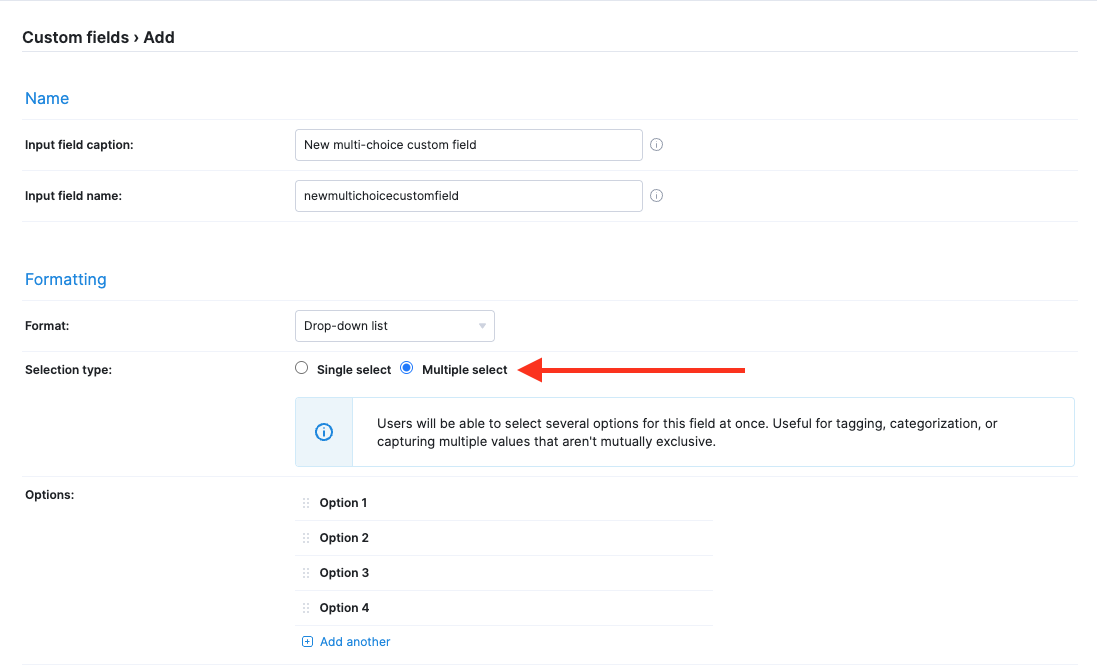
Once the multi-choice custom field is enabled in the respective view, just select the necessary options and click Apply.
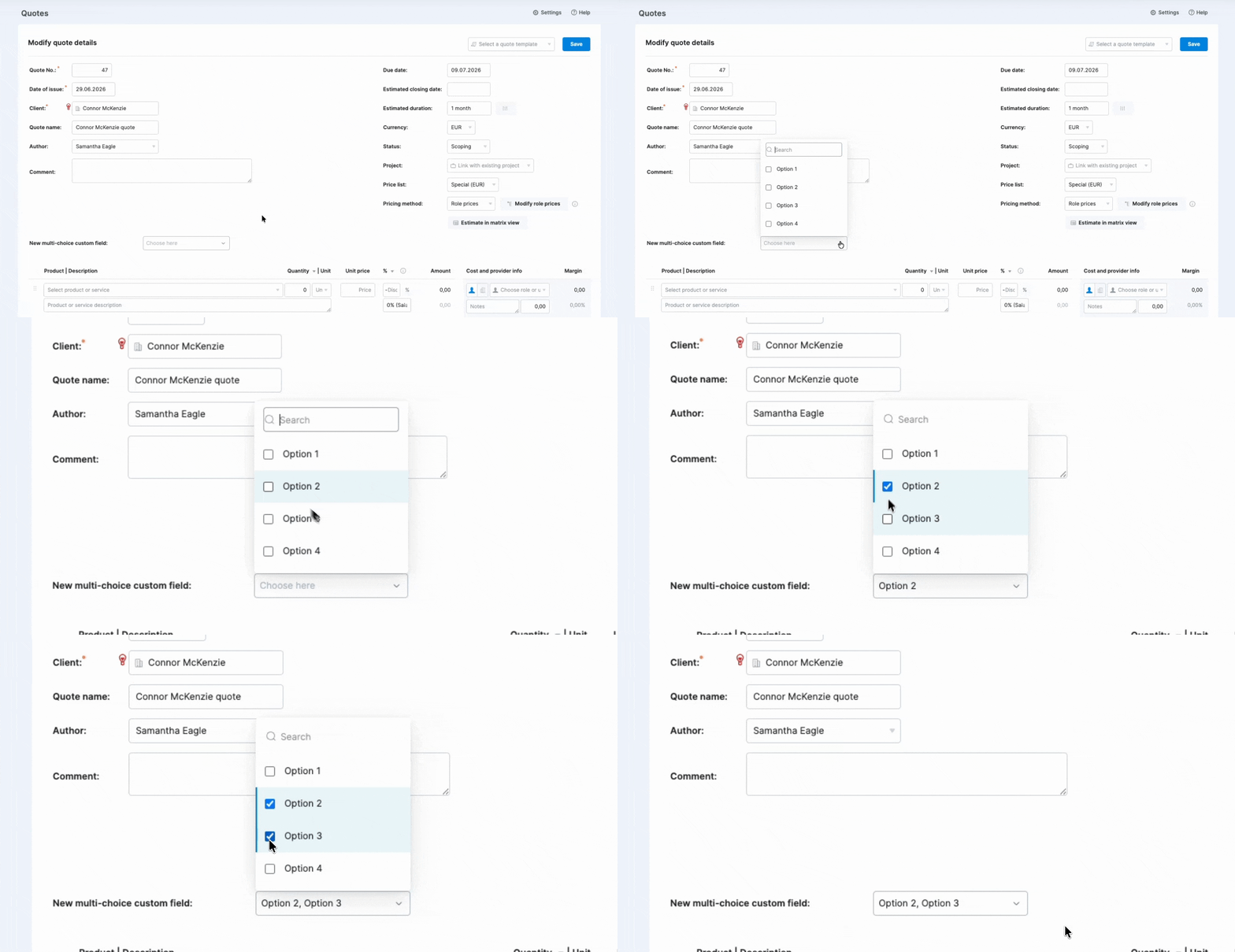
Heads-up: Converting the existing single-choice drop-down custom fields to multi-select ones isn’t possible at the moment; you’ll need to create a new custom field with multiple options.
Other…
Consistent date formats in the Bookings tool
The bookings tool now uses the date format you have set up in your personal preferences, showing the booking dates exactly the way you like it.
Adding tags as a data column in the Contact list
You can now add the Tags data column to your Contact list view, making it easier to sort through your contacts at a glance without clicking into individual contact cards.
Upcoming webinars
Scoro presents: AI in Scoro – the Vision, the Roadmap, the Possibilities
July 15th, 10 AM EST / 3 PM BST / 5 PM EEST
Join us for a live webinar on July 15th, where we’ll share Scoro’s long-term vision for AI-powered work and outline what is coming next on our development roadmap! In this live walkthrough, we’ll show you how ELI can actively help with real-time analysis, data insights, strategic decisions, and bulk actions to maximize your team’s efficiency. We will also save time for a live Q&A session at the end to answer your specific questions.

We’re working on…
- Quote-based pipeline bookings & retainer quotes. Visualize your sales pipeline directly in the Bookings module to see how potential deals and retainers impact your team’s capacity and revenue forecast even before a project is created.
- Time mobile app. Use the Scoro Time mobile app for iOS or Android to log hours against your daily work tasks to easily hit your utilization goals while working away from your desk.
❗Don’t worry if your Scoro site hasn’t been updated yet – the update is rolling out gradually over the next few weeks.
We do our very best to make Scoro better every day, so we appreciate your feedback! Share your thoughts with us via our contact form.
Wishing for your improvement ideas to come to life on your Scoro site? Send us feedback.
What to do next?
- Join our referral program to invite others to try out Scoro and earn monetary rewards of up to 1800 USD when they become a Scoro customer!
- Visit our Help Center to find in-depth guides about all Scoro features.
- Listen to our podcast The Handbook by Harv Nagra, an Ops Consultant and Ex-Agency Leader, where he dives into engaging conversations with operations experts to discuss and explore the behind-the-scenes and latest trends and innovations in the professional services space.
- Subscribe to The Handbook newsletter to get the latest info on agency challenges and solutions delivered directly to your inbox.