











Planning blindspots, delayed approvals, and unreliable time data can stall even the best-planned projects. Our March release addresses these pain points head-on. Now you can assign roles to tasks to forecast resource needs before your project team is confirmed. Trigger instant email alerts for financial document approval requests for a faster turnaround. Plus, new time management improvements will safeguard your data integrity and accuracy at every step.
See what’s new in Scoro!
Assigning roles to tasks
The transition from high-level project planning to granular execution has become more seamless than ever! Now, you can assign roles to tasks – just like you would assign users. Roles assigned to tasks serve as placeholders indicating the specific expertise required to complete the work. They allow you to plan work and forecast costs before you know which specific team members will be doing the work.
How it works
If you have roles set up on your site, you can assign them to tasks wherever and whenever you’re creating tasks and work – the task list, task bundles, and planner. Roles can be assigned to any task type, regardless of how it was created, and a task can have multiple role assignees.
If your quote includes services with roles set as the providers – whether added directly on the quote line item or via the quote estimation matrix – Scoro will automatically set them as task assignees when you’re creating tasks from the quote.
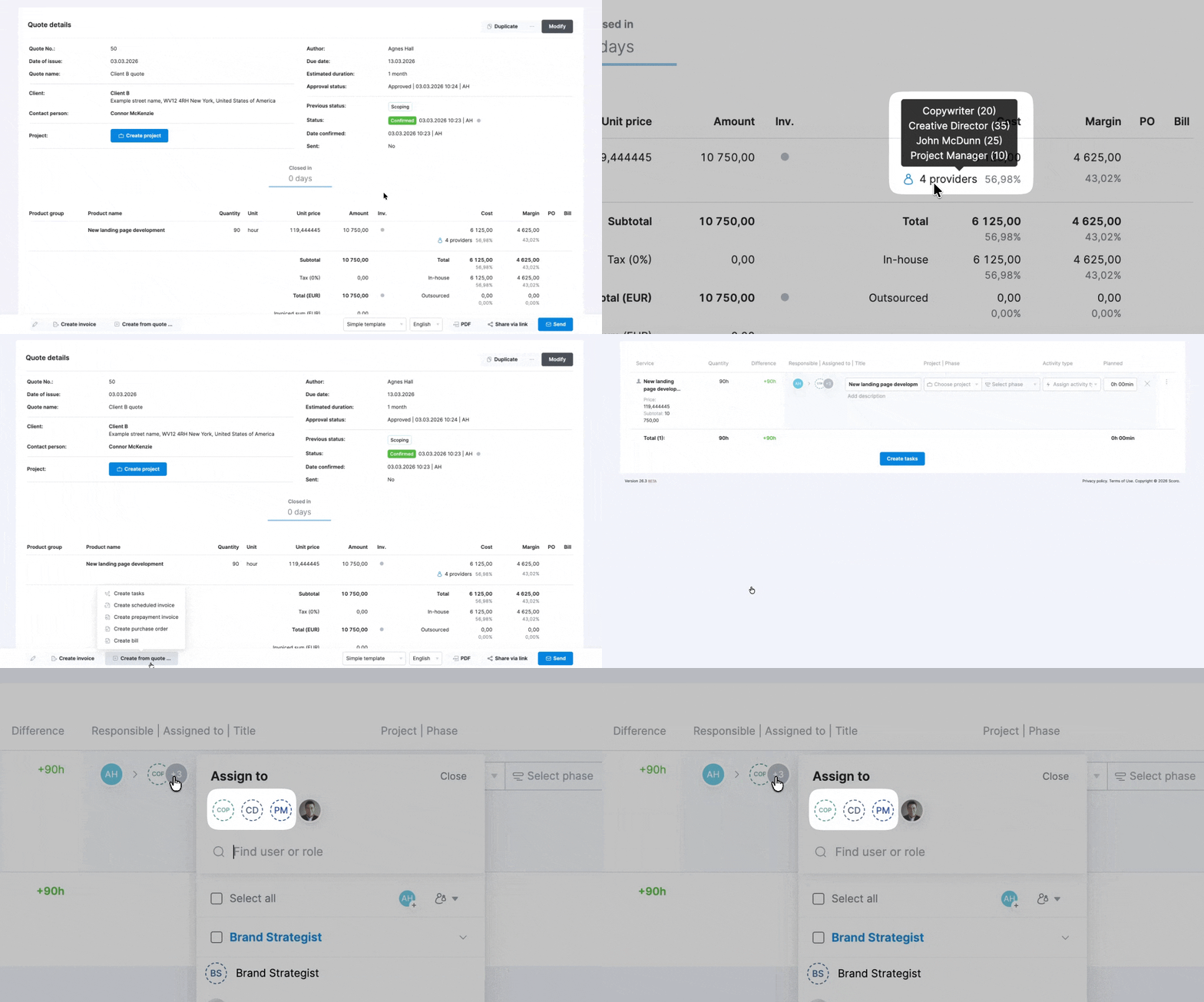
Role avatars have a dotted border, making them easy to identify and distinguish from user avatars.
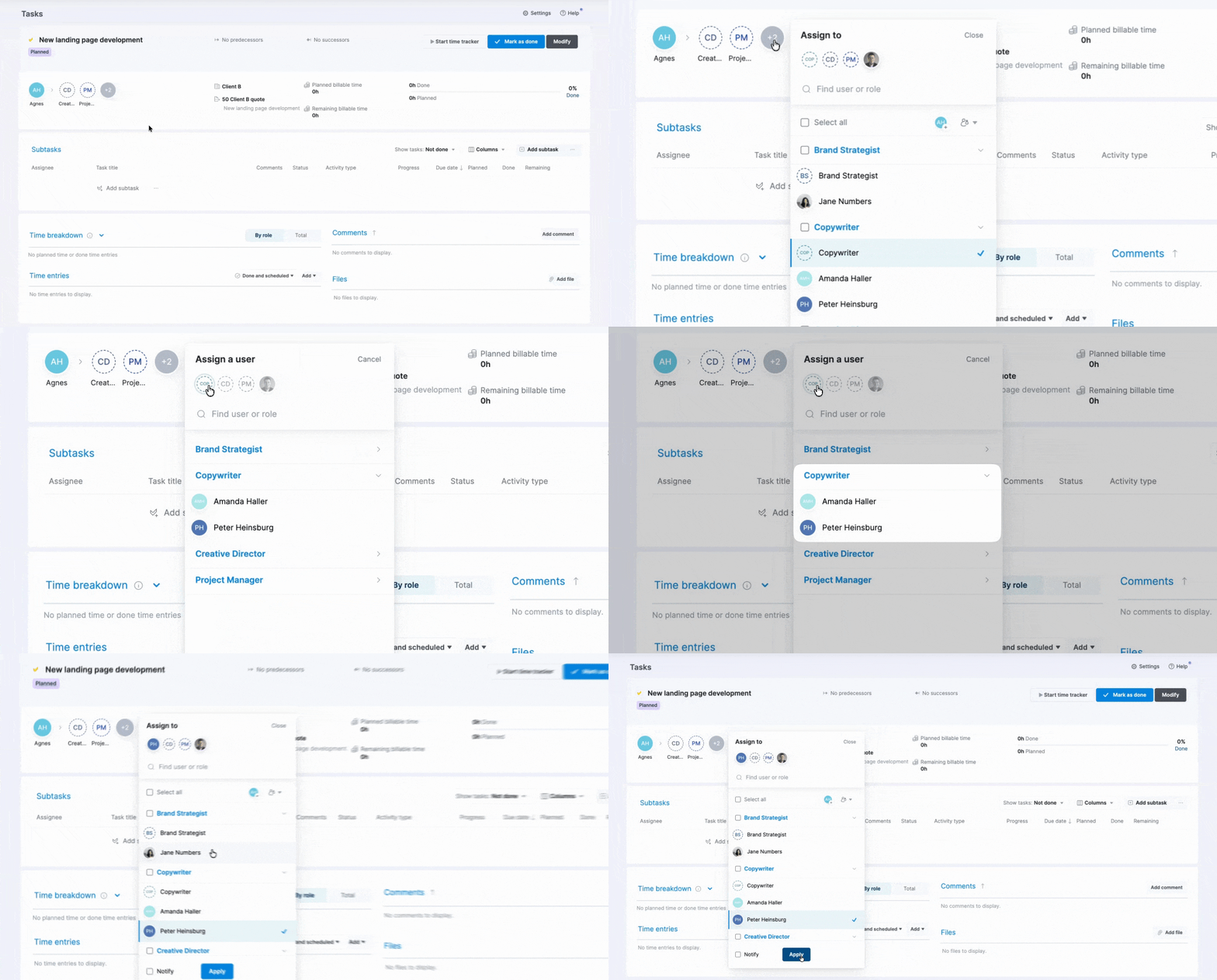
When you’re ready to delegate the task to an actual team member, click the role avatar. Scoro will automatically suggest users who hold that specific role, making the handoff quick and intuitive.
How to get started
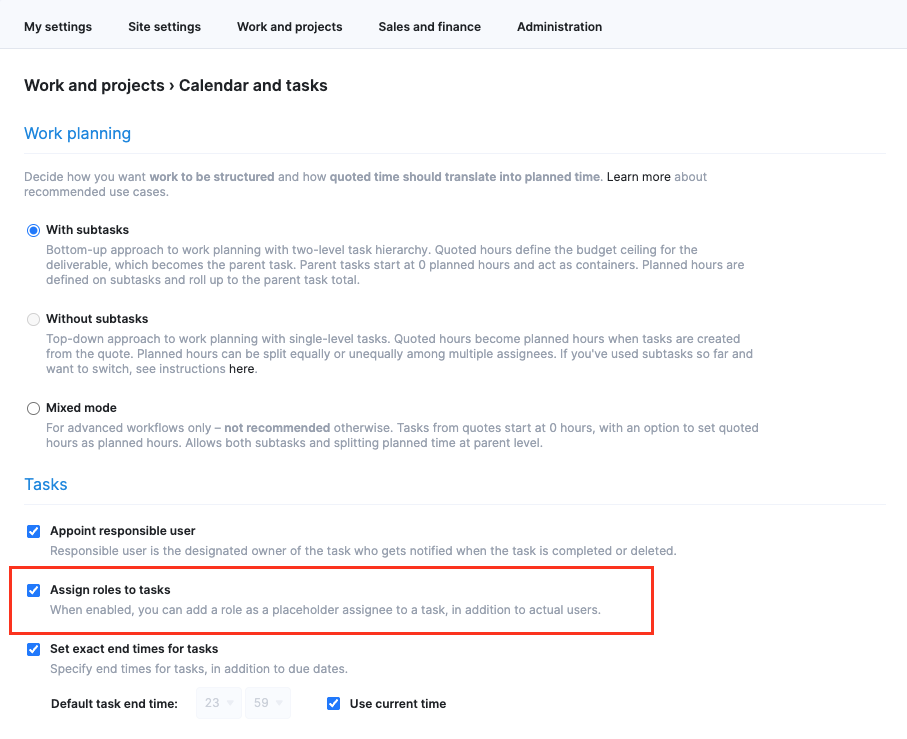
Site admins can enable this feature for their site under Settings > Work and projects > Calendar and tasks by ticking the Assign roles to tasks checkbox.
Pro tip! Ensure your role initials are set up under Settings > Sales and finance > Roles. Just like user profile avatars, these initials make it easy to identify the required specialist at a glance. You can also export your roles to bulk-update initials for the entire role list.
Learn more about roles in Scoro.
Faster financial document approvals with email notifications
Previously, the approval process for financial documents triggered only a notification in Scoro. However, as not all roles need to check Scoro daily, some more urgent requests might not be noticed in a timely manner, leading to delays in approving quotes or sending invoices.
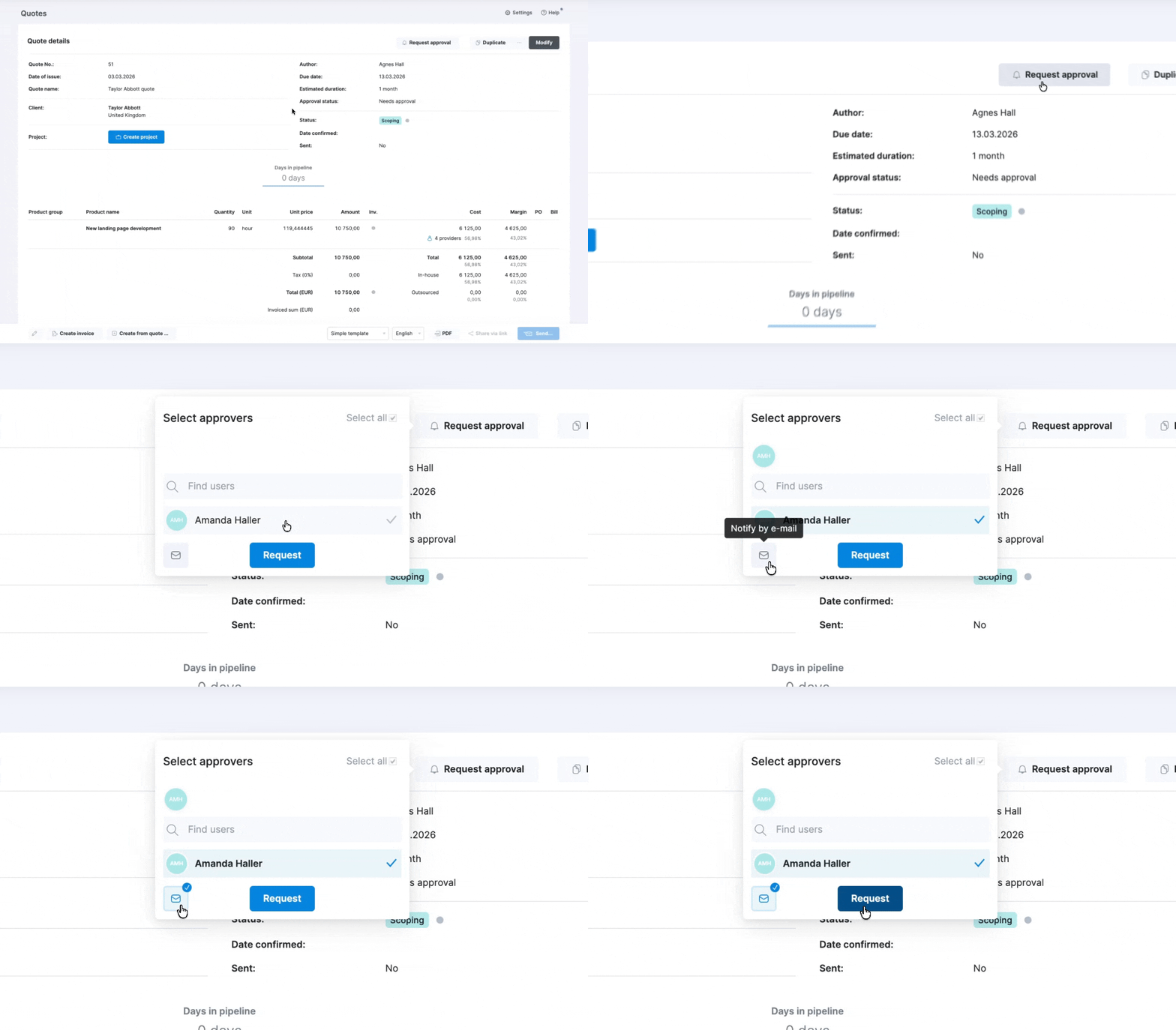
To speed up the approval workflow and ensure no document sits unnoticed, you can now click the Notify by email button when requesting approval to send an email to the selected approvers along with the Scoro notification.
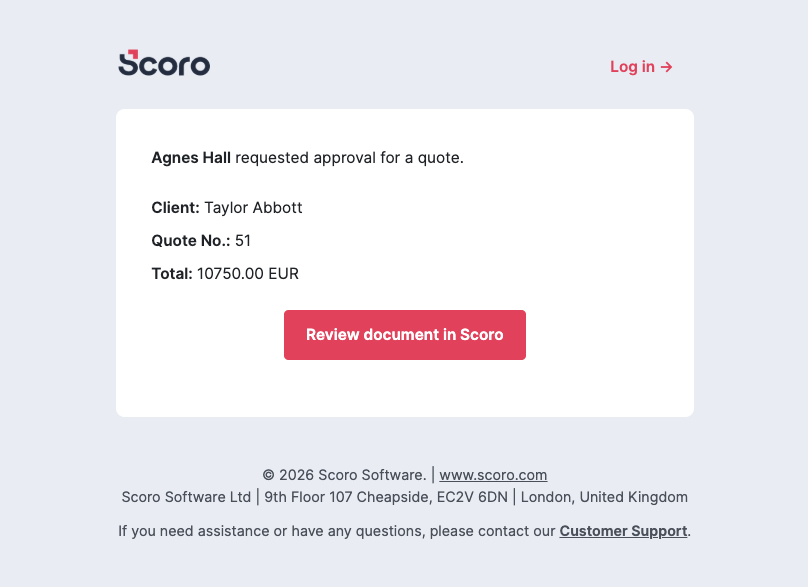
The email alert includes a link to the document, allowing the approver to go straight into the review process, ensuring a much faster turnaround for crucial business documents.
Learn more about approvals of quotes, invoices, and purchase orders.
New permission for managing time entries of others
We’ve introduced a new permission – Add, modify, and delete time entries of other users –, giving site administrators better control over time log management under tasks. This permission applies only to time tracker or manual time entries; it doesn’t affect calendar events.
Users without this permission can only add and manage their own time entries. Additionally, you won’t be able to mark projects or tasks as done if they contain someone else’s future time entries.
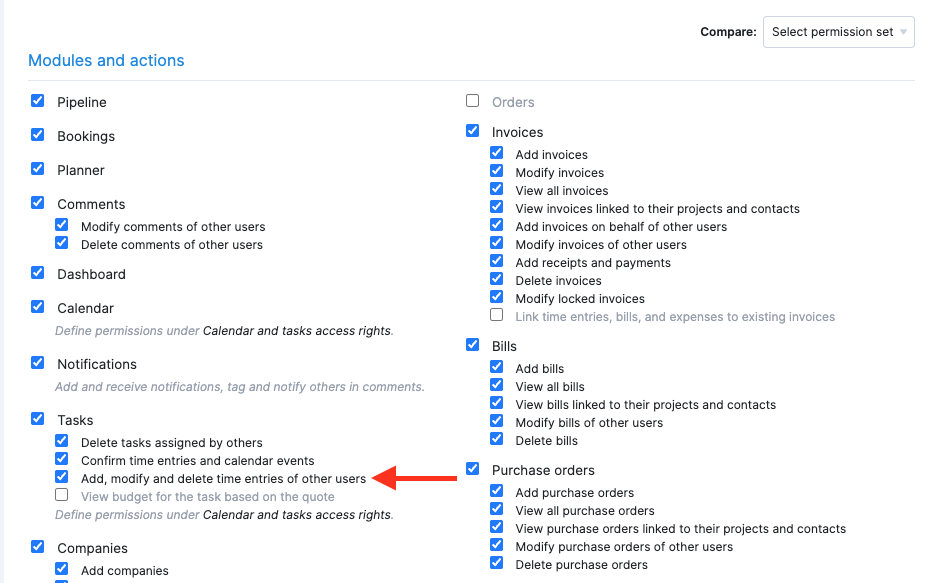
Heads-up for site admins: To maintain your current workflow, this new permission is enabled by default for all existing permission sets, except those with the Tasks module access disabled. We recommend going to Settings > Administration > Permission sets to review and decide which permission sets need this new permission.
Custom currency for outsourced costs – now out of beta!
Originally released in beta with our Christmas update, all sites on the Growth plan and higher with multiple currencies enabled can now set the outsourced service costs on quotes in a currency other than the quote currency! For example, if you’re an event organizer in the UK planning an event in Italy, you can now set the venue rental cost in EUR on a quote issued in GBP. This helps you better understand your true margins, even when project costs span multiple currencies.
To do this, simply add your outsourced service or product to your quote and select the appropriate currency for the costs from the dropdown field. You’ll also see the currency exchange rate details.
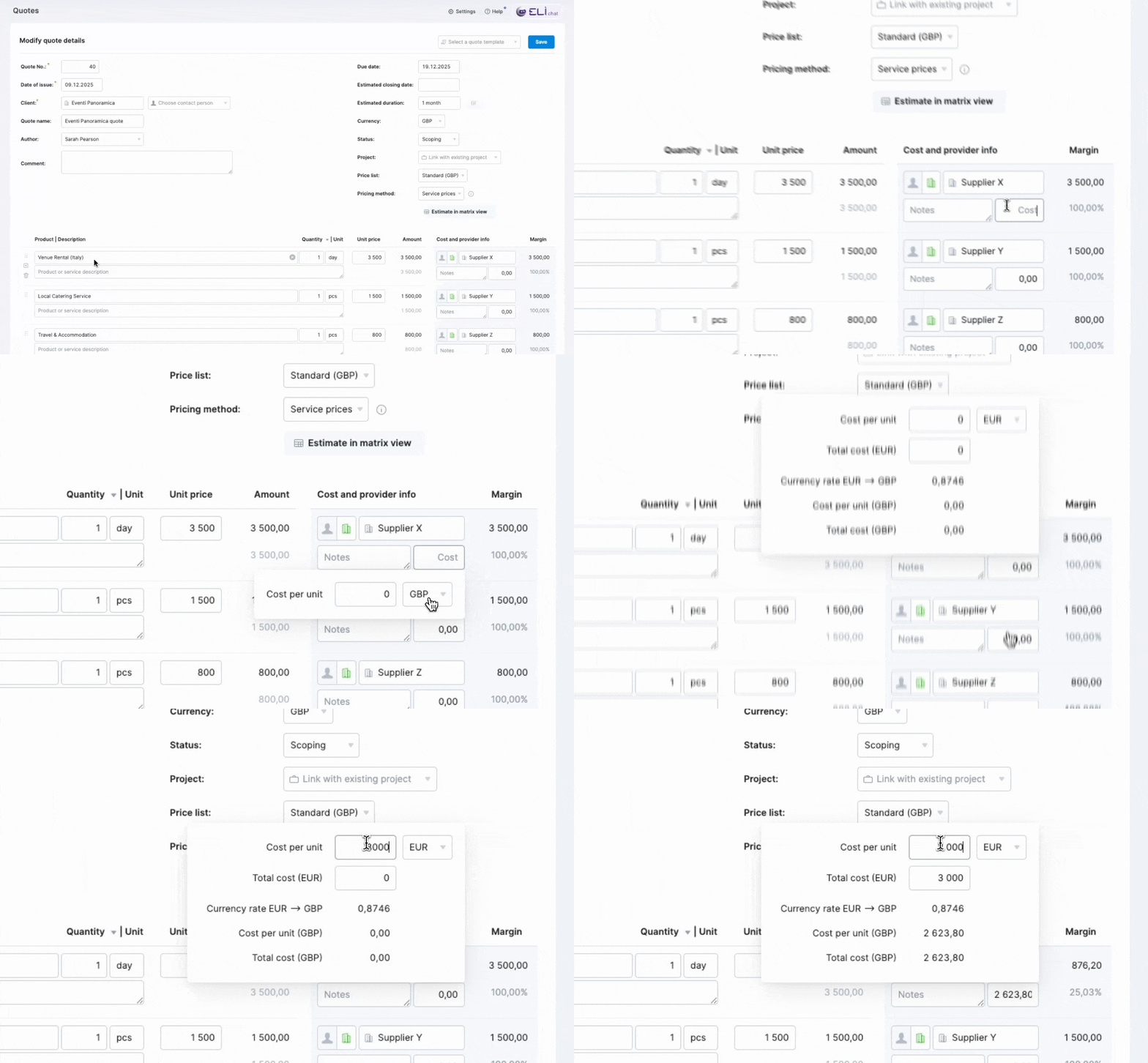
Because currency conversions are automatic, you can assess your margins instantly without manual math. Any purchase orders and bills created directly from your quote will automatically use the correct vendor currency.
Learn more about custom currency for outsourced costs on quotes.
Other…
Time locking improvements
We’ve improved the time-locking logic for calendar events to prevent unintentional changes to locked periods. If a calendar event falls within a period that is locked for any of its participants, the event now becomes read-only for all participants and cannot be modified. This ensures that events cannot be modified once a team member’s period is locked, maintaining better data integrity across the platform. Only siteadmins can modify read-only events.
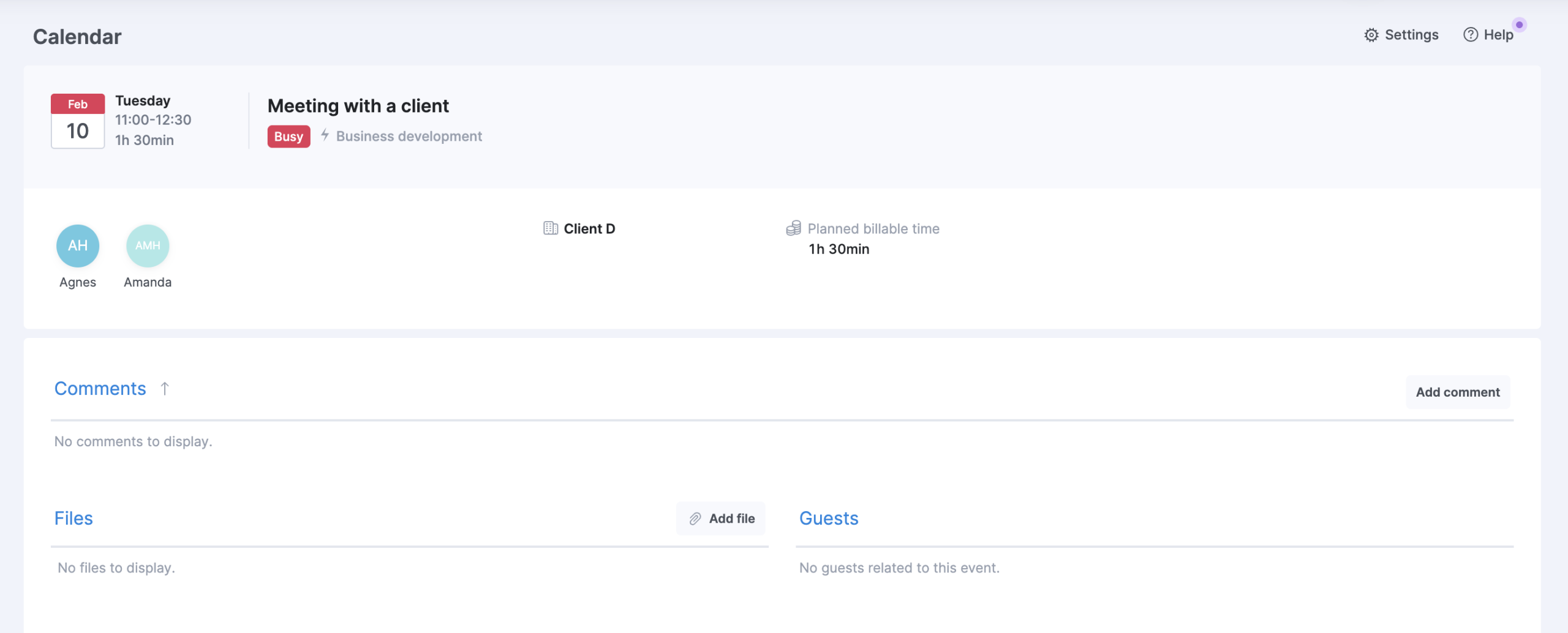
Also, calendar event locking is now also possible via our API. Learn more about Scoro API.
Consistent task due dates across time zones
To better support global teams, we’ve updated how task due dates handle time zone differences:
- Task due dates, like start dates, are no longer affected by users’ time zone preferences. This means that deadlines no longer shift forward or backward based on the user’s time zone and appear the same way for everyone.
- If you need task due dates to follow specific user time zones for precise timing in time-sensitive work, enable the Set exact end times for tasks checkbox under Settings > Work and projects > Calendar and tasks. When enabled, tasks in Scoro will display the exact due date and time based on the user’s time zone.
We’re working on…
- ELI 2.0 (currently in beta, soon accessible to everyone). Use the AI-powered work assistant in Scoro to pull data, surface insights, and actually do things for you: create tasks, schedule meetings, log time, add comments, and more.
- Always billable tasks. Set tasks as always billable to ensure every logged hour is automatically marked as billable, eliminating the need to manually update the billable status for time entries that exceed the tasks’ estimates.
❗Don’t worry if your Scoro site hasn’t been updated yet – the update is rolling out gradually over the next few weeks.
We do our very best to make Scoro better every day, so we appreciate your feedback! Share your thoughts with us via our contact form.
Wishing for your improvement ideas to come to life on your Scoro site? Send us feedback.
What to do next?
- Join our referral program to invite others to try out Scoro and earn monetary rewards of up to 1800 USD when they become a Scoro customer!
- Visit our Help Center to find in-depth guides about all Scoro features.
- Listen to our podcast The Handbook by Harv Nagra, an Ops Consultant and Ex-Agency Leader, where he dives into engaging conversations with operations experts to discuss and explore the behind-the-scenes and latest trends and innovations in the professional services space.
- Subscribe to The Handbook newsletter to get the latest info on agency challenges and solutions delivered directly to your inbox.